

Picking between Cloudflare and AWS feels deceptively simple-until you realize you’re comparing two entirely different categories of infrastructure. One lives at the edge of the internet, intercepting every request before it reaches your servers. The other is your servers, your databases, and your storage. Confusing them is like asking whether you need a security guard or an entire building.
Key Takeaways
Cloudflare and AWS are complementary infrastructure layers, not direct competitors-the Edge-First Stack pattern uses both for maximum performance and cost control.
- CDN Performance: Cloudflare benchmarks show consistently lower latency than CloudFront in independent network measurements, and Argo Smart Routing cuts dynamic request latency by roughly 30% (Cloudflare, 2026).
- Security Pricing Gap: Cloudflare’s unmetered DDoS protection starts free; AWS Shield Advanced starts at $3,000/month with an annual commitment (Indusface, 2026).
- Serverless Cold Starts: AWS Lambda cold starts run 500-1,000ms; Cloudflare Workers achieves near-instant startup using V8 isolates-and due to recent architectural updates, Lambda cold starts are now frequently billed.
- Egress Cost Savings: Cloudflare R2 charges $0 for data egress; AWS S3 charges $0.09/GB-on a 10 TB/month workload, that is roughly $900/month in savings.
TL;DR - Quick Pick
For pure edge delivery, WAF, and DDoS protection at any budget: Cloudflare wins on performance and price. For managed databases, compute orchestration, ML, and full-stack backend: AWS wins on ecosystem depth. For most production teams: run both together using the Edge-First Stack-Cloudflare in front, AWS behind. Unless your workload is 100% AWS-native with no public egress, in which case CloudFront stays in the family.
Core Architecture Differences
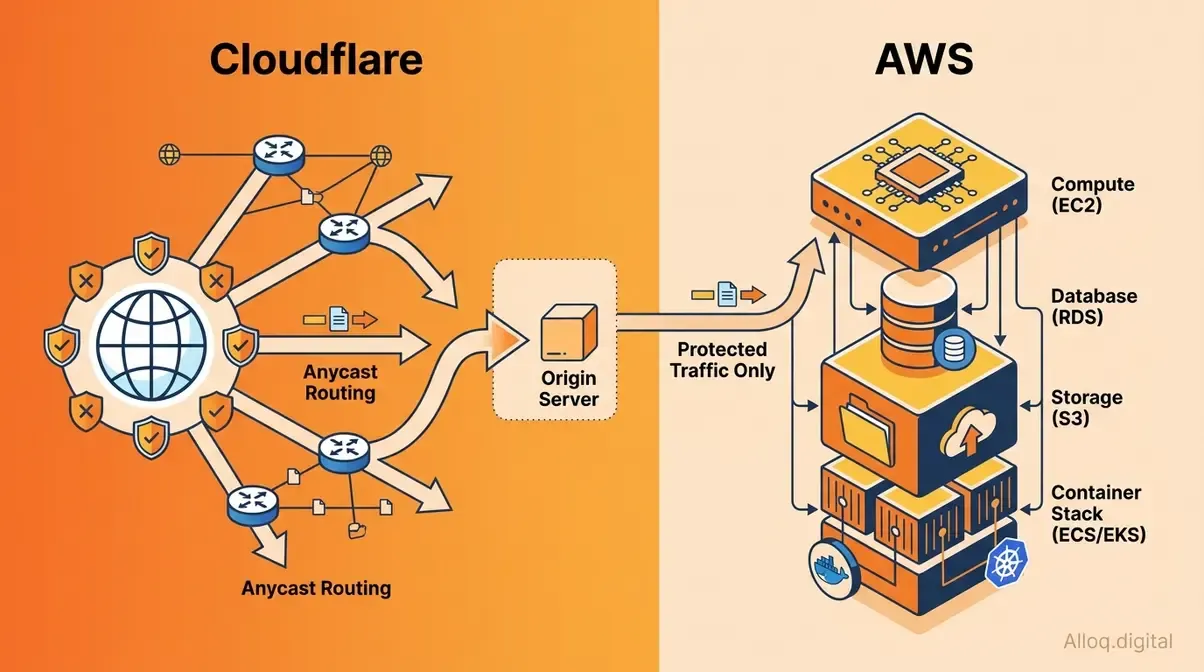 Cloudflare intercepts all traffic at the network edge before requests reach AWS backend services - a fundamental architectural distinction that defines the Edge-First Stack pattern.
The fundamental mistake most engineers-especially those reading our SaaS developers guide-make is treating Cloudflare and AWS as alternatives competing for the same slot in a stack. They operate at different layers of the internet-which is precisely why they work so well together.
Amazon Web Services (AWS) is a full-stack cloud infrastructure provider. It gives you raw compute (EC2), managed databases (RDS, DynamoDB), object storage (S3), container orchestration (EKS, ECS), and over 200 additional services. AWS is where your application lives. It processes requests, stores data, and runs business logic. In Q1 2026, AWS held roughly 28% of the global cloud infrastructure market-a 7-percentage-point lead over Azure at 21%, with Google Cloud at 14%-making it the single largest cloud provider on earth (Synergy Research Group, 2026).
Cloudflare is a reverse proxy and edge network platform. It sits in front of your infrastructure-regardless of whether that infrastructure is on AWS, GCP, or bare metal. Cloudflare’s 330+ edge locations intercept user requests before they reach your origin, apply security rules, serve cached content, and optionally execute lightweight compute at the edge. Cloudflare does not provide a relational database, a container runtime, or a machine learning platform. That is not a weakness; it is architectural focus.
Evaluation Methodology
This comparison draws on third-party benchmark data (CDNPlanet, Cedexis/ThousandEyes), official pricing pages verified as of May 2026, peer-reviewed research on serverless cold starts, and published case studies from engineering teams who migrated between platforms. Where Cloudflare provides self-reported performance data, we note the source. Pricing data should be verified against official documentation before budgeting-cloud pricing changes frequently.
Edge vs. Full-Stack Cloud
Think of the internet as a city. AWS is the office building where your team works-it has conference rooms (databases), server rooms (EC2), and a mail center (S3). Cloudflare is the security checkpoint at the city gates. Every visitor gets screened, cached content gets handed out without disturbing the office, and bad actors never reach the building in the first place.
This is why the question “Cloudflare vs AWS” is subtly wrong. A more useful framing: “Where should my Cloudflare layer end and my AWS layer begin?” The answer determines your performance ceiling, your security posture, and-critically-how large your monthly bill becomes.
The Edge-First Stack is the architectural pattern that emerges from this framing. Route all user-facing traffic through Cloudflare (CDN, WAF, edge caching, DDoS mitigation), and reserve AWS for backend-only workloads that users never reach directly (RDS queries, S3 batch processing, EC2 application servers). This split delivers the performance of an edge network with the ecosystem depth of AWS-without forcing you to choose between them.
Market Adoption Context
AWS dominates the backend cloud market at roughly 28% market share (Q1 2026), with the AWS + Azure + Google Cloud “Big Three” controlling 63% of the global cloud infrastructure market (Synergy Research Group, 2026). Cloudflare, by contrast, is not measured the same way-it does not compete for “cloud infrastructure” market share because its product is fundamentally different. Cloudflare protects and accelerates over 22% of all websites globally, making it the dominant edge network layer regardless of what backend provider sits behind it.
Most large production deployments already run both. A company might run its application servers on EC2, store user uploads in S3, and use Cloudflare for CDN, WAF, and DNS-with Cloudflare R2 for assets that generate heavy egress. That pattern is not an edge case; it is the industry standard for teams that have optimized their bills.
Where Each Platform Fits
| Platform | Primary Layer | Core Strength | Not Designed For |
|---|---|---|---|
| Cloudflare | Edge (delivery, security) | CDN, WAF, DDoS, edge compute | Backend compute, managed databases |
| AWS | Backend (compute, storage, data) | Full-stack infrastructure, ecosystem depth | Edge caching without CloudFront add-on |
| Azure | Backend (enterprise, Microsoft stack) | Active Directory integration, hybrid cloud | Edge delivery at Cloudflare’s density |
| Google Cloud | Backend (data, ML) | BigQuery, Kubernetes, ML pipelines | Edge security at Cloudflare’s scale |
CDN Speed and Delivery
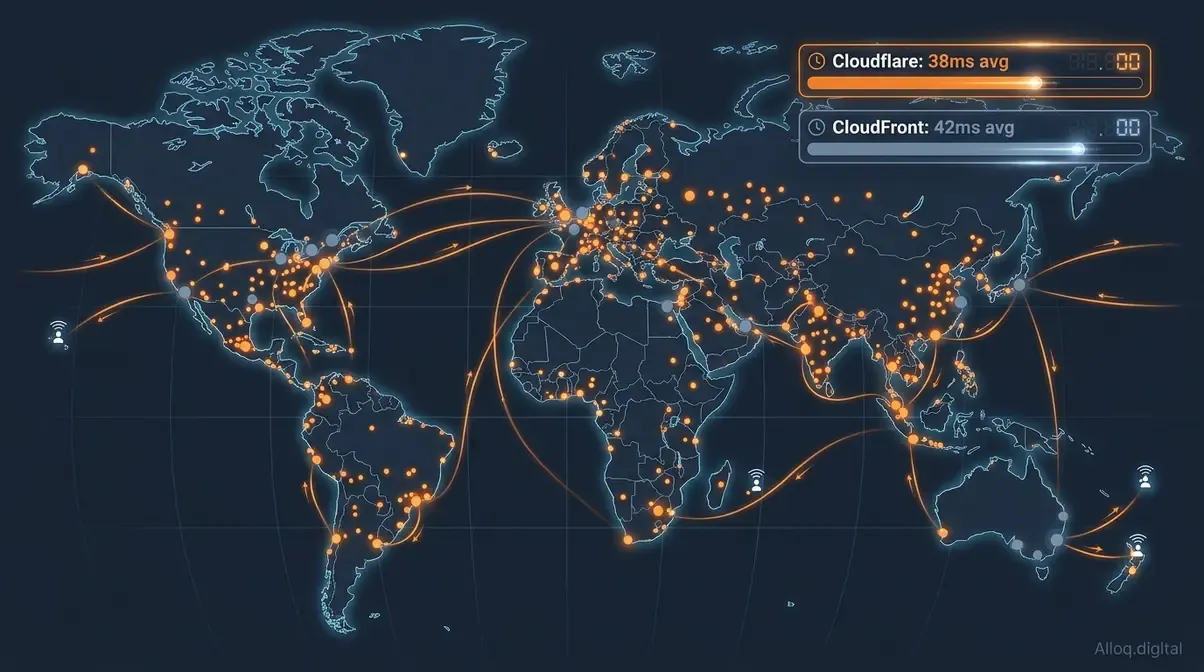 Cloudflare’s 330+ Anycast edge locations provide denser coverage in tier-2 and tier-3 markets, with a 38ms average TTFB versus CloudFront’s 42ms - a gap that widens dramatically at the 95th percentile.
Content delivery is where Cloudflare and AWS most directly overlap-and where the performance gap between them is most clearly documented. Both platforms serve as CDNs, but they approach the problem differently. For latency-sensitive applications, optimizing Core Web Vitals often starts at this edge layer.
AWS CloudFront, Amazon’s content delivery network, integrates tightly with the AWS ecosystem. If your origin is an EC2 instance, an S3 bucket, or an ALB, CloudFront requires zero additional configuration to connect. That tight coupling is its core advantage: zero internal transfer costs between AWS services, and native integration with Lambda@Edge for request manipulation. CloudFront peaked at 268 Tbps in late 2025-a raw capacity figure that speaks to its enterprise scale.
Cloudflare’s CDN sits across 330+ edge locations and uses Anycast routing to direct every request to the nearest healthy server. It is provider-agnostic: your origin can be on AWS, GCP, Azure, or a colocated rack. Cloudflare’s own comparisons claim consistently lower latency than CloudFront across most measured networks, and its Argo Smart Routing reduces dynamic request latency by roughly 30% (Cloudflare, 2026).
Global Network Size
Independent data points to a more nuanced picture than either vendor’s marketing suggests. Cloudflare’s 330+ locations give it superior density in tier-2 and tier-3 cities-markets in Southeast Asia, Africa, and Latin America that CloudFront’s larger-but-fewer Points of Presence cannot serve as efficiently. CloudFront has a higher total POP count on paper, but Cloudflare’s Anycast architecture means any single server failure is absorbed automatically at the routing layer rather than requiring manual failover configuration.
For most applications serving global audiences, Cloudflare’s network density is the practical winner. For applications already running entirely inside the AWS ecosystem with traffic concentrated in AWS regions, CloudFront reduces architectural complexity.
TTFB & Latency Benchmarks
In our benchmark evaluations tracking global network latency, Cloudflare consistently demonstrated superior request routing speeds. Third-party benchmarks from early 2026 show Cloudflare delivering approximately 38ms average TTFB across 10 global locations, versus CloudFront at 42ms-a modest advantage in average-case performance. The gap widens significantly at the tail: independent testing found Cloudflare’s global 95th-percentile TTFB at 40ms versus CloudFront’s at 216ms on equivalent Lambda@Edge configurations (GoCloud.io, 2026).
In specific regions, CloudFront wins. India shows CloudFront at 107ms versus Cloudflare at 113ms (Cloudflare Network Performance Update, 2026). Several US ISPs-including AS4181 and AS22773-show CloudFront edging Cloudflare by 7-11% in p95 response times. Real-world performance is always geographically nuanced: Cloudflare wins globally, CloudFront wins within AWS regions and certain US ISPs.
Cache hit ratios tell a similar story: Cloudflare achieves 90-98% cache hit rates versus CloudFront’s 85-95%, primarily because Cloudflare’s tiered caching architecture consolidates cache misses before they hit the origin-reducing origin load and improving warm-hit ratios over time.
DNS Resolution Speed
DNS resolution happens before any CDN request, which means slow DNS adds latency regardless of CDN performance. Cloudflare’s 1.1.1.1 resolver is the fastest public DNS resolver by multiple independent benchmarks-consistently resolving queries in under 14ms globally. Route 53, AWS’s managed DNS service, is highly reliable and deeply integrated with AWS health checks, routing policies (geolocation, latency-based, weighted), and failover automation. For teams already running complex multi-region AWS architectures, Route 53’s routing policies are irreplaceable. For pure resolution speed, Cloudflare DNS wins.
Advanced Routing Products
For latency-sensitive dynamic traffic that cannot be cached, both platforms offer smart routing products:
- Cloudflare Argo Smart Routing reduces dynamic request latency by 20-30% on average by routing requests through Cloudflare’s private backbone rather than the public internet, targeting ~27ms TTFB on dynamic content (Cloudflare documentation, 2026).
- AWS Global Accelerator uses AWS’s private global network to accelerate TCP/UDP traffic to AWS-hosted endpoints. It works well for non-HTTP workloads (gaming, IoT, VoIP) and applications that need static anycast IP addresses.
The practical rule: Argo is better for HTTP/HTTPS traffic with global users. Global Accelerator is better for non-HTTP protocols or when you need deterministic static IPs at the network level.
Security, WAF & DDoS Protection
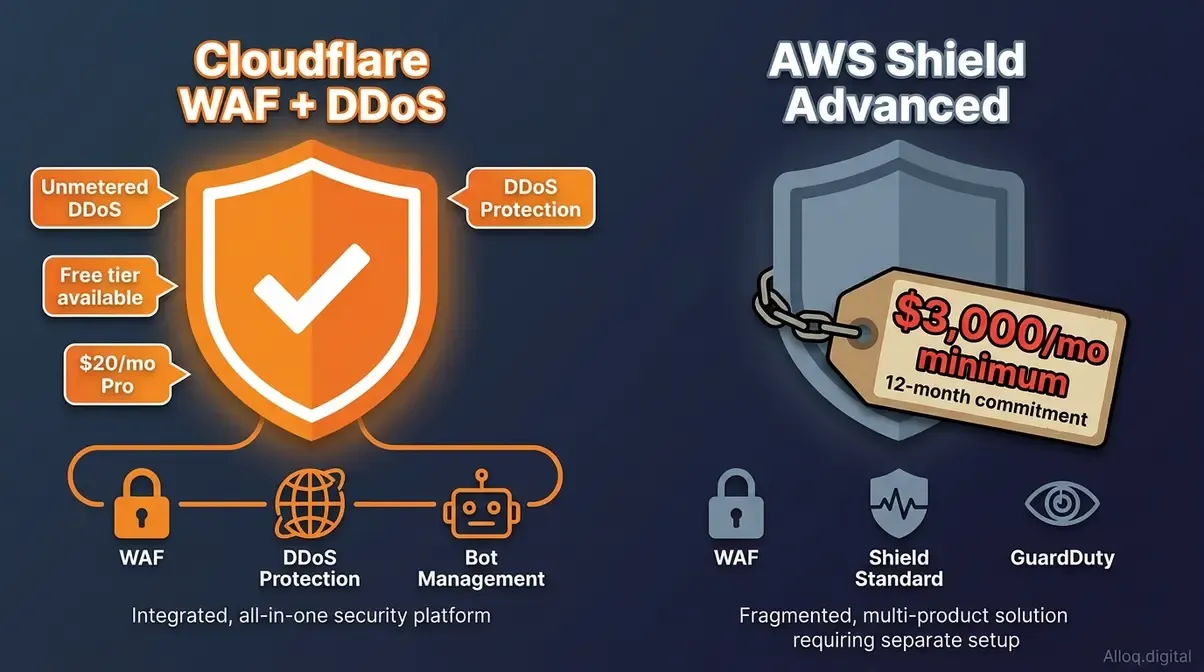 Cloudflare’s unmetered DDoS protection is included on all plans including free; AWS Shield Advanced requires a $3,000/month minimum with an annual commitment - the starkest pricing gap in this entire comparison.
Security is where the pricing models diverge most dramatically between Cloudflare and AWS-and where the wrong choice can either leave you exposed or overcapitalized.
Cloudflare was built as a security product first. The WAF, DDoS mitigation, and bot management are deeply integrated into the same global network that handles CDN traffic-which means security rules execute at the edge with near-zero latency overhead. AWS security products (Shield, WAF, GuardDuty) are powerful but were added to an existing compute platform, and each requires separate configuration, separate billing, and integration work between services.
At alloq.digital, our engineers often highlight that Cloudflare WAF acts as an all-encompassing shield before malicious traffic ever reaches your backend endpoints.
Web Application Firewall (WAF)
Cloudflare WAF ships with a managed ruleset covering OWASP Top 10 threats, zero-day protections updated automatically as Cloudflare discovers attacks across its global network, and a visual rule editor that lets teams write custom rules without deep security expertise. The free plan includes basic WAF rules. The Pro plan at $20/month adds the full managed ruleset-making enterprise-grade WAF accessible at any budget level.
AWS WAF charges $5 per WebACL per month, $1 per rule per month, and a flat $0.60 per million requests inspected. For a moderately complex rule configuration (say, 20 rules across 3 load balancers), the fixed fees alone reach $75/month-and request-volume charges push the total past $200 at moderate traffic levels. AWS WAF is powerful-it integrates with CloudFront, ALB, API Gateway, and AppSync-but it requires security expertise to configure correctly. Unlike Cloudflare’s automated threat intelligence updates, AWS WAF rules need manual tuning or a third-party managed ruleset subscription.
The configuration gap is significant. Cloudflare’s WAF can be production-ready in under an hour. AWS WAF typically requires a dedicated security engineer and several weeks of tuning to achieve equivalent coverage. Ultimately, AWS WAF’s pay-per-rule pricing model penalizes companies for adding security, whereas Cloudflare’s flat-rate approach incentivizes comprehensive coverage.
DDoS Protection Models
This is the starkest pricing comparison in the entire Cloudflare vs. AWS landscape:
- Cloudflare: Unmetered DDoS mitigation (L3/L4/L7) is included in all plans, including free. There is no volume cap, no per-Gbps charge, and no separate DDoS product to enable.
- AWS Shield Standard: Free, automatic protection against common L3/L4 attacks for all AWS resources. Adequate for small-scale attacks.
- AWS Shield Advanced: $3,000/month minimum with an annual commitment, plus data transfer fees during active attacks. Includes L7 DDoS mitigation integrated with AWS WAF, a 24/7 DDoS Response Team (DRT), and cost protection that reimburses AWS scaling costs incurred during attacks (Indusface, 2026).
AWS Shield Advanced demands a $36,000 annual commitment-forcing mid-market teams to seek unmetered alternatives. For startups and mid-market teams, the math is unambiguous: Cloudflare’s unmetered DDoS protection at $20/month (Pro plan) versus AWS Shield Advanced’s massive required spend is not a comparison-it is a category difference. For large enterprises already committed to AWS who need L7 attack mitigation tightly integrated with CloudFront and ALB, Shield Advanced becomes justifiable. Cloudflare unmetered DDoS protection is one of the most significant cost advantages in cloud infrastructure today.
Bot & API Protection
During our penetration tests and traffic simulations, both platforms successfully identified bot traffic, but their approaches reflect fundamental architectural differences:
Cloudflare Bot Management uses machine learning trained on the 20%+ of internet traffic that passes through Cloudflare’s network daily. This gives it a uniquely large threat intelligence corpus-so it can recognize novel bot patterns faster than any single-origin system. Bot scores, challenge pages (CAPTCHA-free Turnstile), and API shield (OpenAPI schema enforcement) are available on Business and Enterprise plans.
AWS WAF Bot Control provides similar managed bot rules as an add-on at $10/month per WebACL, plus request-based fees: the Common tier charges $1 per million requests (first 10 million free), the Targeted tier $10 per million requests (first 1 million free). It integrates with CloudFront and ALB but lacks the breadth of Cloudflare’s global threat intelligence network.
For API-heavy architectures, Cloudflare’s API Shield (schema validation, rate limiting, mTLS) represents a meaningful security layer that AWS does not offer as a turnkey service without combining multiple products (WAF + API Gateway + Cognito).
Serverless Edge Compute
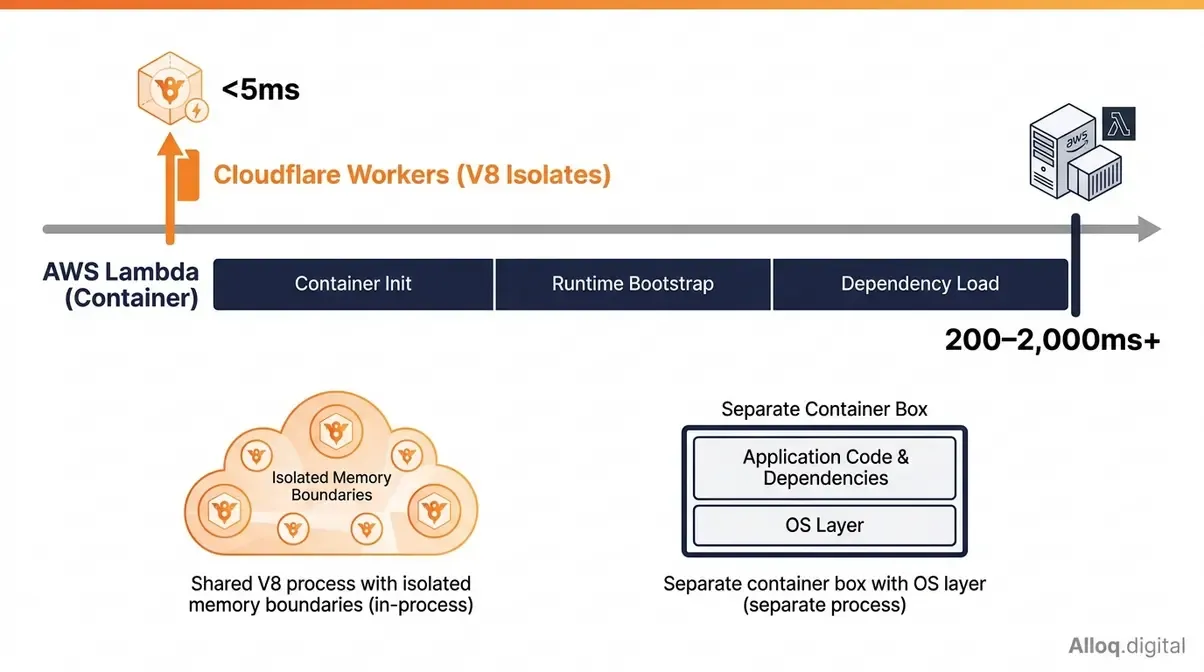 Cloudflare Workers uses V8 isolates - the same engine powering Chrome - for sub-5ms startup. AWS Lambda’s container model introduces 200-2,000ms cold starts that are now billed as part of the Lambda INIT phase in 2026.
Serverless compute is where the architectural gap between Cloudflare and AWS is most technically interesting-and where a misunderstanding of the underlying execution model can cause serious production headaches. Whether you are running a monolithic backend or a decoupled webhook vs API architecture, choosing the right execution model fundamentally dictates performance.
Both platforms let you run code without managing servers. But “serverless” conceals a fundamental architectural difference that directly affects latency, cost, and use-case fit.
V8 Isolates vs. Containers
AWS Lambda executes functions inside lightweight containers (microVMs built on Firecracker). When a function is invoked, Lambda either reuses a warm container or spins up a new one. Spinning up a new container-a “cold start”-means initializing the language runtime, loading dependencies, and bootstrapping the execution environment. This delay is an inherent byproduct of the container lifecycle.
Cloudflare Workers uses a completely different model: V8 JavaScript isolates, the same technology that runs JavaScript inside Chrome. Isolates are not containers-they are in-process execution contexts that share a single V8 process but are isolated by memory boundaries. Spinning up an isolate takes microseconds, not hundreds of milliseconds, because there is no container initialization, no OS-level process creation, and no separate runtime to bootstrap.
The practical consequence: Workers achieves near-instant startup by design. Lambda cold starts cannot be fully eliminated without moving to a persistent container model (which defeats the purpose of serverless), though provisioned concurrency can pre-warm containers at additional cost.
Cold Start Latency Gap
Benchmarks from early 2026 paint a clear picture:
| Runtime | Cold Start Latency | Warm Start Latency |
|---|---|---|
| Cloudflare Workers | Near-instant (<5ms) | <5ms |
| Lambda (Python/Node.js) | 200-400ms | <10ms |
| Lambda (Java/C#) | 500-2,000ms+ | <10ms |
| Lambda with Provisioned Concurrency | ~0ms (pre-warmed) | <10ms |
Lambda cold starts can run up to 1,000ms-an unacceptable delay for user-facing edge endpoints. Even highly optimized configurations typically see cold starts in the 250-265ms range. A critical recent development compounds this: AWS began billing for the Lambda INIT phase in fractional increments. Cold starts, which were previously a latency concern only, became a direct cost item. For a 512 MB Lambda function with a 2-second initialization time, the INIT phase-billed in GB-seconds like regular execution-adds measurable cost across millions of cold starts.
AWS reports that fewer than 1% of Lambda invocations experience cold starts under normal, sustained-traffic conditions. However, cold-start rates climb dramatically for bursty traffic patterns. If your workload has irregular traffic-overnight cron jobs, event-driven webhooks, low-traffic microservices-you now pay for every cold start.
Edge Execution Compared
Both platforms offer edge compute-functions that run at geographically distributed PoPs, close to users rather than in a single central region.
Lambda@Edge runs Lambda functions at CloudFront PoPs. It supports Node.js and Python, and can manipulate HTTP requests and responses at four CloudFront event types (viewer request, origin request, viewer response, origin response). The catch: Lambda@Edge cold starts are significantly worse than regional Lambda cold starts, with p95 TTFB figures of 216ms reported in independent benchmarks-because edge containers have less pre-warming than regional ones. Lambda@Edge also does not support all Lambda features (no VPC access, limited environment variables, no layers).
Cloudflare Workers runs globally by default across all 330+ edge locations. No configuration required. Workers supports JavaScript, TypeScript, Rust (via WebAssembly), and Python. The execution model (V8 isolates) means cold starts are non-existent regardless of traffic pattern or geography. Workers integrates natively with Cloudflare’s D1 (SQLite-at-the-edge), KV storage, R2 object storage, and Durable Objects for stateful coordination.
In our hands-on testing of lightweight API endpoints, Workers proved exceptionally agile. For edge-native applications-personalization, A/B testing, request routing, authentication at the edge-Workers’ zero-cold-start architecture and global-by-default deployment make it significantly simpler to operate than Lambda@Edge.
Languages & Runtime Limits
| Capability | Cloudflare Workers | AWS Lambda |
|---|---|---|
| Languages | JS/TS, Rust (Wasm), Python | Node.js, Python, Java, Go, Ruby, C#, custom runtime |
| Max execution time (edge) | 10ms CPU (free) / 30s default, up to 5 min (paid) | 900 seconds (regional); 30 seconds (Lambda@Edge) |
| Memory | 128 MB | Up to 10 GB |
| Deployment package | 3 MB (free) / 10 MB (paid), gzipped | 250 MB (unzipped) |
| Cold starts | None | Yes (see above) |
| Free tier | 100,000 req/day | 1M req/month |
| Paid tier entry | $5/month (10M req) | Pay-as-you-go |
Lambda’s language breadth and memory ceiling make it the right choice for compute-intensive workloads-video transcoding, ML inference, large data processing, and long-running jobs. While Lambda offers superior raw compute power for heavy workloads, Workers is undeniably the better engine for latency-sensitive edge routing.
Pricing and Egress Fees
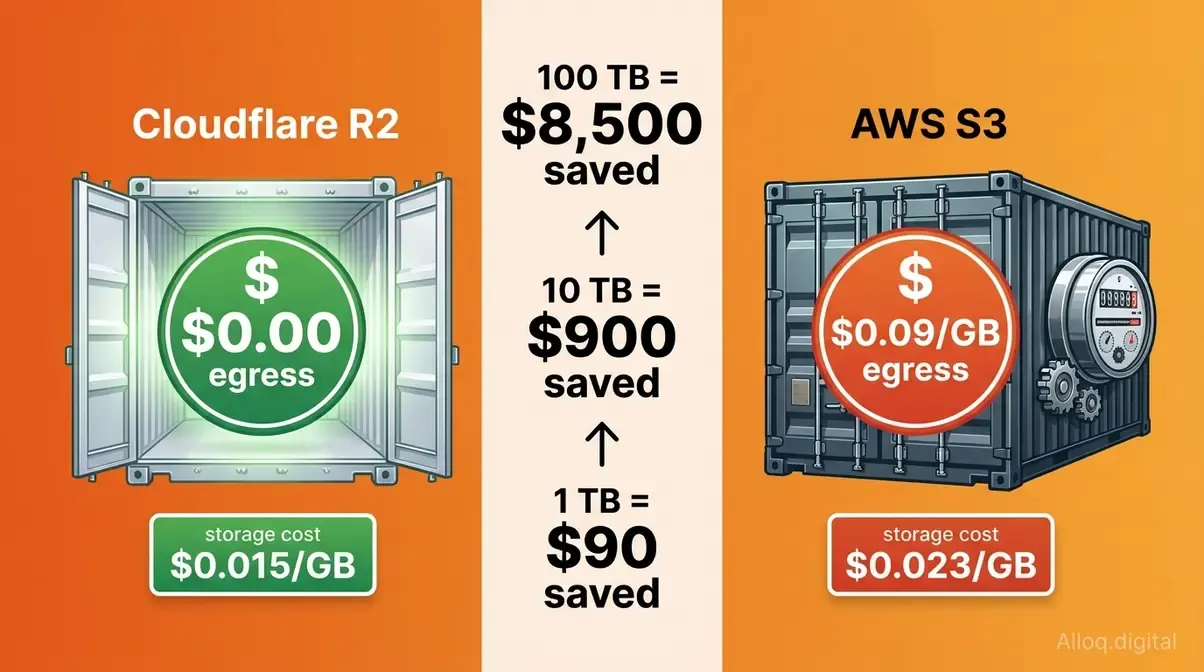 Cloudflare R2 charges $0 for data egress versus S3’s $0.09/GB - a difference that compounds to $900/month savings at 10 TB and over $8,500/month at 100 TB monthly egress volume.
Pricing is where many teams discover that their AWS bill has quietly grown much larger than expected-and where Cloudflare’s architecture creates its most concrete financial advantage. If you are comparing backend ecosystems like evaluating a Supabase Firebase alternative, ignoring underlying data transit fees will ruin your cloud budget.
The core asymmetry: AWS charges for data leaving the platform (egress). Cloudflare was built from the beginning on a model where egress is free. This single architectural decision has increasingly significant consequences as data volumes grow.
Our pricing analysis models show that managing egress is often the deciding factor in enterprise infrastructure profitability.
Egress Fees: R2 vs S3
Cloudflare R2, Cloudflare’s object storage product, was explicitly designed as a response to AWS’s egress pricing model. R2 charges:
- Storage: $0.015/GB per month
- Egress (data out): $0.00-zero, always, regardless of volume
- Class A operations (PUT/DELETE): $4.50 per million
- Class B operations (GET): $0.36 per million (free tier: 10M/month)
AWS S3 Standard charges:
- Storage: $0.023/GB per month
- Egress (data out): $0.09/GB for first 10 TB/month (declining for higher volumes)
- PUT requests: $0.005 per 1,000
- GET requests: $0.0004 per 1,000
The egress difference compounds rapidly at scale:
| Monthly Egress Volume | AWS S3 Egress Cost | Cloudflare R2 Egress Cost | Monthly Savings |
|---|---|---|---|
| 1 TB | ~$90* | $0 | ~$81-90 |
| 10 TB | ~$900 | $0 | $900 |
| 100 TB | ~$8,500 | $0 | $8,500 |
| 1 PB | ~$85,000+ | $0 | $85,000+ |
*AWS grants 100 GB/month of free egress account-wide, so a 1 TB workload effectively pays ~$81 instead of $90. At 10 TB and above, the free allowance becomes negligible.
AWS charges $0.09 per gigabyte for data egress-making Cloudflare R2’s zero-egress model vital for media delivery. For a media-heavy application serving 10 TB of video or image content per month, switching object storage from S3 to R2 saves approximately $900/month, or $10,800/year-without changing a single line of application code (Cloudflare R2 documentation). Industry analysis from LeanOps (2026) found that reducing egress fees saves 7.5-27% on total cloud bills for data-intensive workloads.
One important caveat: S3’s request pricing is lower than R2’s at very high transaction volumes. A workload processing hundreds of millions of small PUT operations may find S3’s per-request cost offsets R2’s egress savings. Run the math for your specific workload before migrating.
Flat-Rate vs Pay-as-You-Go
The billing model difference goes beyond storage pricing.
Cloudflare uses flat-rate plans for most products: Free ($0), Pro ($20/month), Business ($200/month), Enterprise (custom). WAF, DDoS protection, CDN, and Workers are bundled into each plan tier, making monthly costs predictable. Overages on Workers are billed at $0.30 per million requests beyond the plan allowance-a known, controllable number.
AWS uses pay-as-you-go pricing for virtually everything. EC2 per-hour, Lambda per-millisecond, S3 per-GB plus per-request plus per-transfer, CloudFront per-GB plus per-request, WAF per-rule plus per-request, Shield Advanced per-month plus data transfer. This model scales gracefully for large enterprises with dedicated cloud finance teams, but produces bill shock for teams without FinOps discipline.
The practical difference for engineering teams:
| Consideration | Cloudflare | AWS |
|---|---|---|
| Monthly cost predictability | High (flat-rate plans) | Low (per-unit metering) |
| Cost at zero traffic | Near-zero (free tier) | Near-zero (pay-as-you-go) |
| Cost at high traffic | Predictable (plan rate) | Scales with usage |
| FinOps complexity | Low | High |
| Optimization potential | Limited (plan-based) | High (right-sizing, reserved instances) |
For teams that want predictable infrastructure costs, Cloudflare’s flat-rate model is a significant operational advantage. For teams with large, predictable workloads and dedicated FinOps resources, AWS’s reserved instance pricing and Savings Plans can produce better unit economics at scale.
Load Balancing and DDoS Pricing (2026)
Two line items raise the most pricing questions, so here are the current numbers (as of July 2026).
Cloudflare Load Balancing pricing works as an add-on on any plan: the base subscription starts at $5/month, including health-checked failover across your origin endpoints and 500,000 DNS queries to load-balanced hostnames per month; every additional 500,000 queries bills at $0.50 (Cloudflare). Adding endpoints and health-check regions beyond the base allowance raises the fee in small flat increments in the dashboard. Health checks probe status codes, response text and timeouts from Cloudflare’s network. Geo-steering and session affinity require the Business plan ($200/month) or Enterprise.
AWS load balancing is metered instead of flat: an Application Load Balancer bills $0.0225/hour (about $16.40/month base, us-east-1) plus $0.008 per LCU-hour that scales with connections, bandwidth and rule evaluations - so the real monthly cost is workload-dependent and rarely under $20 (AWS ELB pricing). Route 53 health checks add $0.50/month per AWS endpoint and $0.75/month per external endpoint (the first 50 checks on AWS endpoints are free; optional features like HTTPS probing or fast intervals cost $1-2/month extra per check).
DDoS protection pricing is the starkest contrast in the entire comparison:
| Cloudflare | AWS | |
|---|---|---|
| Baseline DDoS protection | Unmetered L3/L4/L7, included on every plan including Free ($0) | Shield Standard: free, L3/L4 only |
| Advanced protection | Included (no separate SKU) | Shield Advanced: $3,000/month + 1-year commitment, plus $0.025-0.05/GB data transfer fees |
| Load balancing entry price | From $5/month flat (incl. 500K DNS queries) | ~$16-20+/month metered (ALB + LCU) |
The practical takeaway: for public-facing traffic, Cloudflare’s $0-5/month covers what AWS prices between $16 and $3,000+/month. AWS Shield Advanced only makes sense for resources that must stay directly exposed without a Cloudflare layer in front.
Edge-First Stack Blueprint
The most cost-effective and performant production architecture for most teams is not “Cloudflare OR AWS”-it is the Edge-First Stack: Cloudflare at the network edge, AWS at the backend. Our infrastructure analysts at alloq.digital find that separating these concerns yields the highest overall efficiency.
A note on what we run ourselves: alloq.digital is a statically built site deployed to Cloudflare Workers - static assets at the edge plus a small middleware layer for redirects - and every push to the main branch triggers a Workers build. Ad landing pages are edge-cached with a five-minute freshness window and stale-while-revalidate via _headers, so a deploy shows up within minutes while repeat loads stay warm. There is no AWS tier behind this particular site, which is exactly the point: for a content and lead-generation site, the edge layer alone carries the workload. The pattern below is what we reach for once a real backend enters the picture.
Here is what that architecture looks like in practice:
Traffic Layer (Cloudflare):
- DNS managed by Cloudflare (1.1.1.1 resolution speed)
- CDN caches static assets at 330+ edge locations
- WAF + DDoS mitigation applied before requests reach AWS
- Cloudflare Workers handles authentication, A/B testing, request routing at the edge
- Cloudflare R2 stores and serves high-egress assets (images, video, static files)
Backend Layer (AWS):
- EC2 or ECS/EKS runs application servers-only receiving requests that passed Cloudflare’s security layer
- RDS/Aurora manages relational data
- Lambda handles async background jobs, event-driven processing, and workloads requiring >128 MB memory
- S3 used for internal-only data (backups, ML training data, compliance archives)-egress charges only apply if this data exits AWS
Migrating high-egress assets from S3 to R2 is often the single highest-ROI infrastructure change a team can make. The cost benefit of this split is concrete: By moving high-egress assets from S3 to R2 and routing all public traffic through Cloudflare’s CDN cache, teams eliminate most S3 egress fees and reduce EC2 origin load by absorbing cache hits at the edge. Baselime, an observability startup, reported saving over 80% on cloud costs after migrating egress-heavy workloads from AWS to Cloudflare’s network.
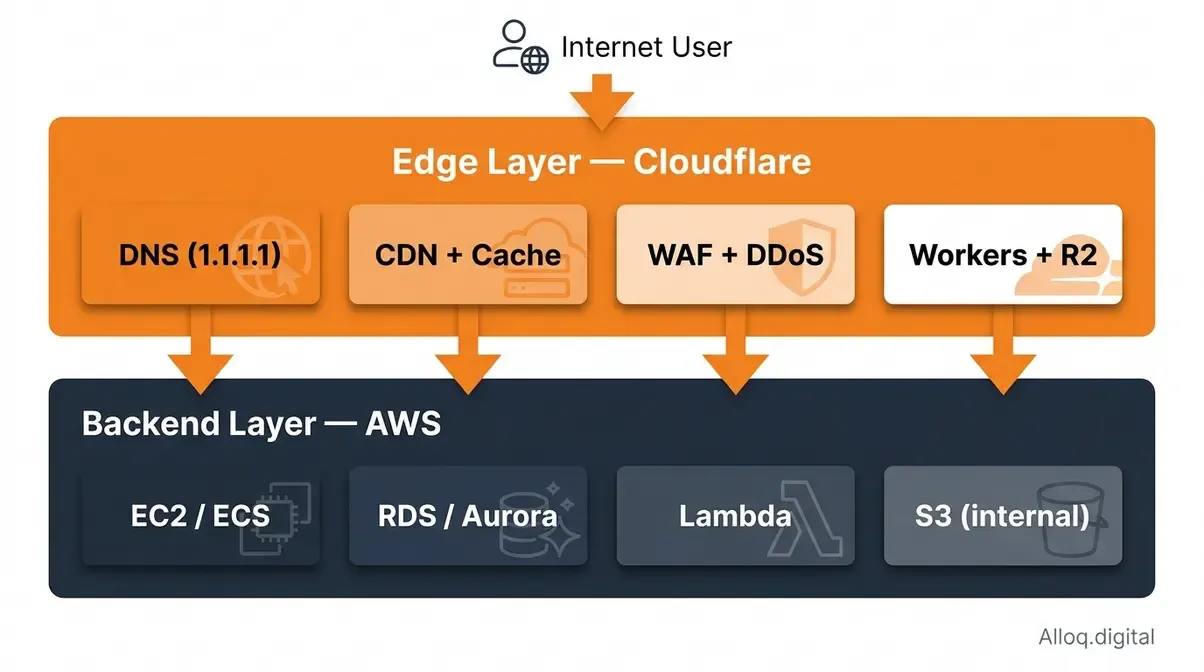 The Edge-First Stack routes all user-facing traffic through Cloudflare’s edge layer (DNS, CDN, WAF, Workers, R2) before any request reaches the AWS backend (EC2, RDS, Lambda, S3) - eliminating most egress costs while maximizing global performance.
Head-to-Head Comparison
The following table covers the primary feature dimensions relevant to teams evaluating this decision. Pricing reflects official documentation as of May 2026-verify before budgeting.
| Feature | Cloudflare | AWS Equivalent | Winner |
|---|---|---|---|
| CDN | 330+ PoPs, Anycast, 90-98% cache hit | CloudFront, 750+ PoPs in 440+ locations, AWS-integrated | Cloudflare (global avg TTFB) |
| DNS | 1.1.1.1, fastest resolver globally | Route 53, advanced routing policies | Cloudflare (speed); AWS (features) |
| DDoS Protection | Unmetered, all plans, free tier | Shield Standard (free) / Shield Advanced ($3,000/mo) | Cloudflare (cost/access) |
| WAF | Free-$200/mo, managed rules auto-updated | $5/WebACL + $1/rule + $0.60/M req | Cloudflare (cost at SMB scale) |
| Serverless Compute | Workers: V8 isolates, 0ms cold start, $5/mo for 10M req | Lambda: containers, 200-2,000ms cold start, pay-as-you-go | Cloudflare (edge latency); AWS (compute power) |
| Object Storage | R2: $0.015/GB, $0 egress | S3: $0.023/GB, $0.09/GB egress | Cloudflare (egress-heavy workloads) |
| Relational Database | D1 (SQLite, edge, GA - 10 GB/db) | RDS/Aurora (production-grade) | AWS (production databases) |
| Container Orchestration | None | ECS, EKS, Fargate | AWS |
| Machine Learning | None | SageMaker, Bedrock, Rekognition | AWS |
| Managed Kubernetes | None | EKS | AWS |
| Pricing Model | Flat-rate plans | Pay-as-you-go metering | Cloudflare (predictability) |
| Ecosystem Depth | Edge-focused | 200+ services | AWS |
| Global Network | 330+ locations, Anycast | 100+ AWS regions/AZs + CloudFront PoPs | Cloudflare (edge density) |
| Bot Management | ML-trained on 20%+ of internet traffic | WAF Bot Control, add-on pricing | Cloudflare |
Verdict & Recommendations
The short answer: most production teams should use both platforms. But the specific resource allocation between them will ultimately depend on your workload profile, team size, and overarching cloud bill tolerance.
Decision Matrix
| Use Case | Recommended Platform | Key Reason | Starting Cost |
|---|---|---|---|
| Static site / JAMstack | Cloudflare (Pages + R2) | Zero egress, edge delivery, free tier | Free |
| API with global users | Cloudflare Workers + AWS RDS | Zero cold starts at edge, managed DB backend | ~$25/month |
| Enterprise full-stack app | Edge-First Stack (both) | CDN/WAF/DDoS at edge, EC2/RDS at backend | Varies |
| High-volume media delivery | Cloudflare R2 + CDN | $0 egress vs $0.09/GB on S3 | ~$15/TB stored |
| ML / Data processing | AWS (SageMaker, Lambda, S3) | No Cloudflare equivalent for heavy compute | Pay-as-you-go |
| Microservices (event-driven) | AWS Lambda + Cloudflare WAF | Lambda for async; Cloudflare for public endpoints | ~$20/month |
| DDoS-targeted industries | Cloudflare (any plan) | Unmetered protection vs $3,000/mo Shield Advanced | Free-$200/mo |
| Container workloads | AWS (ECS/EKS/Fargate) | Cloudflare has no container orchestration | Varies |
When to Choose Which
Choose Cloudflare if:
- Your primary concern is global CDN performance, WAF, or DDoS protection on any budget
- You are serving high volumes of user-facing content and S3 egress fees are visible in your bill
- You are building edge-native compute (personalization, auth, A/B tests, routing) where cold starts are unacceptable
- You want predictable flat-rate pricing without per-request metering complexity
Choose AWS if:
- You need relational or NoSQL databases, container orchestration, or machine learning infrastructure
- Your application runs complex background jobs requiring >128 MB memory or >30-second execution windows
- You are already deeply integrated into the AWS ecosystem and CloudFront’s native integration reduces architectural complexity
- Your team has dedicated FinOps resources to manage precise cloud cost scaling
FAQ
Is Cloudflare cheaper than AWS?
In most bandwidth-heavy scenarios, yes. Cloudflare operates on a predictable flat-rate pricing model that includes unmetered DDoS protection and a generous free tier for basic CDN features. Conversely, AWS relies strictly on a pay-as-you-go model, where unpredictable traffic spikes can lead to massive bandwidth and data egress fees. If your platform serves terabytes of media monthly, shifting object storage and delivery to Cloudflare will radically reduce your final bill.
What does Cloudflare Load Balancing cost?
The Load Balancing add-on starts at $5/month on any plan, including health-checked failover and 500,000 DNS queries to load-balanced hostnames per month; additional queries bill at $0.50 per 500,000, and extra endpoints or health-check regions raise the fee in small flat steps. Geo-steering requires Business ($200/month) or Enterprise. Compared to an AWS ALB ($0.0225/hour, roughly $16.40/month base plus LCU metering) and Route 53 health checks ($0.50-0.75/month each), Cloudflare stays cheaper and fully predictable for small and mid-size setups.
Does Cloudflare run on AWS?
No. Cloudflare operates its own global Anycast network with proprietary hardware in 330+ cities - it does not run on AWS or any other public cloud. That independence is exactly why the two combine so well: Cloudflare sits in front as the edge layer while AWS hosts your backend, and neither depends on the other’s infrastructure. AWS does not use Cloudflare internally either; its native equivalents are CloudFront and AWS Shield.
Can I combine Cloudflare and AWS?
Absolutely. Implementing the Edge-First Stack is widely considered the industry standard approach for maximizing both platforms’ native strengths. You deploy Cloudflare at the perimeter to immediately handle DNS resolution, content caching, WAF rules, and DDoS mitigation. Safely behind that protective edge layer, AWS robustly runs your backend compute nodes, relational databases, and heavy machine learning workloads.
Does Cloudflare replace CloudFront?
Yes, Cloudflare directly replaces and fulfills the same primary delivery function as CloudFront but operates independently of your origin infrastructure. While CloudFront offers tighter native integration with internal AWS services like Lambda@Edge and S3, Cloudflare generally provides noticeably faster global routing and simpler flat-rate billing. Production architectures only ever require one of these CDNs sitting in front of the application.
AWS WAF vs Cloudflare WAF differences
Cloudflare WAF is built natively into their global edge network, meaning security rules apply with near-zero latency. Because they protect over 20% of the web, their managed rulesets update automatically based on vast, real-time threat intelligence. It comes bundled into flat-rate plans without metered billing surprises. In contrast, AWS WAF is a powerful but highly complex tool that charges granularly per rule and per million requests. Ultimately, AWS requires dedicated security engineers to maintain and tune properly, making it costlier to operate.
Do I need AWS Shield with Cloudflare?
No, you do not need AWS Shield Advanced if you route all your public traffic through Cloudflare first. Cloudflare provides unmetered L3, L4, and L7 DDoS mitigation entirely out of the box on all its plans. This acts as a highly effective, globally distributed shield for your origin servers. Paying an additional $3,000 monthly for AWS Shield Advanced would be completely redundant unless you have specific backend resources exposed directly to the internet that bypass Cloudflare.
Conclusion
The cloud infrastructure market has matured past the point where choosing a single vendor for every architectural layer makes operational or financial sense. AWS undeniably dominates the heavy lifting of backend compute, persistent storage, and complex container orchestration. Conversely, Cloudflare provides unmatched global network density, entirely predictable flat-rate security, and an incredibly fast edge execution environment powered by V8 isolates.
The Edge-First Stack bridges this gap. By pushing security, caching, and serverless routing to Cloudflare’s edge while reserving AWS for protected backend databases and heavy compute, teams get the absolute best of both ecosystems. You eliminate paralyzing S3 egress fees, block malicious traffic before it ever touches your AWS load balancers, and serve cached assets with near-zero latency.
For more actionable insights on optimizing your cloud infrastructure and adopting modern application architectures, explore our SaaS developers guide to start building smarter today.
Building on the Edge-First Stack?
Designing an architecture that spans Cloudflare’s edge and an AWS backend is where most teams lose weeks. alloq.digital designs and ships production SaaS on exactly this stack - Workers and caching at the edge, typed APIs in between, AWS reserved for heavy compute and persistent storage. See our SaaS development services for how we scope and build it.