Poor contract management quietly erodes 9.2% of annual revenue for the average organization - a figure from WorldCC (formerly IACCM) research that shocks most procurement managers the first time they see it. Contracts are the backbone of every vendor relationship, client agreement, and regulatory commitment your business holds. Yet most teams still track them in spreadsheets, shared drives, or overflowing email inboxes.
Contract lifecycle management (CLM) software fixes that. These platforms centralize every agreement you own, automate the tedious steps from drafting to renewal, and flag risks before they become costly surprises. The global CLM market is worth $3.39 billion in 2026 (Mordor Intelligence) - a sign that organizations everywhere are making the switch.
This guide explains what contract management software does, which features actually matter, how it serves different industries, and which seven tools stand out in the modern market. Whether you run a five-person legal team or a multinational procurement department, you’ll leave with a clear recommendation.
Key Takeaways
Contract management software (CLM) reduces contract-related revenue loss by centralizing agreements, automating workflows, and flagging compliance risks before they escalate.
- The Contract Value Gap: Manual contract handling costs organizations an average 9.2% of annual revenue through missed deadlines, compliance penalties, and renegotiation costs (WorldCC/IACCM) - CLM software closes this gap directly.
- AI is now table stakes: AI-powered agreement workflows deliver 36% efficiency gains (Deloitte & Docusign 2026 study) - clause extraction and agentic capabilities drive this directly.
- Right-sizing matters: Enterprise tools like Sirion and Icertis start at an estimated $50K+ per year; small-business options like ContractSafe stay under $10K annually, while mid-market Juro starts from around $12-15K.
- Industry fit is non-negotiable: Healthcare, construction, government, and legal teams need compliance features (HIPAA, FAR, NEC) that general-purpose platforms often lack.
Why Contract Management Matters
Contract management software is a digital platform that handles every stage of a contract’s life: drafting, negotiation, approval, execution, storage, performance monitoring, and renewal or termination. The term CLM (contract lifecycle management) is used interchangeably with “contract management software,” though CLM emphasizes the full end-to-end process rather than just storage.
Without a dedicated system, contracts scatter across email threads, shared drives, and individual desks. Renewal deadlines get missed. Non-compliant clauses slip through. Negotiation history disappears. A CLM platform solves all three problems simultaneously.
CLM vs. CRM: What’s the Difference?
A CRM (Customer Relationship Management) tool like Salesforce or HubSpot tracks your sales pipeline, customer interactions, and revenue forecasts. A CLM platform takes over once a deal is ready to be formalized - managing the actual contract document, its approval chain, its legal language, and its obligations after signing.
Think of CRM as managing the relationship and CLM as managing the commitment. The two systems are complementary, not competing. In fact, modern CLM platforms integrate directly with Salesforce so contracts flow from deal-won to executed without manual handoffs.
The 4 Pillars of Contract Management
The four pillars below map to the standard phases of the contract lifecycle - recognized across both public and private sectors - and are a useful anchor for understanding what any CLM platform must cover:
- Pre-award: Drafting, template management, negotiation, and approval workflows
- Award: Execution, e-signatures, and official record creation
- Post-award: Obligation tracking, milestone alerts, performance monitoring, and amendments
- Close-out: Renewal decisions, termination processing, and archiving
Strong CLM software handles all four stages without requiring you to switch tools mid-process. Weak platforms often cover drafting and signing well but collapse at post-award obligation tracking - the stage where most revenue loss actually happens.
The Contract Value Gap
The Contract Value Gap is the measurable business loss your organization accumulates when contracts are managed manually or across disconnected systems. It compounds quietly across three cost categories:
- Missed renewals that auto-renew on unfavorable terms or expire unnoticed
- Compliance penalties from overlooked regulatory clauses or audit failures
- Administrative overhead - legal and procurement staff spending hours on version control, email approvals, and document hunting instead of higher-value work
Deloitte’s research puts average contract value erosion at 8.6%, with the worst-managed organizations losing over 20% of contract value annually. Organizations that deploy advanced CLM capabilities are 55% more likely to report outperforming their financial goals (Deloitte & Docusign Digital Agreement Management Study). Closing the Contract Value Gap is the single strongest ROI argument for any CLM investment.
Key Features to Look For in a CLM Platform
Not all contract management software is built the same way. Some platforms excel at storage and search; others shine at AI-powered drafting. Knowing which features matter for your team prevents you from overpaying for capabilities you’ll never use - or underpaying for a tool that creates new bottlenecks.
Repository and AI Extraction
A central contract repository is the non-negotiable baseline of any CLM platform. Every contract your organization has ever signed - active, expired, or pending - should live in one searchable location. This sounds simple, but the real test is metadata extraction: can the platform automatically read a scanned PDF and pull out the counterparty name, start date, end date, and key clauses?
Modern platforms use AI to transform contract workflows from passive storage into active intelligence. As Harvard Business Review noted, AI systems can now review thousands of contracts in hours - a task that previously required armies of legal reviewers working over weeks. When evaluating a platform, ask specifically: does it extract data automatically, or do you have to tag fields manually? Manual tagging negates most of the time-saving value.
Industry reports note that AI-driven analytics are rapidly becoming standard across enterprise applications. This threshold has firmly been crossed, making AI extraction a standard feature in any serious CLM tool today.
Workflows and E-Signatures
Automated approval workflows route contracts to the right reviewers in the right sequence without anyone having to manually email a document and wait. You configure rules once - “all contracts over $100K go to the CFO before Legal” - and the system enforces them on every agreement.
Deadline alerts are equally critical. Your CLM should notify stakeholders automatically at 90, 60, and 30 days before a contract renewal, expiration, or critical milestone. Miss these windows and you either auto-renew on terms that no longer reflect market rates, or scramble to negotiate under time pressure.
E-signature integration (either native or via Docusign/Adobe Sign) closes the loop at execution. Look for platforms that embed e-signatures inside the contract workflow rather than bouncing you to a separate tool - every handoff is a place where a contract can stall.
Compliance and Audit Trails
Compliance is where CLM platforms earn their keep for legal, procurement, and regulated industries. The features to look for here include:
| Feature | What It Does | Why It Matters |
|---|---|---|
| Clause libraries | Pre-approved language for common risk scenarios | Prevents non-standard language slipping through |
| Risk scoring | Flags unusual or missing clauses automatically | Speeds up legal review without losing rigour |
| Audit trails | Immutable log of every view, edit, and approval | Essential for regulatory audits and disputes |
| Obligation tracking | Monitors post-execution deliverables | Prevents silent breaches that erode contract value |
Deloitte’s contract lifecycle ROI research puts average contract value erosion at 8.6% - value that leaks away through untracked obligations and missed performance triggers. Organizations with mature CLM practices claw back a meaningful share of that erosion, which is more than enough to justify platform investment.
CLM Software by Industry
Generic CLM platforms work reasonably well for straightforward commercial contracts. However, once regulatory complexity enters the picture - as it does in healthcare, construction, government procurement, and legal services - industry-specific capabilities stop being “nice to have” and become mandatory requirements.
Construction: NEC Contracts
Construction contracts are uniquely complex because they are living documents. Project scope changes, weather delays, subcontractor substitutions, and dispute resolution procedures require constant amendments - a process called contract change control. A CLM built for financial services contracts will frustrate a construction project manager within days.
Look for platforms that support NEC (New Engineering Contract) and FIDIC contract structures natively, including change event management, early warning notices, and compensation event workflows. Subcontractor management - tracking dozens of concurrent agreements with different payment schedules, milestones, and liability caps - requires dedicated relationship mapping that generic tools rarely provide.
Procore and Asite are purpose-built for construction and handle NEC structures well. General CLM platforms like Ironclad can be configured for construction use cases but require significant setup investment.
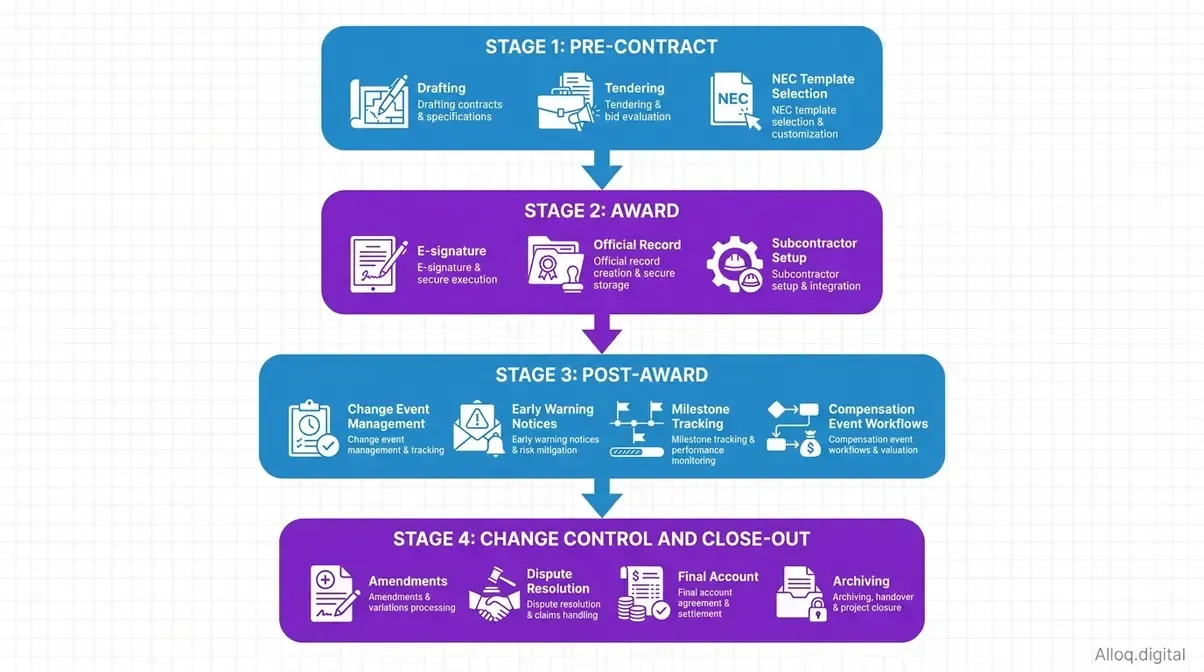 Construction contracts require active change control management throughout the project lifecycle - not just at signing.
Healthcare: HIPAA Compliance
Healthcare organizations face a unique contractual burden: every vendor, contractor, or partner that handles Protected Health Information (PHI) must sign a Business Associate Agreement (BAA). A missing or expired BAA is not just a contract oversight - it is a potential HIPAA violation with penalties reaching up to $73,000+ per violation and an annual cap above $2.1 million, per the 2025 inflation-adjusted figures (HHS Office for Civil Rights).
The NIH’s research on healthcare contracting efficiency underlines how critical systematic contract processes are in regulated medical environments. HIPAA-compliant CLM platforms include 256-bit encryption, two-factor authentication, and comprehensive audit trails that satisfy regulatory inspection requirements. They also maintain separate tracking for BAAs, payer contracts, equipment leases, and pharmaceutical supply agreements - all with different renewal cycles and compliance requirements.
Icertis and Ironclad are consistently rated among the top healthcare CLM choices, both offering HIPAA-compliant infrastructure and dedicated BAA management modules.
Legal Teams and Law Firms
For in-house legal teams and law firms, the critical CLM capability is not storage - it is negotiation support. Redlining (tracked changes and clause-level comments between counterparties) needs to happen inside the CLM platform, not in Word documents that then get uploaded.
Version control - knowing exactly which draft is current, what changed between Draft 3 and Draft 4, and who approved each version - prevents the nightmare of signing an outdated contract. alloq.digital’s AI automation services show how automation is transforming legal workflows by handling repetitive review tasks so lawyers focus on strategic judgment.
Look for platforms with Microsoft Word integration (for lawyers who live in Word), native compare functionality, and clause-level commenting threads that stay attached to the relevant contract section.
Small Business and Government
Small businesses do not need enterprise CLM. They need a clean repository, basic deadline reminders, and e-signature. Paying for Icertis-level AI when you manage 50 contracts per year is wasteful - and the implementation complexity will likely prevent adoption entirely.
Government contractors face the opposite challenge: they need tools that align with FAR (Federal Acquisition Regulation) standards for contract administration, data rights, and performance reporting. FAR compliance requirements are non-negotiable for any organization holding federal contracts, and generic tools rarely address them adequately.
ContractSafe for small business and Cobblestone or Ivalua for government contractors represent appropriate right-sizing for these opposite ends of the spectrum.
Tech Stack Integrations for CLM
Buying a CLM platform in isolation is a common and expensive mistake. Your contracts do not exist in isolation - they connect to your CRM (customers), ERP (procurement and finance), HRIS (employees), and document management systems. A CLM that cannot communicate with these systems creates data silos that defeat the purpose of centralizing contract information.
Microsoft Contract Management
Microsoft does not offer a dedicated CLM platform. However, Microsoft 365’s capabilities for contract management - including SharePoint for document storage, Power Automate for approval workflows, and Microsoft Purview for compliance - can be configured into a workable basic CLM system for organizations already deeply embedded in the Microsoft ecosystem.
The honest assessment: a SharePoint-based contract system works adequately for small teams with simple contracts and limited volume. It breaks down quickly when you need AI-powered extraction, sophisticated approval routing, or cross-system reporting. Most Microsoft-first organizations eventually layer a dedicated CLM tool on top of SharePoint rather than replacing it entirely.
Contracts365 and CLM365 are purpose-built CLM tools that run natively inside Microsoft Teams and SharePoint, bridging this gap for Microsoft-committed organizations.
Salesforce Integration
Salesforce is the CRM of record for thousands of organizations. When a sales opportunity closes, the natural next step is generating a contract - and if that handoff requires exporting data from Salesforce, reformatting it, and emailing a Word document for signature, you have already introduced delay and error risk.
Integrating CLM with Salesforce’s CRM creates a seamless quote-to-cash pipeline where contract generation triggers automatically from an Opportunity, approval workflows run inside Salesforce, and executed contract data flows back into the CRM record. Ironclad, Conga CLM, and Docusign CLM all offer certified Salesforce integrations with pre-built connectors.
For teams using Salesforce Revenue Cloud, look specifically for CLM tools that support CPQ (Configure, Price, Quote) handoffs - this is where the most time is typically lost in the sales-to-legal handover.
SAP and Oracle ERPs
Procurement-led CLM implementations - where sourcing, supplier management, and financial obligations all need to connect - require deep ERP integration. SAP Ariba and SAP CLM handle this natively for SAP shops. Oracle CLM works within Oracle Fusion Procurement for Oracle-committed organizations.
alloq.digital’s AI automation services demonstrate how custom API-based integrations can connect specialized CLM platforms to legacy ERP systems when out-of-the-box connectors are unavailable - a relevant consideration for organizations running older SAP or Oracle versions. If your organization uses a non-standard ERP, check whether your shortlisted CLM platform offers a webhook or REST API architecture before committing to the integration design.
Top Contract Management Software
Selecting these seven platforms involved evaluating over twenty CLM tools against six criteria: AI capability, workflow automation depth, integration breadth, pricing transparency, industry-specific features, and verified user feedback from G2, Capterra, and TrustRadius. Each tool was assessed against the needs of a specific user profile rather than ranked on a single universal scale.
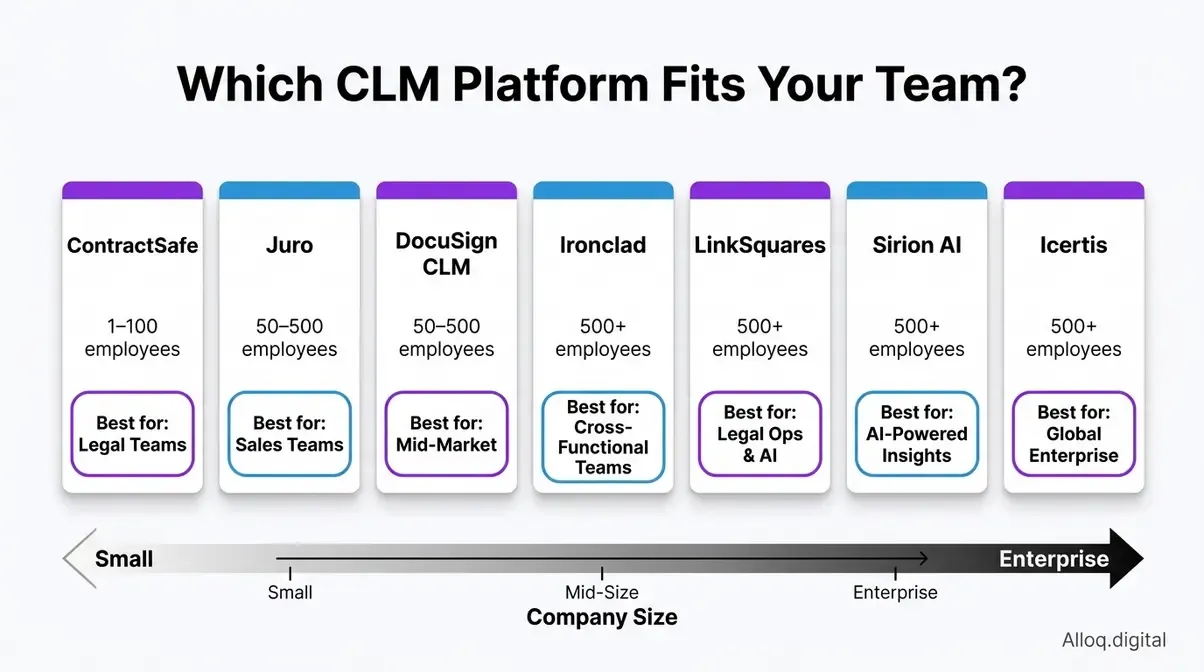 The right CLM platform depends on your team size, industry, and whether AI automation is a current priority or a future consideration.
Sirion: Enterprise Workflows
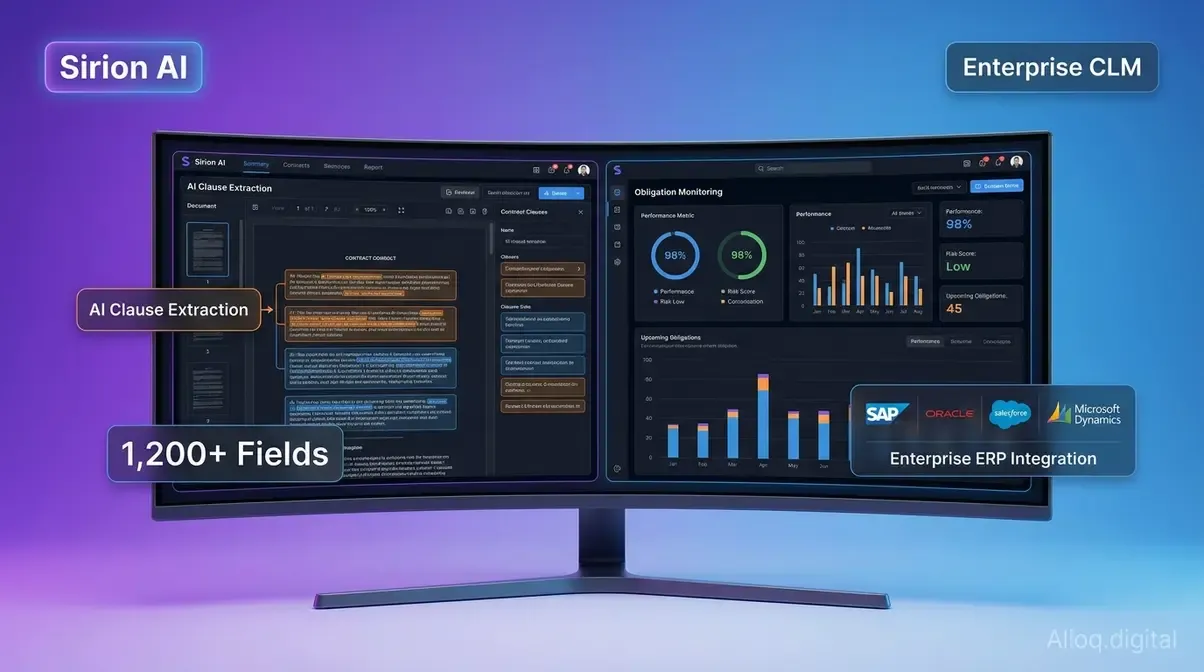 Sirion’s AI-native architecture extracts data from over 1,200 contract fields automatically, delivering real-time obligation performance intelligence for enterprise teams.
Sirion is purpose-built for large enterprises that manage thousands of contracts simultaneously. Its AI-native architecture extracts data from over 1,200 contract fields automatically and provides real-time performance intelligence against committed obligations. In head-to-head ML clause classification testing, Sirion frequently outperforms competitors on extraction accuracy. Haveli Investments acquired Sirion in January 2026, giving the platform fresh backing for its AI roadmap.
Best for: Global enterprises managing complex supplier, partner, or customer contracts at scale. Key specs: AI-native clause extraction (1,200+ fields) | Real-time obligation monitoring | Enterprise ERP integrations
Pros:
- Most capable AI extraction layer of any CLM in the market, reducing manual review time significantly
- Real-time performance dashboards surface obligation breaches before they become formal disputes
- Deep ERP and Salesforce integration with pre-built enterprise connectors
Cons:
- Pricing starts around an estimated $50,000 annually (Sirion publishes no public pricing) and scales sharply - not feasible for mid-market teams
- Implementation timelines of 3-6 months require dedicated IT and legal resources
Verdict: Sirion sets the technical benchmark for enterprise CLM. It is overkill for anything under 500 contracts annually, but for large organizations the AI accuracy advantage directly reduces legal review costs.
Choose Sirion if: Your procurement or legal team manages 500+ contracts and needs obligation performance intelligence, not just document storage. Skip Sirion if: You’re a mid-market team on a budget - Ironclad or Juro will deliver 80% of the value at a fraction of the cost.
Docusign CLM: E-Signatures
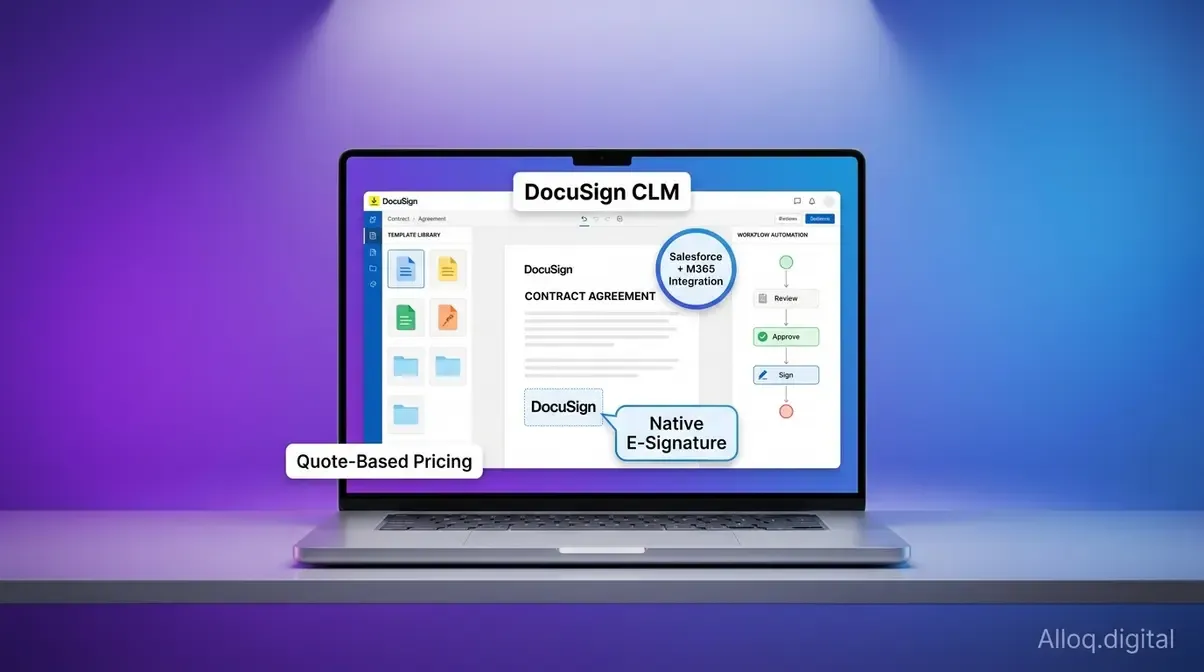 Docusign CLM extends the world’s most widely deployed e-signature platform into full contract lifecycle management, with certified Salesforce and Microsoft 365 integrations.
Docusign CLM extends the world’s most widely deployed e-signature platform into full contract lifecycle management. For organizations already using Docusign for signatures, the CLM layer adds workflow automation, template management, and repository capabilities without requiring staff to learn a new interface. Docusign now folds CLM into its Intelligent Agreement Management (IAM) platform, with Docusign Iris - the company’s AI engine - powering data extraction and agreement analysis across the suite.
Best for: Organizations already using Docusign for e-signatures who want to extend into full CLM without platform disruption. Key specs: Native Docusign e-signature | Template library | Salesforce and Microsoft 365 integrations
Pros:
- Zero friction for teams already on Docusign - the UX is familiar and adoption is faster than any alternative
- Certified integrations with Salesforce, SAP, and Microsoft 365 are mature and well-documented
- Strong compliance audit trail that leverages Docusign’s established legal validity infrastructure
Cons:
- AI capabilities are less advanced than Sirion or Ironclad - data extraction requires more manual configuration
- Pricing is quote-based and can escalate quickly as contract volume grows
Verdict: The safe choice for Docusign shops. It is not the most powerful CLM available, but for organizations prioritizing adoption speed and integration reliability, it consistently delivers.
Choose Docusign CLM if: Your team is already using Docusign e-signatures and wants CLM capabilities without a disruptive platform migration. Skip Docusign CLM if: You need deep AI extraction from day one - Sirion or Ironclad will provide more automated intelligence out of the box.
Ironclad: Legal Workflows
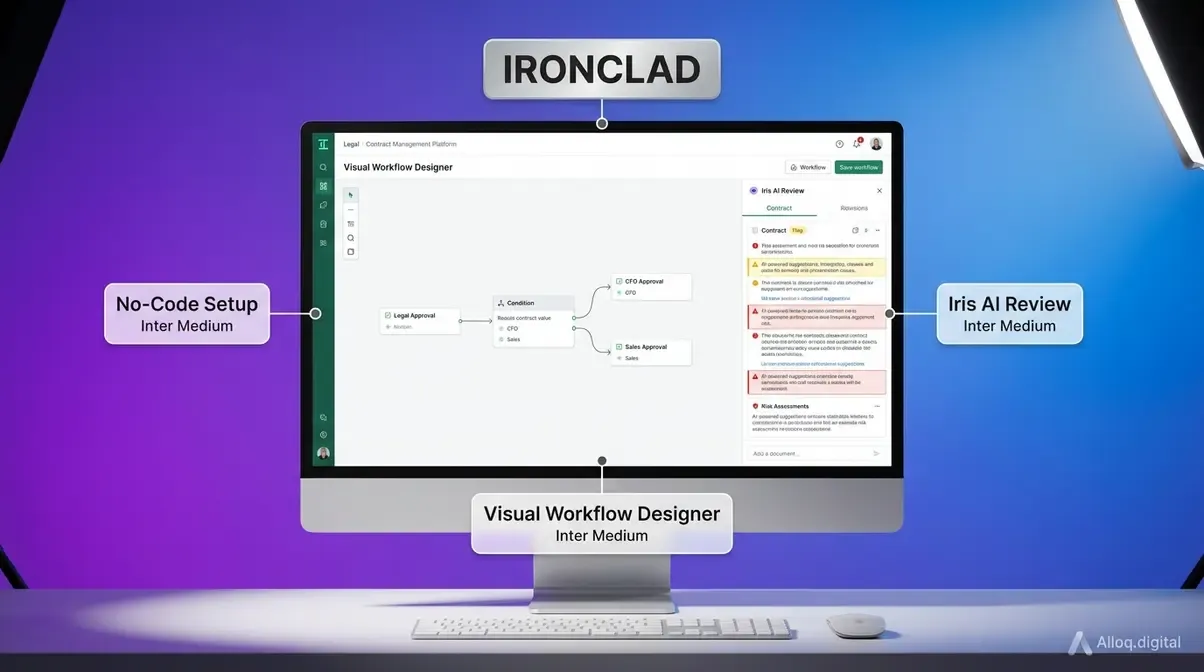 Ironclad’s no-code visual workflow designer lets legal operations teams configure conditional approval flows independently - without any IT dependency.
Ironclad has built its reputation on legal team usability. Its workflow designer - which allows legal operations professionals to build conditional approval flows visually, without coding - is the most intuitive in the market. Jurist, Ironclad’s native AI assistant, handles first-pass contract review, flags non-standard clauses, and suggests approved playbook language - with Ironclad Agents extending this into agentic workflows.
Best for: In-house legal teams and legal operations professionals who need sophisticated workflow automation without IT dependency. Key specs: Visual workflow designer | Jurist AI for clause review | Salesforce integration | Microsoft Word plugin
Pros:
- Visual workflow builder genuinely requires no coding - legal ops teams configure it independently
- Microsoft Word plugin allows lawyers to stay in their preferred environment while the CLM records all changes
- Strong mid-market pricing compared to enterprise alternatives
Cons:
- Less suited for supply chain and procurement-led CLM use cases - it skews toward legal department ownership
- Some users report that the AI clause suggestions require significant training on custom playbooks before reaching high accuracy
Verdict: Ironclad is the benchmark for legal-first CLM. If your primary user is a legal team - not procurement or finance - this is where to start the evaluation.
Choose Ironclad if: You have an in-house legal team that wants to own contract workflows and reduce reliance on external counsel for routine drafting and review. Skip Ironclad if: Your CLM initiative is procurement-led and requires deep ERP integration - Icertis or SAP Ariba will serve that use case better.
Icertis: Regulated Industries
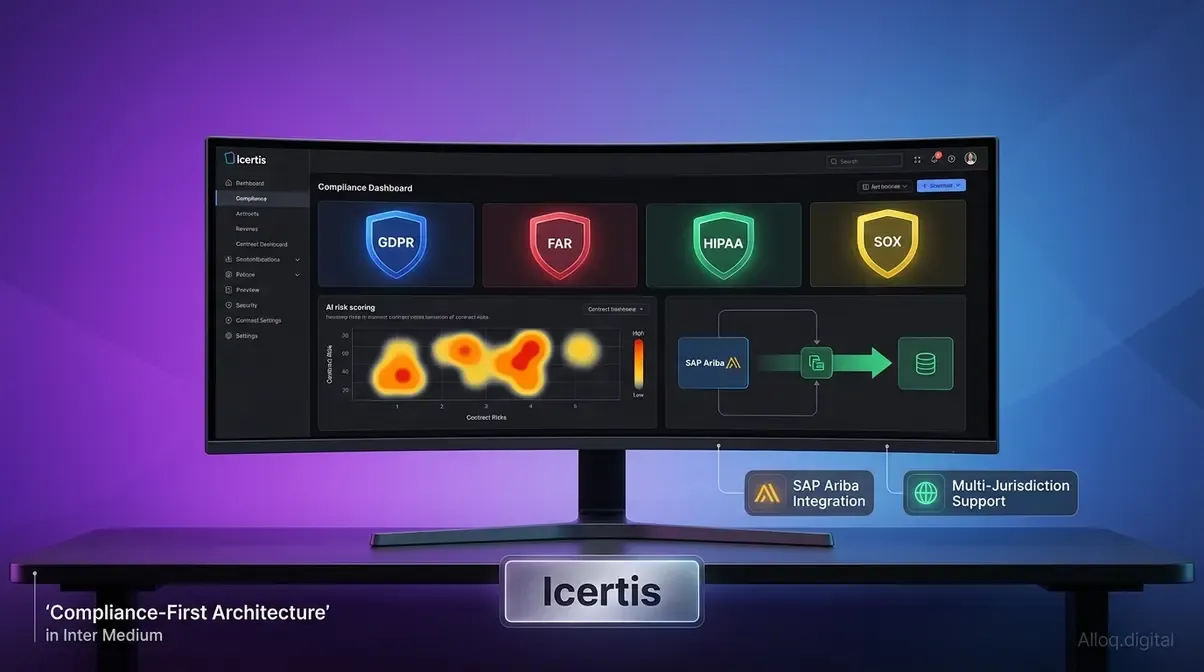 Icertis delivers compliance-first CLM architecture covering GDPR, FAR, HIPAA, and SOX simultaneously - purpose-built for Fortune 500 regulated industry deployments.
Icertis serves the Fortune 500 with a compliance-first architecture. Its platform is designed for organizations in heavily regulated industries - pharmaceutical, aerospace, government contracting, and financial services - where contract compliance is a board-level risk, not just a legal department concern. Icertis integrates with SAP Ariba, Microsoft Azure, and Salesforce, covering the dominant ERP and CRM landscapes.
Best for: Regulated industries (pharmaceutical, aerospace, government, financial services) where CLM compliance drives enterprise risk management. Key specs: Compliance-first architecture | SAP Ariba integration | AI risk scoring | Multi-jurisdictional support
Pros:
- Industry-leading compliance framework across multiple regulatory standards simultaneously (GDPR, FAR, HIPAA, SOX)
- Robust multi-jurisdictional and multi-language support for global operations
- SAP Ariba integration is among the deepest available for procurement-led CLM
Cons:
- Enterprise-only pricing (mid-six figures annually for Fortune 500 deployments) puts it out of reach for most mid-market organizations
- Implementation complexity is high - expect 6-12 months for a full deployment
Verdict: If you are a global enterprise in a regulated industry and contract risk is a board-level priority, Icertis is the most credible choice. For everyone else, the cost and complexity are prohibitive.
Choose Icertis if: You need multi-jurisdictional compliance coverage and your organization manages contracts across multiple regulated business lines simultaneously. Skip Icertis if: You’re mid-market or primarily need workflow automation rather than enterprise compliance governance - Ironclad delivers better usability at lower cost.
ContractSafe: Small Business
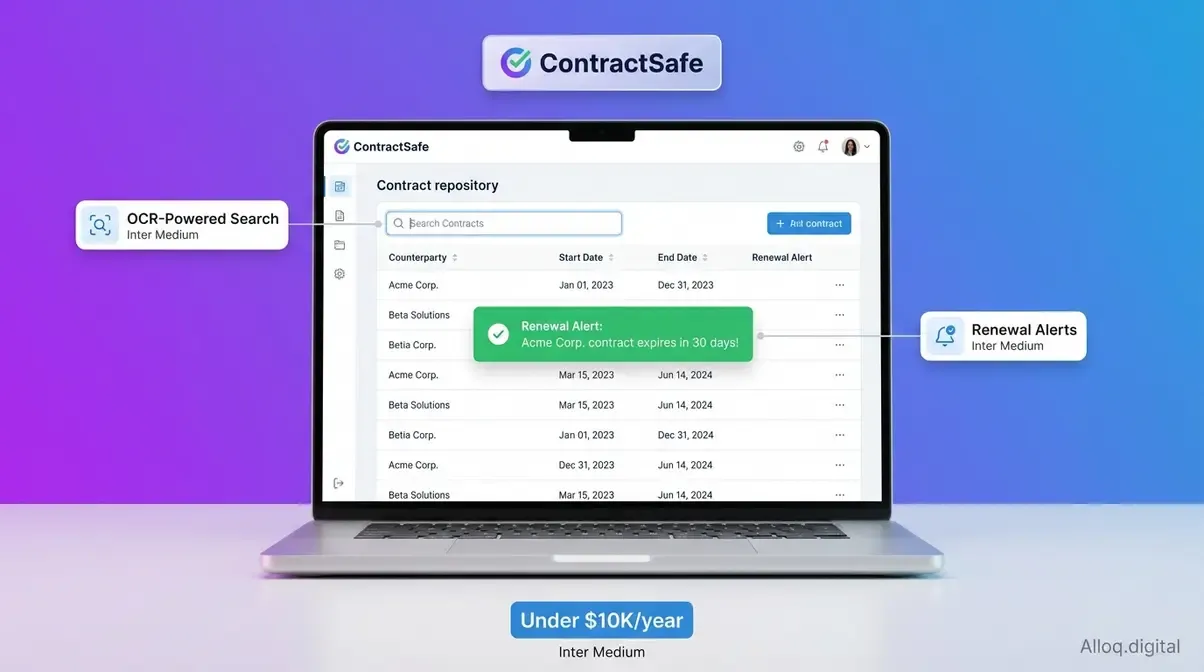 ContractSafe’s OCR-powered repository makes even scanned legacy contracts instantly searchable, with automated renewal alerts requiring zero workflow configuration.
ContractSafe does one thing exceptionally well: making contract storage and search fast and painless for small businesses and teams without a dedicated legal operations function. You upload your contracts - PDFs, Word documents, scanned images - and ContractSafe’s OCR technology extracts key metadata automatically. Renewal alerts notify the right people without any workflow configuration.
Best for: Small businesses, startups, and teams managing under 200 contracts who need organized storage and renewal reminders without enterprise complexity. Key specs: OCR-powered ingestion | Deadline alerts | Simple search | Accessible pricing under $10K annually
Pros:
- Setup in hours, not months - minimal implementation investment required
- Entry pricing stays accessible for small businesses - the Organize plan runs around $4.5-5.4K per year, while higher-volume tiers scale toward $25K+ annually
- Strong OCR accuracy means even older scanned contracts are searchable from day one
Cons:
- No AI-powered clause extraction or workflow automation - this is a repository tool, not a full CLM
- Will not scale into enterprise use cases: no ERP integration, limited approval workflows
Verdict: ContractSafe is the right answer if your main problem is “I cannot find my contracts and keep missing renewals.” It is the wrong answer if you need drafting, negotiation support, or compliance tracking.
Choose ContractSafe if: You manage 200 or fewer contracts and your primary need is organized storage with renewal alerts - not AI-powered automation. Skip ContractSafe if: You need workflow automation, approval routing, or compliance tracking - Juro or Ironclad offers a fuller feature set at a still-accessible price point.
Juro: Mid-Market Teams
Juro positions itself as the CLM for high-growth companies that have outgrown Google Drive and basic e-signature tools but are not yet ready for enterprise complexity. Its browser-native editor means there is no Word back-and-forth - counterparties can negotiate directly inside the platform. AI-assisted drafting helps business teams generate contracts from templates without legal review for routine agreements.
Best for: Mid-market and high-growth companies (50-500 employees) that need full CLM functionality without enterprise implementation overhead. Key specs: Browser-native contract editor | AI-assisted drafting | Self-serve contract creation | Starts from around $12-15K annually
Pros:
- Browser-native editing eliminates the Word/email round-trip that slows most mid-market negotiations
- Business team self-serve capability reduces legal bottlenecks for routine, pre-approved contract types
- Faster to deploy than enterprise alternatives - most teams are operational within weeks
Cons:
- Clause library and AI capabilities are less mature than enterprise platforms - not suited for complex multi-jurisdiction contracts
- Limited ERP integration compared to Icertis or SAP Ariba
Verdict: Juro hits the sweet spot for companies that have clearly outgrown basic document storage but cannot yet justify an enterprise CLM implementation timeline or budget.
Choose Juro if: You’re a fast-growing company where legal bottlenecks are slowing sales or procurement, and you want teams to self-serve routine contracts with appropriate guardrails. Skip Juro if: Your contracts are complex, highly regulated, or require multi-jurisdictional compliance - Icertis or Ironclad offers the depth you need.
Top 7 CLM Platforms Compared
| Platform | Best For | AI Capability | Starting Price (approx.) | Salesforce Integration | Ideal Team Size |
|---|---|---|---|---|---|
| Sirion | Enterprise AI workflows | ★★★★★ | ~$50K+/year (est.) | ✅ | 1,000+ employees |
| Docusign CLM | E-signature extension | ★★★☆☆ | Quote-based | ✅ | 100-5,000+ |
| Ironclad | Legal workflow automation | ★★★★☆ | Mid-five figures/year | ✅ | 50-5,000 |
| Icertis | Regulated industries | ★★★★☆ | Mid-six figures/year | ✅ | 5,000+ |
| ContractSafe | Small business storage | ★★☆☆☆ | Under $10K/year | ❌ | 1-100 |
| Juro | Mid-market teams | ★★★☆☆ | ~$12-15K/year | ✅ | 50-500 |
| LinkSquares | In-house legal teams | ★★★★☆ | Quote-based | ✅ | 100-2,000 |
Pricing verified from publicly available ranges (Sirion.ai, Knowlee.ai, Bindlegal.com). Exact pricing requires vendor quote.
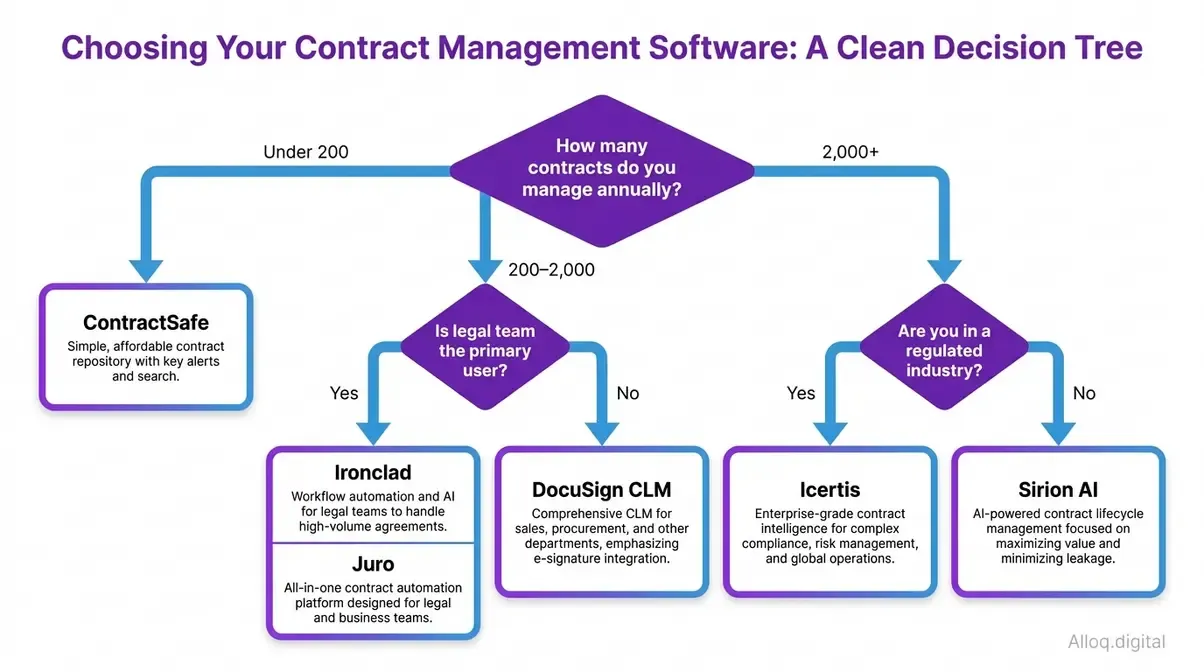 Start with team size and compliance requirements - these two factors determine your viable platform shortlist more reliably than any feature checklist.
CLM Software Costs Explained
CLM pricing is notoriously opaque - most enterprise vendors require a sales call before disclosing any figures. Understanding the pricing models and likely cost ranges before that call puts you in a significantly stronger negotiating position.
Typical Pricing Models Explained
| Pricing Model | How It Works | Typical Tier |
|---|---|---|
| Per-user/month | Cost scales with seats | SMB and mid-market |
| Contract volume | Cost scales with active contracts | Repository-focused tools |
| Platform fee | Fixed annual license + implementation | Enterprise |
| Module-based | Pay for specific capabilities (AI, integrations) | Enterprise add-ons |
SMB tools like ContractSafe typically start below $10,000 per year, while Juro enters at around $12-15K annually. Mid-market tools (Ironclad, Docusign CLM) run from mid-five figures annually. Enterprise platforms (Sirion, Icertis) start at $50,000 per year and routinely reach six figures when implementation, training, and integrations are included.
Free and Open-Source Options
Several platforms offer limited free tiers worth evaluating before committing to a paid tool:
- PandaDoc Free provides document automation and e-signature for simple agreements
- Google Drive + Docusign remains a functional zero-cost option for organizations managing fewer than 20 contracts simultaneously
The honest limitation: free tiers lack the AI extraction, automated alerts, and compliance features that deliver the real ROI of CLM software. They are appropriate for testing a workflow concept, not for managing business-critical contracts long-term.
Hidden Costs to Watch Out For
The Contract Value Gap created by underestimating total CLM cost of ownership is a common procurement mistake. Beyond the annual license fee, budget for:
- Implementation and migration: Moving legacy contracts into a new system costs 20-40% of the annual license in professional services fees for enterprise deployments
- Integration development: Custom ERP or CRM connectors can add $15,000-$50,000 for non-standard tech stacks
- Training and change management: User adoption is the most common failure point - budget dedicated time and resources
- AI add-on modules: Many platforms price advanced AI capabilities as separate line items above the base platform fee
A McKinsey analysis of procurement’s next chapter notes that organizations reaching top-quartile procurement maturity - which includes technology-enabled contract and supplier management - achieve at least 5 percentage points of EBITDA margin uplift, a figure that frames CLM investment as a strategic decision, not a software procurement exercise.
Common Pitfalls to Avoid
Understanding where CLM implementations fail is as valuable as knowing which platforms excel. These are the patterns that consistently derail otherwise well-chosen CLM projects.
Common Implementation Pitfalls
-
Choosing based on features, not adoption: The most feature-rich platform that nobody uses delivers zero ROI. Prioritize usability for your actual daily users - legal team, sales ops, or procurement - over AI capabilities your team is not yet ready to leverage.
-
Underestimating integration complexity: “It integrates with Salesforce” covers a wide range of quality, from a basic data sync to a fully bidirectional workflow integration. Test the specific integration scenario you need in a sandbox before signing a contract.
-
Skipping the obligation tracking evaluation: Most demos focus on drafting and signing. Push every vendor to demonstrate post-execution obligation tracking - this is where the most valuable CLM ROI lives, and it is where the most platform weaknesses hide.
-
Ignoring user permissions and access controls: At scale, who can see which contracts matters enormously. A platform without granular permission controls creates compliance exposure when sensitive agreements are visible organization-wide.
When to Avoid CLM Platforms
CLM software is not the right immediate investment if:
- You manage fewer than 20 contracts per year - a well-organized Google Drive folder with calendar reminders covers this volume without the overhead of a CLM deployment.
- Your contracts are fully standardized - if you use one or two contract templates with zero negotiation, a document automation tool (Docassemble, HotDocs) is cheaper and simpler.
- Your team lacks the bandwidth for implementation - a CLM deployment that is never properly configured or adopted is worse than the status quo.
In these cases, consider starting with a lightweight repository tool like ContractSafe before evaluating full CLM platforms in 12-18 months.
When to Seek Expert Help
Certain CLM scenarios require specialist guidance before platform selection:
- M&A due diligence environments where thousands of contracts must be reviewed for change-of-control provisions - this requires specialized legal AI tools, not standard CLM
- Multi-jurisdictional compliance across more than three regulatory frameworks simultaneously - engage a legal operations consultant before selecting a platform
- Custom ERP integrations with legacy systems (SAP ECC 6.0, Oracle E-Business Suite) - involve your IT architecture team early; underestimating integration complexity is the leading cause of CLM project failure
Frequently Asked Questions
How long does a typical CLM implementation take?
Implementing contract lifecycle management software generally takes between four to twelve weeks, depending on the complexity of your existing data. Small businesses using streamlined tools often deploy within a few days. Enterprise organizations requiring extensive custom integrations with Salesforce or SAP should plan for a multi-month rollout. Proper team training and change management are crucial for accelerating this timeline and ensuring high adoption rates.
Can small businesses benefit from enterprise CLM solutions?
While powerful, enterprise contract management platforms are typically unnecessary and overly complex for small businesses. Organizations managing fewer than a few hundred contracts annually should prioritize lightweight repositories with simple deadline alerts. Purchasing enterprise AI capabilities before establishing basic document control often leads to low adoption and wasted budgets. Startups and small teams are better served by accessible tools that focus strictly on core storage and e-signature needs.
Does contract management software replace legal teams?
Contract software does not replace legal professionals; instead, it eliminates the administrative burden of repetitive document handling. By automating routine approvals and standardizing clause libraries, legal teams reclaim hours previously spent on manual reviews. Platforms equipped with AI extraction can highlight risky clauses, allowing lawyers to focus their expertise strictly on strategic negotiation. Ultimately, CLM tools act as a force multiplier for existing legal staff rather than a complete replacement.
How does CLM software integrate with existing CRM systems?
Modern contract platforms integrate directly with popular CRM tools to create a seamless quote-to-cash pipeline. When a sales opportunity closes in a system like Salesforce, the integration automatically triggers the generation of a customized contract using pre-approved templates. This eliminates manual data entry, reduces drafting errors, and accelerates the overall sales cycle. Executed contract details then flow back into the CRM, ensuring all teams have real-time visibility into the agreement’s status.
Conclusion
Closing the Contract Value Gap is no longer an optional upgrade for growing organizations-it is a measurable financial necessity. Manual contract management drains revenue through missed deadlines, regulatory non-compliance, and excessive administrative overhead. By centralizing agreements and automating workflows, modern contract lifecycle management software transforms passive documents into active business intelligence.
Whether you need a simple repository for a small business or a highly regulated, AI-driven platform for enterprise procurement, the right tool exists to streamline your operations. Prioritize platforms that fit your immediate compliance needs and integrate smoothly with your existing technology stack. To get started, audit your current contract volume, define your most painful workflow bottlenecks, and consider testing a free tier or requesting a demo from one of the highly-rated platforms. Taking control of your contracts today secures your operational revenue for tomorrow.