
TL;DR: An AI receptionist for small business answers calls 24/7, books appointments, routes callers and captures leads. Pure AI tools typically cost between $30 and $300 per month, with premium and hybrid options running higher. The investment pays off when the revenue you recover from missed calls exceeds the monthly cost - and that happens fast in dental offices and trades, rarely in low-ticket businesses. The technology still struggles with heavy accents, emergencies and occasional hallucinated answers. Plan for human escalation from day one.
Most articles about AI phone tools come from the vendors selling them. This one doesn’t. If you run a small business and your phone rings more often than your team can answer, you need three things before you spend money: real pricing, honest ROI math and a clear picture of where the technology still breaks. That’s what this guide delivers.
What an AI Receptionist Actually Does for a Small Business
An AI receptionist - also called an AI answering service or AI phone assistant - is a voice AI that picks up your inbound business calls, holds a natural conversation and completes a defined task. In practice the three terms mean nearly the same thing - vendors simply market them under different labels.
The core jobs it handles well:
- 24/7 call answering - including nights, weekends and lunch rushes
- Appointment booking - directly into your calendar or scheduling tool
- Call routing and transfer - sending the right calls to the right person
- Structured lead capture - name, number, reason for calling, urgency
- Spam filtering - blocking robocalls before they waste your time
- After-hours and overflow coverage - catching what your team can’t
Just as important is what it’s not. An AI receptionist doesn’t replace a skilled front-desk employee who negotiates, de-escalates angry customers or reads emotional nuance. It takes the bulk of repetitive calls off your team’s plate so they can deal with everything else.
The underlying problem it solves is simple: every missed call is a potential customer who calls your competitor next. For a dental office, a plumber or a law firm, a single unanswered call can be worth hundreds or thousands in lost revenue. The question this article answers is whether the fix costs less than the problem.
Real Use Cases by Industry

You see it in every industry that adopts these tools: call volume outgrows what the team at the counter can physically pick up.
Dental and medical offices. Front-desk staff juggle patients at the counter, insurance paperwork and a ringing phone. An AI receptionist books and reschedules appointments, routes prescription-refill requests to the right queue, answers standard insurance questions from a verified knowledge base, and hands off anything clinical to an on-call human. After-hours coverage matters most here - patients often call about appointments in the evening, and a voicemail box converts far worse than a live booking.
Trades - plumbers, HVAC, electricians. You’re under a sink or on a roof when the phone rings. An AI phone assistant captures the job details (address, problem, photos-by-text follow-up), qualifies whether it’s an emergency or routine work, and books a callback slot. For emergency-heavy trades, the AI’s most valuable skill is triage: “burst pipe flooding the basement” escalates to your mobile immediately; “dripping faucet” becomes a Tuesday appointment.
Service businesses and law firms. Law firms use AI intake to run a basic screening flow: does the matter fit the practice area, what’s the timeline, is there a conflict? The AI collects usable intake data and books the consultation - without creating cleanup work the next morning. Agencies, consultants and repair services work the same way: let the assistant qualify and book, and hand over only the calls that genuinely need a human.
In discussions among business owners evaluating these tools, one requirement comes up repeatedly: they don’t want a glorified message-taker. They want structured intake that fits their workflow. Keep that bar in mind when you evaluate providers.
The skepticism in those same threads deserves attention too. Plenty of owners push back hard. They warn that a robotic voice reads to callers like a spam call, that people hang up the moment they realize they’re talking to a bot, and that a badly scripted agent damages the brand more than a missed call does. Take that reaction seriously. It separates a tool that quietly does its job from one that annoys the exact customers you’re trying to keep. Test how natural the voice sounds to your own callers. Treat any provider that dodges a live trial the same way those owners do - with suspicion.
AI Receptionist Pricing Models Explained: Per-Minute vs Per-Call vs Flat Fee
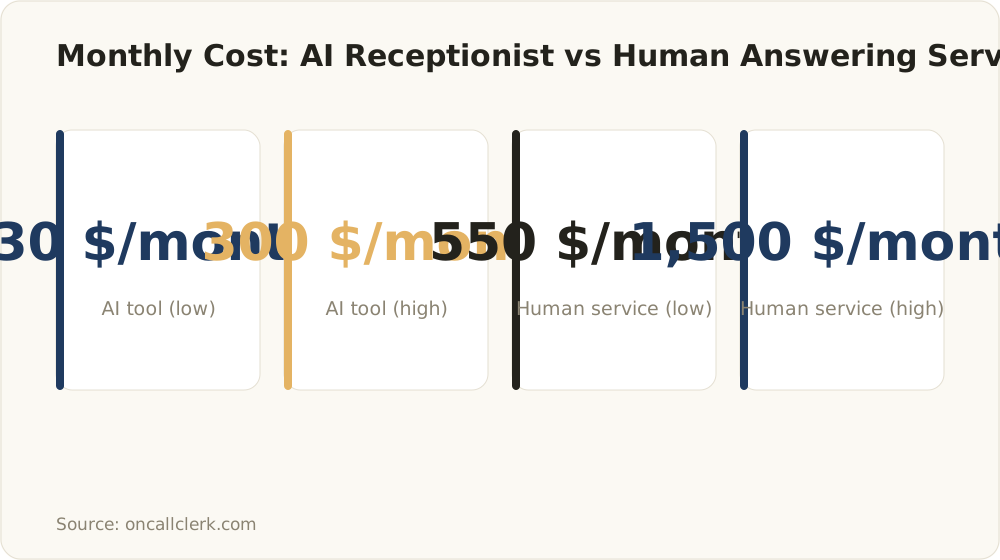
Pure AI receptionist tools range $30-$300/month versus $550-$1,500/month for traditional human-operated answering services.
Vendors price these tools in one of three ways, and which one works for you comes down to call volume and how long your calls run.
Per-minute pricing. You pay for actual talk time. This works well at low volume - if you only get 30-40 short calls a month, per-minute plans keep costs minimal. The risk: long calls. Booking-heavy conversations with back-and-forth about times and insurance details can run 4-6 minutes, and your bill scales with every one of them.
Per-call pricing. You pay a fixed amount per answered call, regardless of length. Costs stay predictable as volume grows, and it beats per-minute pricing once calls run long - a sensible middle ground for steady, moderate volume.
Flat monthly subscription. Pure AI receptionist tools typically cost $30 to $300 per month, compared to $550-$1,500 per month for traditional per-call answering services with human operators. Full-featured plans with unlimited calls, CRM integration and smart call forwarding sit at the upper end of that range. Flat-rate pricing generally beats per-minute models once you receive 20+ calls per month.
Watch for the fine print:
- Setup fees - some providers charge onboarding fees on top of the subscription
- Overage charges - “unlimited” plans often cap minutes in the terms
- Per-seat creep - a recurring complaint in owner discussions: plans look affordable at signup, then per-seat or per-user charges stack up as the team grows. Ask for pricing at 2x and 5x your current usage before you sign.
The break-even logic in one paragraph: at low volume (under ~20 calls/month), per-minute wins. With short calls at medium volume, per-call pricing is easy to forecast. Once volume climbs or booking calls stretch out, a flat-rate subscription usually comes out ahead - assuming the ‘unlimited’ promise holds up against your real usage.
The Honest ROI Math: When an AI Receptionist Actually Pays Off
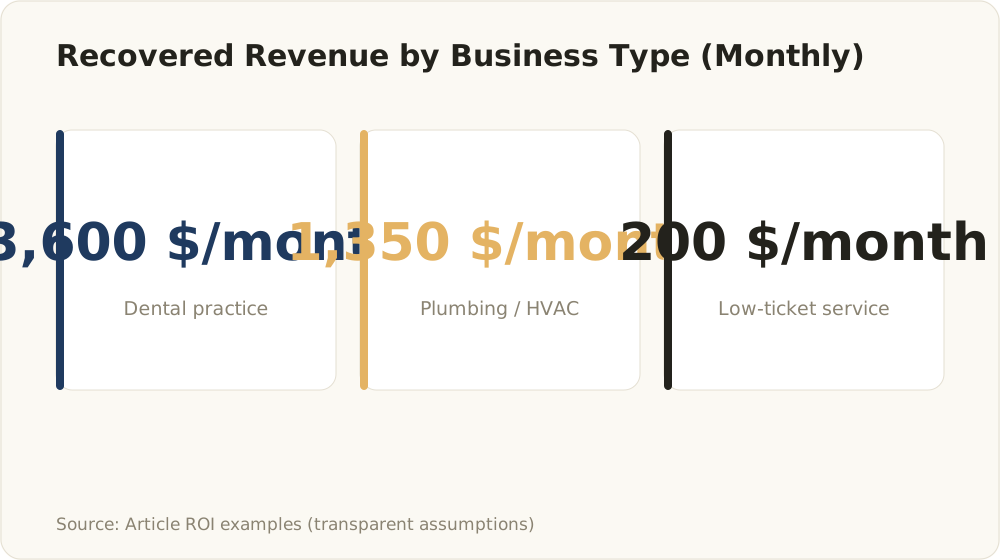
Modeled recovered revenue: dental $3,600, plumbing/HVAC $1,350, low-ticket service $200 per month.
Vendor sites put “ROI” in a headline and never show numbers. Here’s the actual formula:
Recovered revenue = missed calls/month × usable-inquiry rate × conversion rate × average customer value
As soon as the recovered revenue is higher than the monthly bill, the tool has paid for itself. Plug in your own numbers - the examples below use transparent assumptions, not vendor promises.
Example 1: Dental practice
Assumptions: 60 missed calls per month. Half are new-patient or booking inquiries (30). The AI books 40% of those (12 appointments), and 75% show up (9 patients). Average first-year patient value: $400.
- Recovered revenue: 9 × $400 = $3,600/month
- Tool cost: ~$150-$300/month
- Verdict: pays for itself roughly 12-20x over. Even if you cut every assumption in half, the math still works.
Example 2: Plumbing / HVAC business
Assumptions: 20 missed calls per month while on-site. 30% are real job inquiries (6). Half convert after the AI captures details and books a callback (3 jobs). Average job value: $450.
- Recovered revenue: 3 × $450 = $1,350/month
- Tool cost: ~$100-$200/month
- Verdict: fast payback. Fewer calls, but each recovered job carries real value. One saved emergency job can cover a quarter of subscription fees.
Example 3: Low-ticket service business
Assumptions: 25 missed calls per month. 20% convert to customers (5). Average ticket: $40.
- Recovered revenue: 5 × $40 = $200/month
- Tool cost: ~$150-$250/month
- Verdict: marginal to negative. At low ticket values, the AI receptionist barely breaks even on direct revenue. It might still earn its keep through time savings or spam filtering - but not on missed-call recovery alone.
One caveat changes everything: ROI depends on booking-handoff quality, not just answering. An AI that answers every call but books appointments into the wrong slots, drops caller details or creates cleanup work destroys the math. Measure booked-and-kept appointments, not answered calls.
Where AI Receptionists Still Fail (What Vendors Don’t Tell You)

You won’t find this section on any vendor landing page, even though it matters more than the feature list.
Accents, dialects and noisy lines. Speech recognition accuracy drops with strong accents, regional dialects, background noise and poor mobile connections. A caller on a construction site with an accent the model handles poorly gets misunderstood - and frustrated. Mitigation: test the system with your real caller demographics before committing, and configure a low-friction escape hatch (“press 0 for a person”) on every call.
Emergencies. An AI can misjudge urgency. “My basement is flooding” needs to reach a human in seconds, not enter a booking flow. Mitigation: define hard escalation triggers - keywords, caller-stated urgency, repeat calls within minutes - that immediately route to a human, no exceptions.
Hallucinations. A poorly grounded AI invents prices, opening hours or availability with total confidence. A caller told the wrong price becomes an angry customer with a screenshot of your quote. Mitigation: restrict the AI to a verified knowledge base, forbid answers outside it, and configure “I’ll have someone confirm that” as the default for anything uncertain.
Mis-routing and dropped context. Transfers that lose the conversation context force callers to repeat everything - the single fastest way to burn goodwill. Mitigation: require warm transfers with a summary passed to the human, and review mis-route logs weekly.
The “live in minutes” myth. Signup takes minutes. A system that reliably books appointments, routes correctly and represents your business well takes weeks of script tuning, knowledge-base updates and call-log reviews - and ongoing monitoring after that. Industry analysis shows that about 20% of AI-first calls still require human involvement. Budget time for that reality, not the marketing version.
None of these failure modes sinks the business case by itself - left unmanaged, though, a single one can.
Privacy & Compliance Basics: US HIPAA and EU/GDPR
Compliance is where ‘sign up in minutes’ meets legal reality, and the gap between a marketing label and an actual obligation is exactly where things get expensive.
US - HIPAA. If your AI receptionist hears anything about a patient’s health - symptoms, appointment reasons, prescriptions - that’s protected health information (PHI). A ‘HIPAA compliant’ badge on a vendor site proves nothing on its own. You need:
- A signed Business Associate Agreement (BAA) with the provider
- Clarity on where PHI-containing recordings and transcripts live, and for how long
- Access controls on who can review call logs
Call recording consent. Several US states require two-party consent for call recording. Your AI receptionist must disclose recording at the start of every call in those states - verify the provider handles this per-state, not with one generic script.
EU/GDPR. For businesses in the DACH region and the wider EU, the bar sits higher. Voice recordings and transcripts count as personal data, which means you need a lawful basis for processing, a data processing agreement (DPA) with the provider, and clear answers on data residency. Data residency is the key question here: if a provider processes or stores audio on US infrastructure, that can be a problem for EU businesses. Ask specifically: where does transcription happen, where do recordings live, and can the provider guarantee EU data residency?
A practical checklist to hand any provider:
- Will you sign a BAA (US healthcare) or DPA (EU)?
- Where exactly are recordings and transcripts stored and processed?
- How long do you retain voice data, and can we set our own retention period?
- How does the system handle recording disclosure per jurisdiction?
- Which subprocessors (speech-to-text, LLM providers) touch our call data?
Any vendor worth signing with can answer these five questions in writing. If they can’t, keep looking. For EU businesses especially, this checklist eliminates a large share of the US-centric market immediately - often the strongest argument for a custom-built setup.
The Provider Landscape: How to Read Vendor Claims
Providers fall into roughly three camps, and each comes with its own trade-offs:
- Pure-AI tools - lowest cost, fully automated, best for standard workflows with straightforward calls
- Hybrid AI + human services - AI handles routine calls, live agents take escalations; more expensive, but a safety net for high-stakes calls
- Telephony platforms with AI add-ons - AI receptionist features bolted onto business phone systems; convenient if you already use the platform
Instead of a ranked list (which ages badly and usually hides affiliate incentives), evaluate any provider against these criteria:
- Integrations: does it write directly to your calendar, CRM or practice management system - or just email you a summary?
- Languages: if your callers speak German, Turkish or Italian, test those languages specifically, not just the English demo
- Escalation: how fast and how cleanly does a call reach a human?
- Pricing transparency at scale: what does this cost at double your call volume, with three more users?
Red flags: “we tested X services” claims without a published methodology, testimonials without numbers, “unlimited” pricing with undefined fair-use clauses, and any provider that won’t run a real trial on your actual call scenarios.
What a fair pilot measures: answer rate, booking accuracy (booked-and-correct, not just booked), mis-route rate and caller drop-off. Run it for two weeks on real overflow calls before you commit annually.
Subscription Tool vs Custom-Built Voice Agent: A Decision Framework
The final question most guides skip entirely: should you subscribe to an off-the-shelf tool at all, or build a voice agent tailored to your business? A voice agent is just one pattern - these real AI agent examples show what else the same technology handles today.
We have built a voice agent ourselves, and it marks that line well. For a voice app for children - real-time spoken conversations with an AI character, memory across conversations, a cloned voice, parental controls - no subscription tool fit, because the conversation flow itself was the product. Most of the engineering went not into speech recognition but into the call lifecycle: initialization, active conversation, pause, resume, clean ending, each state with defined behavior so the character never turns inconsistent and the user never sees an error. That is the practical test: a subscription tool is right as long as your calls follow a standard script; build custom once the flow itself is what sets you apart.
A subscription tool wins when:
- Your call workflows are standard (book, route, take a message)
- Call volume and complexity are low to moderate
- You need to start this month on a tight budget
- English-only or single-language coverage is enough
A custom voice agent wins when:
- Your routing logic is genuinely complex (multi-location, on-call rotations, triage rules)
- You need deep integration with your CRM, ERP or practice management system - not a Zapier workaround
- You operate in the DACH region or EU and need German-language quality plus guaranteed EU data residency that US subscription tools can’t deliver
- Your calls carry high value, so every hallucination or mis-route costs real money
- Per-seat and overage pricing would compound painfully as you scale
What matters is total cost of ownership, not the sticker price. A subscription looks cheap at $99/month - until per-seat charges, overage minutes and a second location push it toward custom-build territory, with none of the ownership. A custom agent flips that curve: you invest more upfront, then pay a predictable retainer for monitoring and tuning - and the system is built around your exact workflows and compliance requirements.
That’s how we approach it at alloq: a custom voice agent is an investment in a system you control - integrated with your tools, grounded in your verified data, compliant with your jurisdiction - not another subscription line item that reprices itself every year.
Quick decision checklist:
- Can a standard tool handle 90%+ of your call scenarios? → Subscription.
- Do you need EU data residency, German-language quality or deep system integration? → Custom.
- Is a wrong answer on a call expensive (legal, medical, high-ticket)? → Custom, with strict guardrails.
- Unsure? → Pilot a subscription tool for 60 days, measure the failure modes above, then decide with data.
FAQ
How much does an AI receptionist cost for a small business?
Pure AI receptionist tools typically run $30-$300 per month, with full-featured plans (unlimited calls, CRM integration, smart forwarding) at the upper end and hybrid AI-plus-human services costing more. Total cost depends on call volume, minutes and seats - always check overage and per-seat charges before signing.
Is there a free AI receptionist for small business?
Some providers offer free trials or limited free tiers, but ongoing free service is rare and tightly capped in minutes and features. Free tiers almost never include the parts that matter: reliable booking, call routing and compliance features like BAAs or DPAs. Free tiers are fine for testing. Running your business on one is a different story.
Can an AI receptionist give customers wrong information?
Yes. Without strict grounding, an AI can hallucinate prices, hours or availability and state them confidently. Mitigate this with a verified knowledge base, hard rules against answering outside it, and a default escalation path (“I’ll have someone confirm that”) for anything uncertain.
What happens if a caller has a strong accent or it’s an emergency?
Heavy accents, dialects, background noise and poor connections reduce recognition accuracy, and an AI can misjudge how urgent a situation is. A reliable setup needs hard escalation triggers - urgency keywords, repeat calls, caller requests - that route to a human immediately, plus testing with your real caller demographics before launch.
Is an AI receptionist HIPAA or GDPR compliant?
Never assume compliance from a marketing label. For HIPAA, you need a signed Business Associate Agreement and documented PHI handling. For GDPR, you need a data processing agreement, a lawful basis for processing and clarity on EU data residency - voice recordings and transcripts count as personal data. Get every answer in writing.
When is a custom voice agent better than a subscription tool?
Custom wins when you have complex routing logic, need deep CRM or industry-system integration, require multilingual quality and EU data residency, or handle high-value calls where errors cost real money. For standard workflows on a tight budget, a subscription is the faster and cheaper way in. If you’re unsure, pilot a subscription tool, track where it fails, and let those numbers make the decision.