
Choosing between Claude Code and Cursor in 2026 means choosing between two different ideas of how AI should sit in your development workflow. Not a “better” tool versus a “worse” one. This comparison walks through architecture, real workflows, context handling on large codebases, pricing mechanics, and team fit, without the fanboy framing. For the broader landscape beyond these two, see our ranked overview of the best AI coding tools.
TL;DR: Claude Code is a terminal-native agent that drives multi-file work autonomously with a very large usable context. Cursor is an AI-native IDE built for tight inline control. Pick Claude Code for autonomous refactors on big codebases, Cursor for interactive editing - or run both.
Claude Code vs Cursor: The Short Answer
Claude Code and Cursor solve different problems. Neither clones the other. Claude Code is a terminal-native coding agent from Anthropic: you describe intent, and the agent reads your repo, plans, edits files, runs tests, and iterates. Cursor is an AI-native IDE from Anysphere - a fork of VS Code where AI assists you inline while you keep your hands on the keyboard.
The cleanest mental model: with Claude Code, the AI drives and you supervise. With Cursor, you drive and the AI assists.
One honest caveat before the details. As of mid-2026, the two tools converge. Cursor shipped a CLI and cloud agents; Claude Code ships as IDE extensions, a desktop app, and a web interface. The old “terminal vs IDE” binary collapses at the edges. It still matters, though, because each tool’s architecture - not its feature checklist - shapes how work actually feels day to day. That’s what the rest of this article digs into.
What Each Tool Actually Is (Architecture & Philosophy)
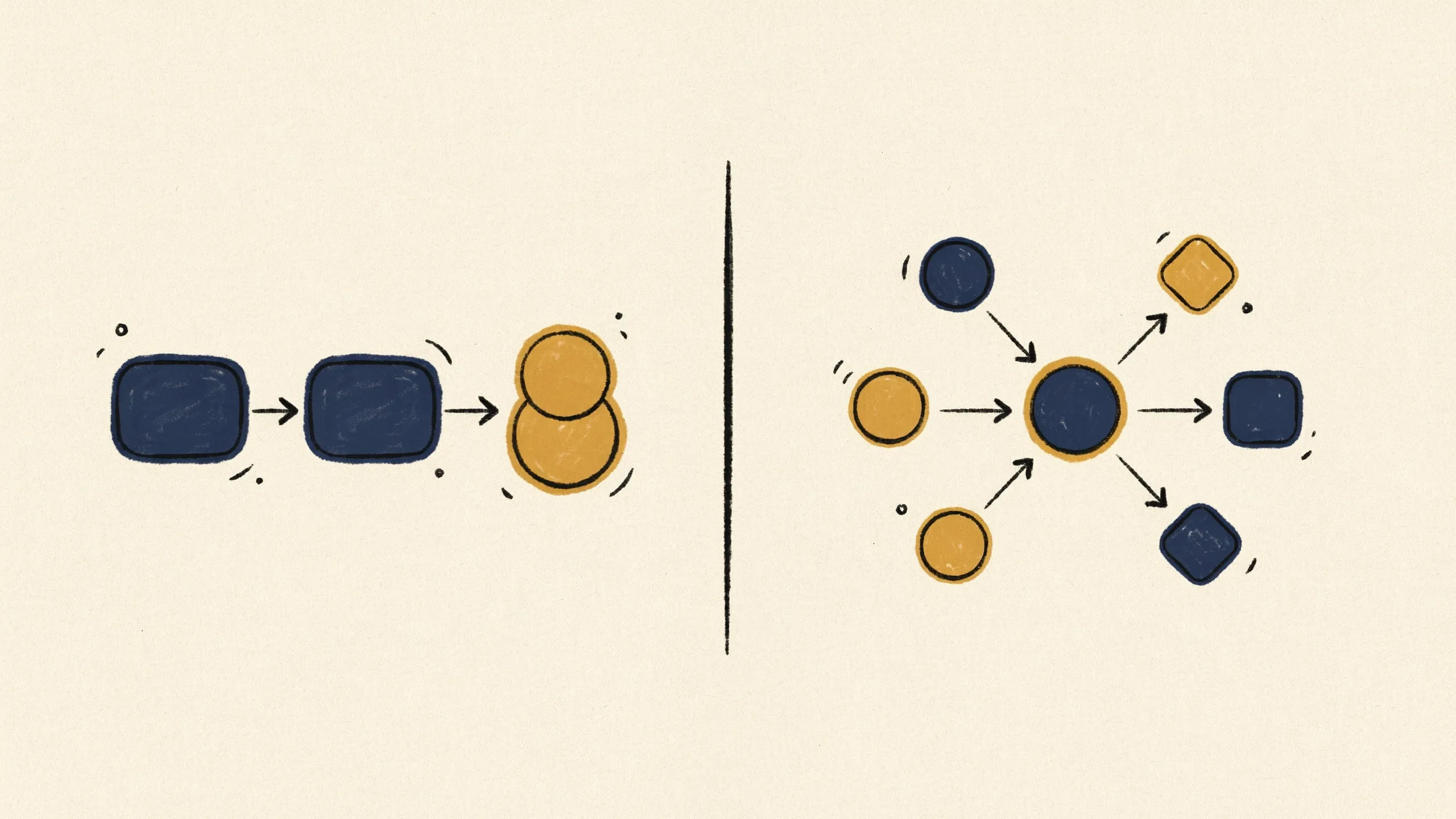
Claude Code started as a pure CLI. It now runs in several shapes - a VS Code extension, a JetBrains plugin, a desktop application, a web interface. Claude Pro includes it at $20/mo, and Claude Max starts at $100/mo with 5x to 20x more usage. It uses Anthropic’s Claude models exclusively - Opus for the heaviest reasoning, Sonnet and Haiku for faster or cheaper runs. No model marketplace here. You buy into the Claude family, full stop.
Cursor takes the opposite bet. It forks VS Code into a full AI-native IDE and stays model-agnostic: you switch between OpenAI, Anthropic, Google Gemini, xAI, and Cursor’s own models depending on the task. Inline Tab completions, chat, Agent/Composer modes - all of it lives inside the editor you already know.
The philosophical difference runs deeper than packaging. Claude Code grants autonomy by default: you delegate a task and review the outcome. Cursor grants autonomy in measured doses: you approve diffs, steer mid-edit, stay in the loop at every step. There’s no objective winner here. If your work is mostly convergent - you know the code, you know the change - Cursor’s control model fits. If your work is exploratory or spans dozens of files, Claude Code’s delegation model pulls ahead.
How a Real Session Feels (Workflows Compared)

The architecture split above shows up most clearly in how a single session plays out.
A typical Cursor session feels like fast, assisted editing. You Tab through completions, highlight a block, ask for a change, review a visual diff, accept or reject. You never leave the editor. The feedback loop runs seconds long. On code you already understand, this is hard to beat - you converge on the right change quickly and stay in control the whole time.
A typical Claude Code session feels like briefing a capable colleague. You write a prompt like “migrate all API handlers from callbacks to async/await and update the tests,” then watch the agent read files, propose a plan, edit across the repo, run the test suite, fix its own failures. You intervene when it drifts, not at every keystroke. Sessions run longer. Each one accomplishes more.
The learning curves differ accordingly. Cursor’s ramp stays nearly flat if you know VS Code - most developers become productive within an hour. Claude Code demands terminal comfort and a different skill: writing precise task briefs, knowing when to interrupt an agent. Teams with mixed skill levels usually adopt Cursor faster; developers who already live in the terminal often prefer Claude Code within a week.
Agentic Capabilities: Autonomous Multi-File Work
Claude Code operates as a full autonomous agent. It reads the codebase on its own, decomposes multi-step tasks, executes shell commands, runs and debugs tests, iterates until the task completes or it hits a wall. Subagents let it parallelize: one agent explores the data layer while another drafts the migration, and results merge back into the main session. It also runs headless, which makes it a natural fit for CI - triggering a code review on every pull request without a human in the loop.
Cursor’s Agent mode has closed much of this gap. Cursor now runs multiple parallel agents, each in its own git worktree, plus cloud background agents in sandboxed environments, and its BugBot reviews pull requests directly. In practice, though, Cursor’s agents still feel more guided: developers tend to watch the diffs, run tests manually, course-correct more often. Part culture - the IDE invites supervision. Part design.
Both sides pay something for their approach. Claude Code’s autonomy delivers more throughput per session but larger, harder-to-review change sets. Cursor’s tighter loop produces smaller, reviewable steps but consumes more of your attention per change. Match the tool to how much you trust the task, not to an abstract notion of which agent is “smarter.”
Context Handling on Large Codebases
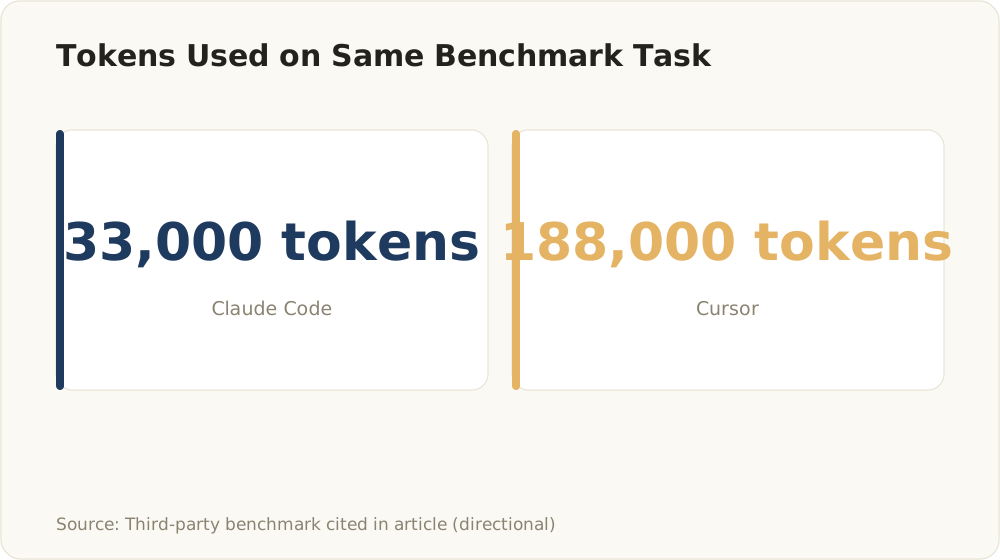
One independent analysis had the same task consume 33K tokens in Claude Code versus 188K in Cursor - roughly a 5.5x efficiency gap. Directional, not vendor data.
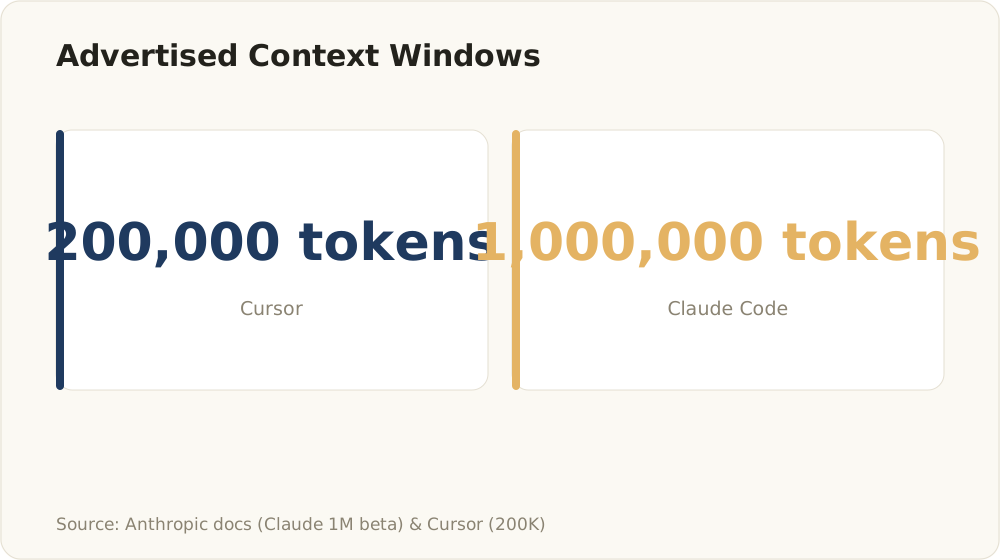
Vendor-published context window ceilings; Anthropic documents a 1M-token window (generally available since March 2026), Cursor advertises 200K.
This is where the comparison stops being a matter of taste. The number that matters is not advertised context but usable context - what actually survives into the model’s working memory after truncation and prompt overhead.
Start with the vendor-published figures. Cursor advertises a 200K context window. Anthropic documents a 1M-token context window, generally available on its flagship Claude models for enterprise-scale repos. Those are the primary sources, and they already tilt the ceiling toward Claude Code on very large codebases.
Third-party analyses push the practical gap further. Several independent write-ups report that Cursor’s usable context lands at only 70K-120K tokens after internal truncation and prompt overhead - well below the advertised 200K. One such analysis clocked Claude Code completing a benchmark task in 33K tokens that consumed 188K tokens in Cursor, a roughly 5.5x token-efficiency gap. Treat those figures as directional rather than definitive: they come from secondary benchmarks, not vendor documentation, and shift with each release. Even so, they line up with what the architecture predicts.
Why does this matter in practice? Two scenarios expose the difference immediately:
- Monorepo refactors. When a change touches shared types, three services, and their tests, the agent needs all of it in view at once. Truncated context produces the classic failure mode: the AI fixes one service and silently breaks another it could no longer “see.”
- Learning an unfamiliar codebase. An agent that holds the full picture answers architecture questions coherently. One working from retrieved chunks answers confidently about the chunks it got - and guesses about the rest.
You push both tools further with structure. For Claude Code, maintain a CLAUDE.md at the repo root describing architecture, conventions, and commands, so every session starts oriented instead of exploring from scratch. For Cursor, .cursorrules plus disciplined use of @-mentions (files, folders, docs) keeps retrieval pointed at the right chunks. Either way: smaller, well-documented modules beat any context window.
Pricing & Real Total Cost of Ownership

Base tiers match at $20/mo; Claude Max starts at $100/mo with 5x-20x more usage.
Sticker prices look identical. At the $20/month tier, both tools cost the same. Both offer heavier tiers, too - Claude Max starts at $100/mo with 5x to 20x more usage, and Cursor sells higher plans for heavy agent workloads.
The billing mechanics differ, though, and that’s where real cost hides. The two tools meter usage differently, so different workloads hit their limits at different points. Neither billing model is kinder than the other - they just punish different usage patterns.
Rough math, using only the published tiers: a solo developer pays $20/month on either tool until their workload outgrows the base tier. A 5-developer team starts at $100/month on either. The divergence comes with workload shape. Teams doing continuous, complex multi-file work often find the effective cost favors Claude Code, because higher token efficiency means the same task burns through far less quota. Teams doing mostly inline-assisted editing rarely hit Cursor’s limits at all, and the base tier stays sufficient.
Before you commit team budget, run a two-week trial with your actual workload. Usage-based limits change frequently on both sides. Your task mix decides what you’ll pay - not the pricing page.
Team & Enterprise Readiness
This is the section most comparisons skip. It’s where SMB and enterprise teams actually make the decision.
Shared configuration. Claude Code teams standardize behavior through a version-controlled CLAUDE.md - architecture notes, conventions, commands - so every developer’s agent starts from the same understanding. Cursor teams use .cursorrules and shared rule sets the same way. Both approaches work - until nobody maintains the files, at which point both quietly rot. Treat them like documentation with an owner, not set-and-forget config.
Admin and access controls. Both vendors sell team and enterprise plans with centralized seat management and SSO. The details - audit logging depth, policy controls, admin granularity - evolve quarterly on both sides, so verify current capabilities directly with the vendors during procurement rather than trusting any blog post, including this one.
Data handling and GDPR. For teams in the DACH region, this deserves more than a checkbox. Ask both vendors the same questions: Where does code go when the agent processes it? What retention applies to prompts and code snippets? Does a zero-retention agreement exist on your tier? Does the tool send telemetry you can’t disable? Your answers belong in your Verzeichnis von Verarbeitungstätigkeiten before rollout, not after. Cursor’s codebase indexing and Claude Code’s full-file reads carry different data-flow profiles - map both against your obligations.
Onboarding reality. For mixed-skill teams, Cursor wins the first month: it looks and feels like VS Code, and adoption friction stays minimal. Claude Code rewards teams with terminal fluency and a delegation mindset; expect a few weeks before developers brief agents well. Budget for that ramp explicitly.
When Each Tool Wins (Decision Matrix)
In the abstract, nobody wins this comparison. Each tool takes a different shape of work:
| Scenario | Better fit | Why |
|---|---|---|
| Solo dev, interactive editing on familiar code | Cursor | Inline speed, visual diffs, minimal ramp |
| Large refactor across a monorepo | Claude Code | Usable context holds the full change surface |
| Learning an unfamiliar codebase | Claude Code | Reads and explains the repo coherently in one pass |
| Greenfield MVP, exploratory building | Cursor | Fast interactive scaffolding, cheap iteration |
| Greenfield MVP from a written spec | Claude Code | Spec-driven agent build with test loops |
| CI/CD automation, headless PR review | Claude Code | Runs headless in pipelines by design |
| Mixed-skill team, fast rollout | Cursor | VS Code familiarity flattens onboarding |
| Heavy multi-file workloads at scale | Claude Code | Token efficiency changes the cost math |
A few nuances the table can’t hold. “Familiar code” is doing a lot of work in the Cursor rows: the moment you stop knowing exactly what to change, delegation beats assistance. And “greenfield” splits on discipline - if you can write a clear spec, an agent builds against it well; if you’re thinking through the product by editing, stay interactive.
Our ranked overview of the best AI coding tools covers where these two sit in the wider field - against Copilot, Windsurf, Codex, and the rest. Read it at the best AI coding tools.
Using Both Together (and Claude Code Inside Cursor)
Yes, you can run Claude Code inside Cursor - the direct answer to the most common follow-up question. It runs as a CLI in Cursor’s integrated terminal, and because Cursor forks VS Code, the VS Code extension typically works there too. You keep Cursor’s editor, diffs, and Tab completion while delegating agentic tasks to Claude Code in a panel below.
Many teams go further and run a relay-race workflow: one tool explores and plans, the other implements or reviews. A common split - Claude Code executes a large refactor autonomously while you handle interactive edits and review in Cursor. Community discussions also describe developers running both tools in parallel in other combinations, steering interactively on top.
Those same community discussions surface two practical lessons about handoffs between tools. Worth flagging as qualitative observations, not benchmarks:
- A progress doc beats memory. Keep a shared progress doc when you switch tools mid-project. Intent survives the handoff; the agent’s working context (which approaches it already ruled out) doesn’t, unless you write it down.
- Budget for the context tax. Each tool re-reads the repo on its first session, which costs tokens and time. A
docs/index that every tool reads on startup cuts that overhead.
The mature conclusion isn’t “pick a winner.” Entry pricing on both tools sits low enough that running both and routing tasks by shape is a legitimate strategy - one that keeps surfacing in community discussions among heavy users.
FAQ
Is Claude Code just Cursor, or are they the same thing?
No. Claude Code is a terminal-native agent tied exclusively to Anthropic’s Claude models. Cursor is an AI-native IDE - a VS Code fork - that supports multiple model providers. They differ in architecture and control model: Claude Code delegates whole tasks to an agent, Cursor assists you inline while you edit.
Is Claude Code slow compared to Cursor?
For quick inline edits, Cursor feels snappier - completions and small diffs return in seconds. Claude Code sessions start heavier because the agent reads context and plans before acting. But for large multi-file tasks, one Claude Code run often replaces many Cursor interactions. Treat anecdotal speed complaints with caution: they’re version-dependent, and both tools ship updates constantly.
Can I run Claude Code inside Cursor?
Yes. Run it as a CLI in Cursor’s integrated terminal, or use the VS Code extension, which works there because Cursor forks VS Code. You keep Cursor’s editing experience and delegate agentic work to Claude Code side by side.
Why use Cursor and Claude Code together?
They cover different shapes of work. Cursor excels at interactive, controlled editing; Claude Code excels at autonomous multi-file changes, codebase exploration, and headless automation. A relay workflow with a shared handoff doc - structured as decided/tried/rejected/next - lets each tool play to its strength.
Which handles a large monorepo better?
Claude Code, generally. It holds more usable context reliably and reads the repo in fewer passes, while Cursor’s effective context can shrink well below its advertised window on very large codebases. For monorepo refactors where a change spans many services, that difference decides whether the agent sees the whole change surface.
What does each cost per month for a real team?
Both start at $20 per user per month, with heavier tiers above that. Actual cost depends on workload, since the two tools meter usage differently. A 5-developer team starts around $100/month on either tool; heavy multi-file work tends to favor Claude Code on token efficiency. Trial both with your real workload before committing.