
TL;DR: The best MCP servers in 2026 depend on the job: filesystem and Git for local code work, the official GitHub server for repo automation, Playwright or Chrome DevTools for browser tasks, Postgres or Supabase for data, Fetch and Context7 for research and docs, and AdPlug for Google Ads. Install only what earns its context window - nothing more.
What makes an MCP server worth installing
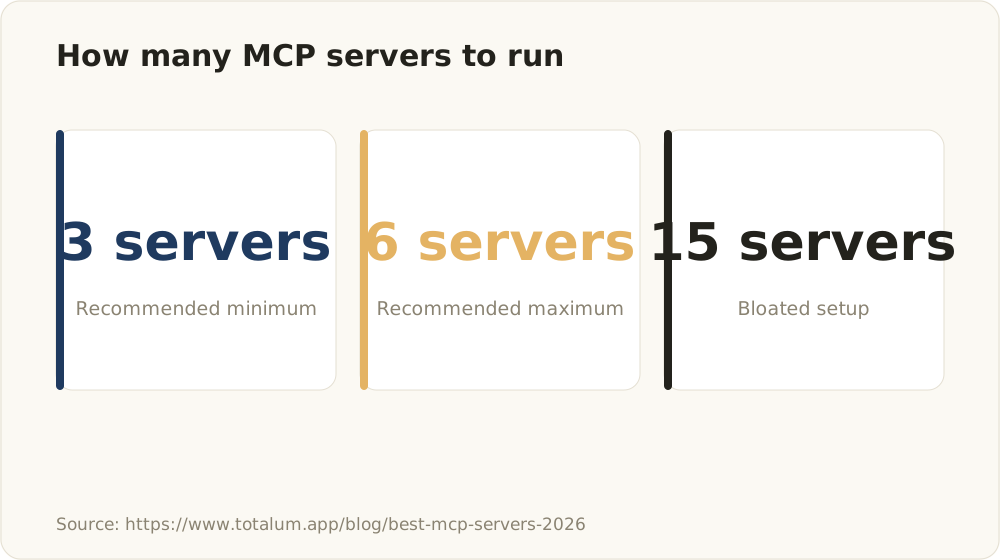
Practitioner guidance: a small curated set of MCP servers outperforms a large directory dump.
An MCP server exposes tools, resources and prompts to an MCP client - Claude Desktop, Claude Code, Cursor - over the Model Context Protocol. Anthropic released MCP in November 2024; OpenAI and Google DeepMind adopted it in early 2025, and the protocol moved to the Linux Foundation’s Agentic AI Foundation in December 2025. The ecosystem now spans thousands of servers. That’s the problem this article solves.
We build AI agent systems for clients at alloq.digital. Our bias is simple: every server you add spends context tokens, adds latency, and widens your attack surface. A curated set of a handful of sharp servers beats a directory dump every time. Client project after client project lands on the same pattern: three to six well-chosen servers beat fifteen, because each server adds tool-call latency and tool-name collisions inside the agent’s context window.
Before anything reaches a client project, it clears these criteria:
- Maintenance status in 2026. Abandoned servers are common - more on that below.
- Auth requirements. What token does it need, and how narrowly can you scope it?
- Local vs remote. Where does your data travel?
- Tool count vs noise. Does every exposed tool serve the agent’s actual job? Tool counts vary widely between servers, so inspect what a server actually registers before you install it - a focused server exposes a handful of tools, while broad ones register dozens, and each definition costs context on every run.
- Read-only option. Can you strip write access for agents that only need to look?
We also stay skeptical of vendor self-ranked lists, where a post’s own product can end up near the top. We rank by what survives on real client projects. What follows is a category-grouped shortlist with copy-paste install commands, not an exhaustive dump. If you want the fundamentals first, read how AI agents actually work.
How to install an MCP server in Claude Code (the 2-minute version)
The general pattern in Claude Code is one command:
claude mcp add <name> -- <command-that-starts-the-server>For Claude Desktop, the equivalent lives in a JSON config block:
{
  "mcpServers": {
    "filesystem": {
      "command": "npx",
      "args": ["-y", "@modelcontextprotocol/server-filesystem", "/path/to/project"]
    }
  }
}
Three details matter in practice.
Scope flags. Claude Code supports local, project and user scope. We default to --scope project on team codebases: the config lands in a checked-in .mcp.json, so every developer and every CI agent runs the same server setup. user scope suits personal tools you want everywhere; local is the default for experiments.
Transport type. Stdio servers run as a local process the client manages for you. Remote servers speak Streamable HTTP over a network endpoint - you add those with claude mcp add --transport http <name> <url>. The older SSE transport has been deprecated since the 2025-03-26 spec revision, and providers are shutting down their remaining SSE endpoints through 2026, so treat Streamable HTTP as the standard. Local stdio fits secrets-heavy work; remote fits hosted, team-shared services.
Verification. Run claude mcp list to confirm the server connects, and claude mcp remove <name> to drop what you no longer use. For client-specific configuration details, the official docs at modelcontextprotocol.io remain the reference. And when you hunt for new servers, start at the official MCP Registry rather than an unvetted directory dump.
Best filesystem and Git MCP servers (local code work)
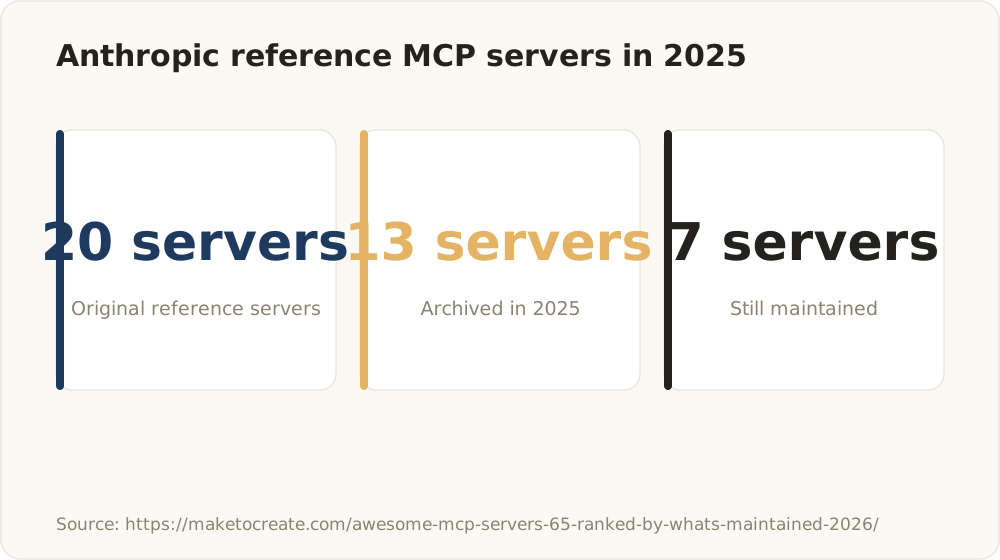
Anthropic archived most of its original reference servers in 2025 - check maintenance status before adopting.
Filesystem MCP - best for giving an agent scoped read/write access to a project directory. The MCP project maintains this official server, and the critical detail sits in the arguments: you whitelist the allowed paths at startup, and the agent cannot reach outside them.
claude mcp add filesystem -- npx -y @modelcontextprotocol/server-filesystem /path/to/projectGit MCP - best for local branch, diff and commit context without touching a remote API. The agent reads history, inspects diffs and stages commits against the local repository.
claude mcp add git -- uvx mcp-server-git --repository /path/to/repoFilesystem write access is the single highest-risk grant on this list. An agent with unrestricted write access can modify configs, credentials files, or its own instructions. Our default: constrain the allowed directories to the project root, exclude anything holding secrets, and run agents in a sandboxed worktree so a bad write never touches the primary checkout.
One more thing worth noting: the ecosystem’s reference servers thin out over time. Anthropic archived most of its original reference servers in 2025, keeping a small maintained core, and much of the community long tail sees only sporadic maintenance. Filesystem and Git sit on the maintained side of that line - check that status before adopting anything more obscure.
Best GitHub and code-hosting MCP server
Official GitHub MCP server - best for issues, PRs, code search and repo automation. This is the server that turns a coding agent into a teammate: it triages issues, opens pull requests, reviews diffs and searches code across repositories. One warning up front: the old npm package @modelcontextprotocol/server-github is deprecated - the package is dead and its repo archived. GitHub now maintains the server itself at github/github-mcp-server, and the remote endpoint is the default we recommend:
claude mcp add --transport http github https://api.githubcopilot.com/mcp/The remote server authenticates via OAuth, so you manage no token at all. If you prefer to run it locally, GitHub ships a Docker image (ghcr.io/github/github-mcp-server) that takes a personal access token:
export GITHUB_PERSONAL_ACCESS_TOKEN=github_pat_...Token guidance: the OAuth flow of the remote server covers most setups. For the Docker or binary variant, use fine-grained personal access tokens scoped to the specific repositories the agent works on. Never hand an agent a classic PAT with org-wide admin - an agent that can open PRs can also close issues, push branches and touch settings if the token allows it. Scope down first, expand only when a workflow demands it.
The server exposes a large tool surface across issues, PRs, actions and code search, and every tool definition consumes context before the agent does any work. Disable toolsets you do not need - the Docker/binary variant takes --toolsets repos,issues,pull_requests or the GITHUB_TOOLSETS environment variable - so the agent stays focused on the two or three operations its job actually requires.
In our agent pipelines, this server anchors the “open a PR automatically” pattern: the agent works in an isolated branch, the GitHub server files the PR, and a human merges. The agent never gets merge rights.
Best browser automation MCP servers (Playwright vs Chrome DevTools)
Playwright MCP - best for end-to-end UI tasks, scraping and form flows across browsers. Microsoft maintains it, and it drives the browser through structured accessibility snapshots rather than screenshots, so the agent interacts with pages without a vision model.
claude mcp add playwright -- npx -y @playwright/mcp@latestChrome DevTools MCP - best for performance traces, DOM inspection and debugging a running page. Where Playwright automates, DevTools diagnoses: network waterfalls, console errors, performance profiles on a live tab.
claude mcp add chrome-devtools -- npx -y chrome-devtools-mcp@latestA gotcha that surfaces repeatedly in practitioner discussions we analyzed: parallel agents or subagents collide when they share one browser session. Teams running multi-subagent UAT flows report that giving each agent its own Chrome profile via a separate --user-data-dir path resolves the overlap - each worker gets an isolated session instead of fighting over cookies and tabs.
Headful mode is invaluable while you debug agent behavior. Switch to headless for CI runs. And if you run agents in parallel, treat session isolation as a setup requirement, not an optimization.
Best database MCP servers (Postgres and Supabase)
Postgres MCP - best for schema-aware querying and letting an agent reason over real data. The agent inspects the schema, writes SQL and returns results into context. Skip the original reference server (@modelcontextprotocol/server-postgres): it has been deprecated since December 2024, and Datadog Security Labs documented an unfixed SQL injection that bypasses its read-only mode - no maintainer will patch it. Pick an actively maintained alternative instead: Postgres MCP Pro for a local server, or the hosted MCP servers from Neon and Supabase if you already run your database there.
Supabase MCP - best for teams already on Supabase who want Postgres plus auth, edge functions and RLS management through one server. Supabase now recommends its hosted server, which authenticates via OAuth 2.1 and defaults to read_only=true:
claude mcp add --transport http supabase "https://mcp.supabase.com/mcp?read_only=true"The npm package stays valid as a local alternative:
claude mcp add supabase -- npx -y @supabase/mcp-server-supabase --read-onlyHandle connection strings through environment variables in both cases. Never paste credentials into a committed config file.
A write-capable database connection in an agent’s hands is a production incident waiting to happen. One hallucinated UPDATE without a WHERE clause is all it takes. For analytics agents, we create a dedicated read-only database role and, on client systems with real traffic, point the agent at a read replica instead of the primary. The agent gets full analytical power; production stays untouchable.
Best search and documentation MCP servers
Fetch MCP - best for pulling live URLs into context. The MCP project maintains this reference server; it retrieves a page, converts it to markdown and hands it to the agent. When your research question depends on anything published after the model’s training cutoff, live fetch often beats stale training data - as long as the source itself is trustworthy.
claude mcp add fetch -- uvx mcp-server-fetchContext7 - best for feeding current, version-specific library documentation to coding agents. Instead of the agent guessing at an API that changed two majors ago, Context7 resolves the library and pulls the matching docs into context. For teams on fast-moving frameworks, this single server reduces a common source of hallucinated API calls - though the model can still generate wrong code.
claude mcp add context7 -- npx -y @upstash/context7-mcpEverything an agent fetches from the web is untrusted input. A malicious page can embed instructions aimed at the agent - prompt injection through fetched content is a real vector, not a theoretical one. Keep tool permissions tight on any agent that both reads the web and holds write access elsewhere: an agent that fetches arbitrary pages should not also hold your GitHub token with push rights.
Best Google Ads MCP server: AdPlug
Disclosure: AdPlug is our own product at alloq.digital. We list it here transparently rather than pretending to rank it neutrally against the open-source servers above - judge it on the criteria in this article, not on our say-so.
Here is a category most MCP shortlists tend to overlook: paid-marketing workflows rarely show up on them, even though ad accounts are exactly the kind of structured, API-backed system MCP was built for.
AdPlug (adplug.app) - best for querying Google Ads campaigns, budgets, performance and pacing through natural language, and letting agents draft optimizations. Instead of exporting reports and pasting them into a chat, you connect the account once and ask directly: which campaigns are pacing over budget, where did CPA move this week, which search terms burn spend without converting. The agent reads the account and drafts changes - bid adjustments, negative keywords, budget shifts - as proposals.
What still needs a human: pushing changes to a live account. Ad spend is real money, and an agent that misreads a pacing signal can reallocate budget in the wrong direction at scale. Our standing rule - the agent analyzes and drafts, a human reviews and applies - at minimum for the first weeks, until you trust the patterns.
Security note: OAuth scopes on a Google Ads account touch real spend. Start with read-only access, review every proposed write, and expand scopes deliberately. AdPlug is our own commercial product, so factor both the license and our obvious bias into your evaluation alongside the open-source servers above. For the full setup - and why Google’s official server stays read-only while writes need a preview-then-execute flow - see our Google Ads MCP guide.
For setup details and the optimization workflows we run on it, see our full Google Ads MCP walkthrough.
MCP server comparison table (category, hosting, auth, cost, best for)
| Server | Category | Local/Remote | Auth | Cost | Read-only by default (our setup) | Best for |
|---|---|---|---|---|---|---|
| Filesystem | Code / files | Local (stdio) | None (path whitelist) | Open source | Yes - whitelist paths, read-only where possible | Scoped project file access |
| Git | Code / VCS | Local (stdio) | None (local repo) | Open source | Mostly - agent commits to isolated worktrees | Local diff, branch, commit context |
| GitHub (official) | Code hosting | Local or remote | OAuth (remote) or fine-grained PAT (Docker) | Open source | Scoped token, no merge rights | Issues, PRs, repo automation |
| Playwright MCP | Browser | Local (stdio) | None | Open source | n/a - isolate sessions per agent | E2E flows, scraping, form automation |
| Chrome DevTools MCP | Browser / debug | Local (stdio) | None | Open source | n/a | Performance traces, DOM debugging |
| Postgres | Database | Local (stdio) | Connection string via env | Open source | Yes - read-only role, replica for prod | Schema-aware querying over real data |
| Supabase MCP | Database / BaaS | Local or remote | OAuth 2.1 (hosted) or access token via env | Open source (Supabase pricing applies) | Yes - read_only=true (hosted) or --read-only flag | Postgres + auth + edge functions in one |
| Fetch | Search / web | Local (stdio) | None | Open source | Read-only by nature - treat output as untrusted | Pulling live URLs into context |
| Context7 | Documentation | Local (stdio) | Optional API key | Free tier available | Read-only by nature | Version-specific library docs for coding agents |
| AdPlug | Google Ads | Remote (hosted) | Google OAuth | Commercial | Yes - start read-only, human-reviewed writes | Campaign analysis, budget pacing, drafted optimizations |
The official reference servers in this table - Filesystem, Git and Fetch - sit on the maintained side of the ecosystem as of mid-2026, and we check maintenance status before adopting anything more obscure. That matters more than it sounds: with most of the original reference servers archived and a long tail of abandoned community projects, maintenance status is the first filter, not the last. The official MCP Registry gives you a vetted starting point for that filter - a far better discovery surface than the directory dumps this article argues against.
We deliberately publish no latency benchmarks or per-server tool counts here. We have not measured them rigorously, and invented numbers help nobody. Measure both in your own setup instead: run claude mcp list to see which servers connect, check each server’s registered tools against your client’s token accounting, and treat the added tool-call latency as a real cost you weigh per project.
Local vs remote MCP servers: which to choose
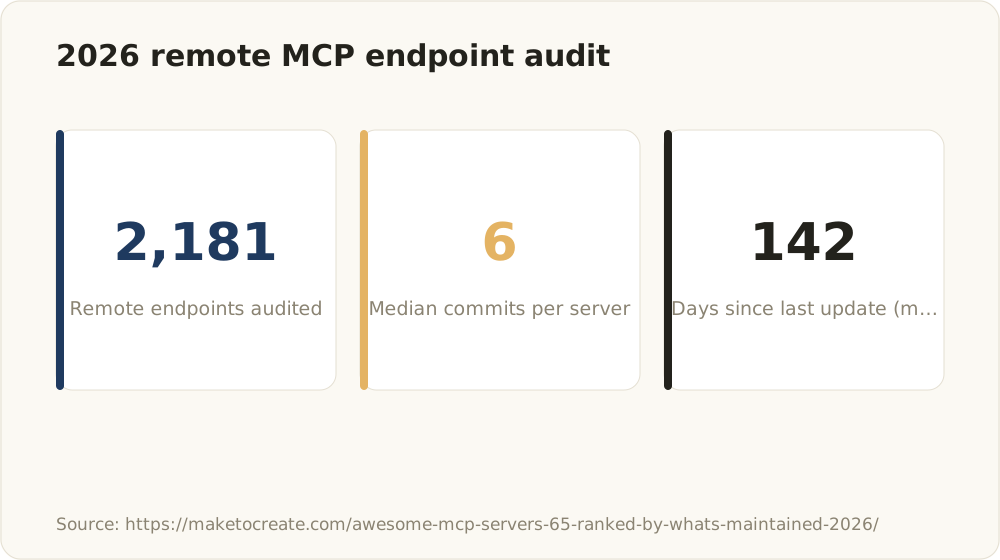
A 2026 audit of remote endpoints highlights how thinly maintained many MCP servers are.
Local (stdio) servers run as a process on your machine. You get full control, no data leaves your environment, and no third party holds your tokens. The cost: you own setup, dependencies and updates, and sharing config across a team takes deliberate work (project-scoped .mcp.json solves most of it).
Remote/hosted servers trade control for convenience. No local dependencies, easy team sharing, always-current versions. The cost: you hand tokens and data to a third party, and you inherit their uptime. A recurring friction point in the practitioner discussions we analyzed: hosted servers waking from idle sessions can respond unreliably on the first call - build retries into any agent workflow that depends on a remote server.
Our decision heuristic for client deployments:
- Keep it local when the server touches secrets, source code, databases or anything data-sensitive. Filesystem, Git, Postgres - local, always.
- Go hosted for stable public APIs where the vendor’s hosted server is the canonical integration - AdPlug for Google Ads fits here, as do official remote servers from SaaS vendors.
- When in doubt, local. You can always move to hosted later; you cannot un-share data.
MCP security checklist before you connect anything

Run through this before any server touches a real account or codebase:
- Default to read-only. Enable write access per server, per project, only when a workflow requires it.
- Least-privilege tokens. Fine-grained PATs scoped to specific repos, database roles limited to specific schemas, OAuth scopes limited to read. Never account-wide admin.
- Secrets in environment variables or a secrets manager. Never in committed config, never inline in an install command that lands in shell history.
- Treat fetched content as untrusted. Any server that pulls web pages into context is a prompt-injection vector. Separate web-reading agents from write-capable agents.
- Consider a proxy layer. If you run several servers side by side, a mediating proxy can prevent one tool’s output from leaking data into another tool’s calls - a pattern security-focused practitioners increasingly recommend for Claude Desktop setups.
- Audit regularly. Run
claude mcp list, question every entry, and remove servers you no longer use. Every idle server is unused attack surface plus wasted context.
How we choose MCP servers on client projects
Our process starts from the agent’s job, not from a server list. A code-review agent needs GitHub and maybe Context7 - it does not need a browser. An analytics agent needs a read-only Postgres connection - it does not need filesystem write access. We add the minimum set the job requires, because fewer tools produce sharper agent behavior and lower token cost per run.
Where official servers exist - Filesystem, Git, GitHub, Playwright - we standardize on them. Community servers go through vetting first: commit activity, scope of permissions requested, whether a read-only mode exists. Given how much of the ecosystem is effectively unmaintained, this filter removes more candidates than any feature comparison does.
MCP server selection is one layer of a larger architecture question: how you structure the agent, its permissions, its error handling and its human checkpoints. We cover that in depth in our guide to building production agents with the Claude Agent SDK. And if you are wiring MCP into a real product and want senior technical ownership rather than experimentation on your production systems - talk to us.
FAQ
What are the best MCP servers for Claude Code in 2026?
For most engineering teams: Filesystem and Git for local code work, the official GitHub server for repo automation, Playwright or Chrome DevTools for browser tasks, Postgres or Supabase for data, Fetch and Context7 for research and docs, and AdPlug for Google Ads workflows. Install only what the agent’s actual job requires - each additional server costs context tokens and adds attack surface.
How do I install an MCP server in Claude Code?
Run claude mcp add <name> -- <command> in your terminal - for example claude mcp add filesystem -- npx -y @modelcontextprotocol/server-filesystem /path/to/project. Choose --scope project for team setups so the config lands in a shared .mcp.json. Verify with claude mcp list. Claude Desktop uses an equivalent JSON block in its config file; the official docs at modelcontextprotocol.io cover client-specific details.
Are MCP servers free?
Most core servers - Filesystem, Git, GitHub, Playwright, Postgres, Fetch - are open source and free. Some are commercial or usage-priced, typically hosted platforms and specialized vendors; AdPlug for Google Ads is a commercial product. Remember the hidden cost either way: every server’s tool definitions consume context tokens on each agent run.
Is there an MCP server for Google Ads?
Yes. AdPlug (adplug.app) exposes Google Ads campaigns, budgets, performance and pacing to MCP clients, so agents can analyze accounts and draft optimizations through natural language. Start with read-only scopes, because write access touches real ad spend. Our Google Ads MCP walkthrough covers setup and workflows in detail.
Should I run MCP servers locally or use hosted ones?
Keep secrets-heavy, data-sensitive work local over stdio: filesystem, Git, databases. Use hosted servers for stable public APIs and team-shared services where the vendor’s hosted version is canonical. Hosted trades control and privacy for less ops overhead - and build retries into agent workflows, since remote servers waking from idle can respond unreliably.
Which MCP servers are a security risk?
Any server with write access ranks highest: filesystem write, write-capable database roles, broadly scoped GitHub tokens, Google Ads write scopes. Fetch-style servers add a different risk - prompt injection through untrusted web content. Mitigate with read-only defaults, fine-grained tokens, secrets in environment variables, separation between web-reading and write-capable agents, and regular audits of your installed server list.