Zalgo Text Generator: Glitch Text That Won’t Get Banned
You want corrupted, glitchy text for your Discord bio or Roblox username. You type your message into a random generator online, hit copy, paste it into chat, and nothing happens. The message gets eaten by a spam filter, breaks the layout on mobile, or worse, gets your account flagged. The tool worked. The platform did not.
That gap between generating Zalgo text and actually using it safely is where most guides fall short. They show you sliders and output fields but never explain why your creepy text crashes an older phone or triggers an auto-mod. This guide closes that gap. You will get a working zalgo text generator, a platform-by-platform safety breakdown for Discord and Roblox, and a technical explanation of the Unicode mechanics that make the whole effect possible.
Key Takeaway
A zalgo text generator converts standard text into glitchy or cursed styles using Unicode combining characters. Before you paste that corrupted text anywhere, you need to understand platform limits.
- Zalgo effects stack invisible characters above and below letters, consuming character limits fast
- Discord enforces a 2,000-character cap that heavy distortion can exhaust in a single sentence
- Roblox filters may censor or block high-intensity Zalgo in chat and bios
- Use low-intensity settings for mobile-safe results that render without lag
- Screen readers cannot interpret Zalgo text, making it an accessibility concern
The Ultimate Zalgo Text Generator & How to Use It
Tip: Use "Discord Safe" or "Roblox Safe" presets for platform-compatible results. Screen readers cannot interpret Zalgo text — use responsibly.
A reliable zalgo text generator does more than scramble your letters. It gives you control over how much distortion you apply and tells you whether the result will survive a platform’s character filter. Most online tools offer a text field and a “generate” button. Few tell you if your output will actually render on the device your audience uses.
The key difference lies in three features. First, instant generation lets you type or paste any message and see the corrupted output in real time. Second, adjustable intensity levels — from subtle to full chaos — let you match the effect to the context. Third, platform-specific safety modes monitor byte size and character count so your message does not fail silently when pasted into Discord or Roblox.
According to a tool benchmark comparison of leading generators, most tools lack any form of output validation. A comparative analysis of tool functionality shows that basic generators ignore the relationship between combining character density and platform limits entirely. Safety presets address this by capping distortion at levels each platform can handle.
Instant Glitch Generation for Any Platform
You type a word or message into the text field, and the generator transforms it into corrupted, glitchy text. The interface is straightforward. A cool looking text generator needs three controls: sliders for “Upper,” “Middle,” and “Lower” distortion levels. Upper marks stack above your letters. Lower marks drop below. Middle marks overlay directly on the character. Each slider adjusts how many combining characters attach to every base letter in your input.
The output field shows your corrupted text in real time. Copy it with one click and paste it directly into a Discord bio, Roblox chat, or social media post. For more on glitch text trends and generators, the range of available styles continues to grow.
Now that you have your text, you can refine the level of chaos.
Customizing Your Chaos Level
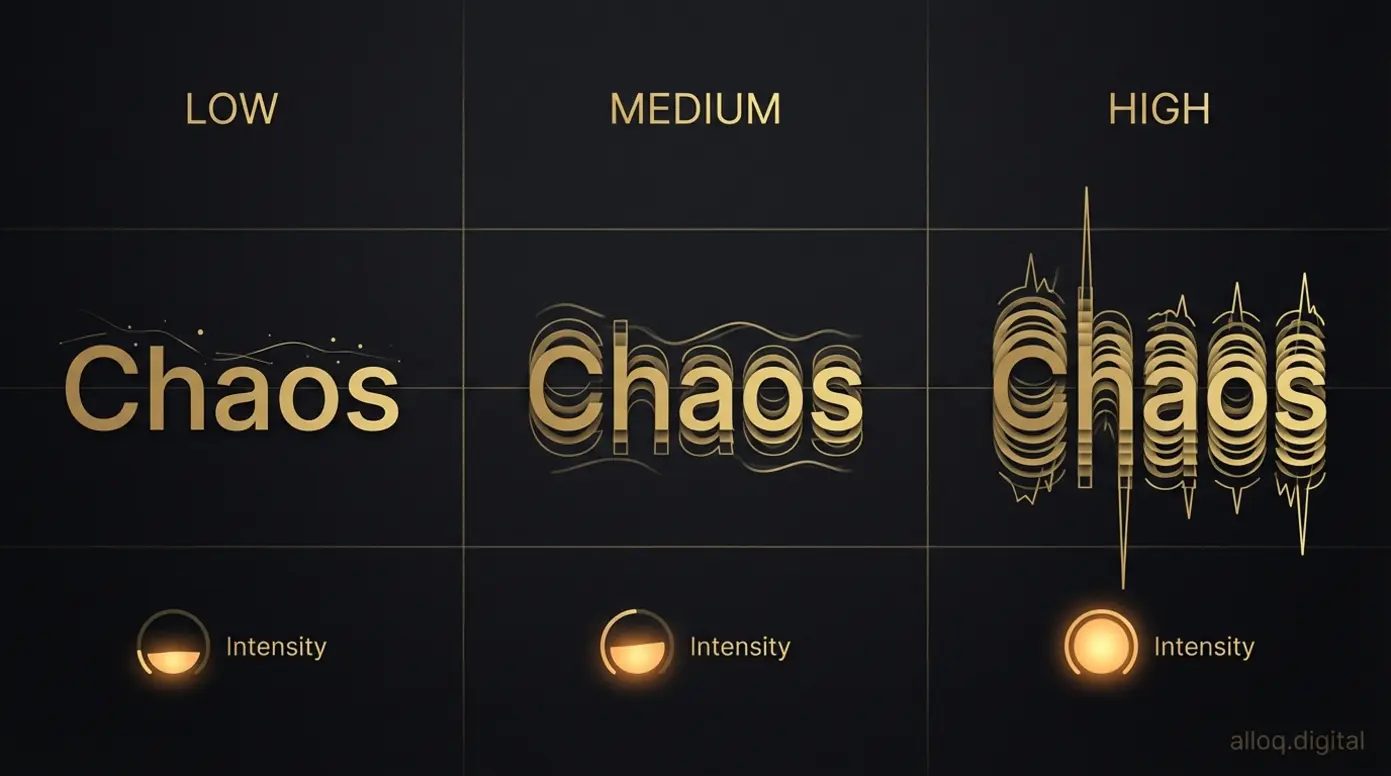 Distortion intensity controls determine whether your Zalgo text stays readable or descends into full visual chaos.
The messed up text generator effect depends entirely on how many combining marks you stack per character. A low setting adds one or two marks, producing a subtle glitch that reads clearly. A high setting adds dozens, turning your text into an unreadable wall of corrupted symbols.
Custom distortion controls let you fine-tune each axis independently. You might want heavy upper distortion for a “dripping” effect but keep lower marks minimal so the text stays within a single line height. This matters for platforms with strict display boundaries. For related decorative font styles, combining Zalgo with other Unicode effects can produce layered results.
Understanding Zalgo: From Glitch to Demonic Aesthetics
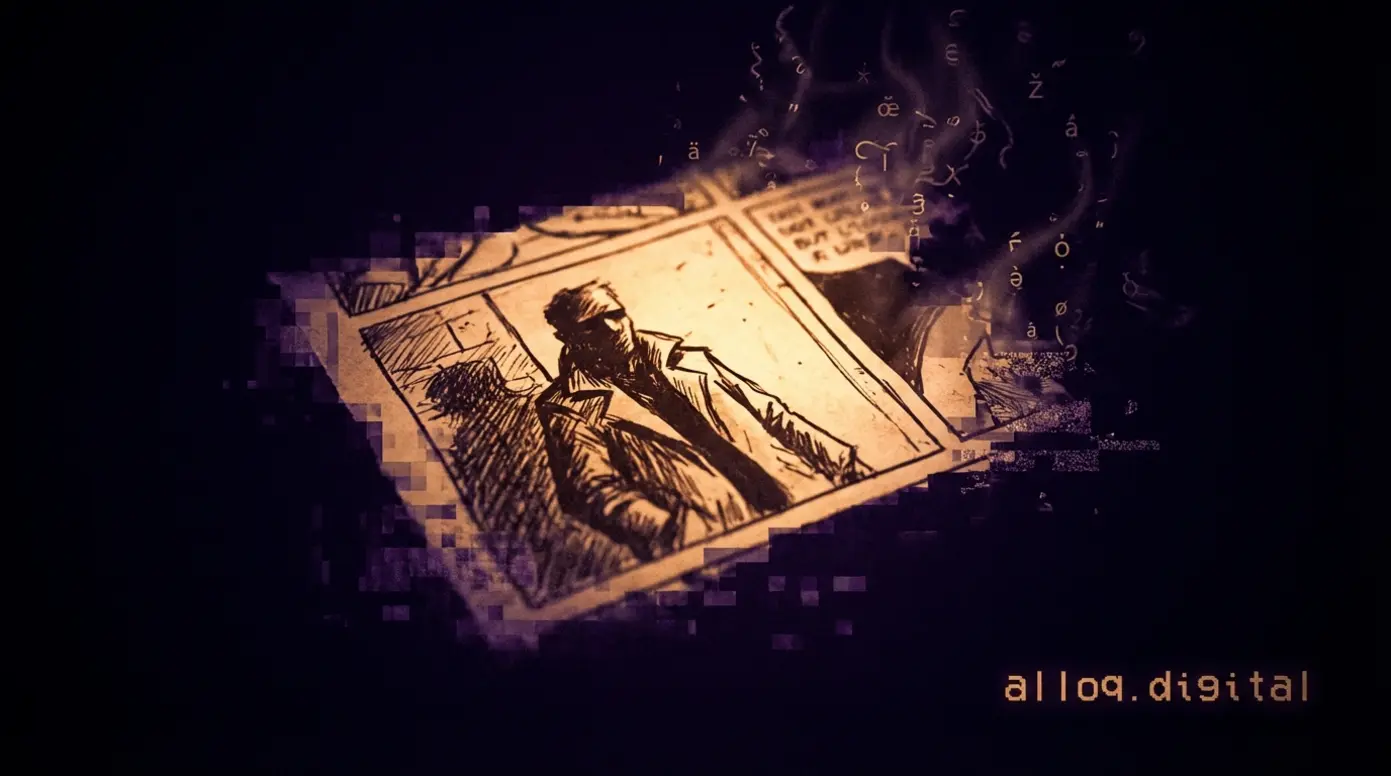 Zalgo text traces back to 2004 horror edits of newspaper comics — digital corruption as an internet art form.
The creepy text generator aesthetic did not emerge from a software tool. It started as internet folklore. The Zalgo meme dates back to 2004, rooted in horror-themed image edits and creepypasta communities. Understanding this origin helps you use the style with intention rather than just novelty.
The name refers to a fictional entity associated with chaos and corruption. Artists began editing newspaper comics and cartoon panels to include distorted, “corrupted” text and imagery. The visual language — dripping letters, stacked diacritics, unreadable words — became shorthand for digital horror. A demonic text generator builds on this tradition, offering preset styles that mimic bloody, hacked, or cursed appearances.
What sets effective horror text apart from generic distortion is range. Different styles serve different purposes. A Halloween-themed bio benefits from moderate distortion. A creepypasta post might call for maximum chaos. Knowing the cultural context behind these choices makes your usage more deliberate and effective.
The Origins of ‘He Who Waits Behind the Wall’
The zalgo text meme traces its roots to artist Dave Kelly, known online as Shmorky. According to the historical origin definition and The Zalgo meme, the Zalgo concept was originally popularized in 2004 through parodies of Nancy and Archie comics. These edits depicted characters with blackened eyes, distorted faces, and corrupted text — all referencing “He Who Waits Behind the Wall.”
The meme spread through forums and imageboards. Users began applying the same corrupted aesthetic to plain text using Unicode combining characters. The visual effect — letters dripping upward and downward with stacked marks — became its own language. For more on horror-style text aesthetics, the style has evolved far beyond its comic-edit origins.
Understanding the origin helps you use the style effectively for modern horror themes.
Creating Horror, Demonic, and Cursed Text Styles
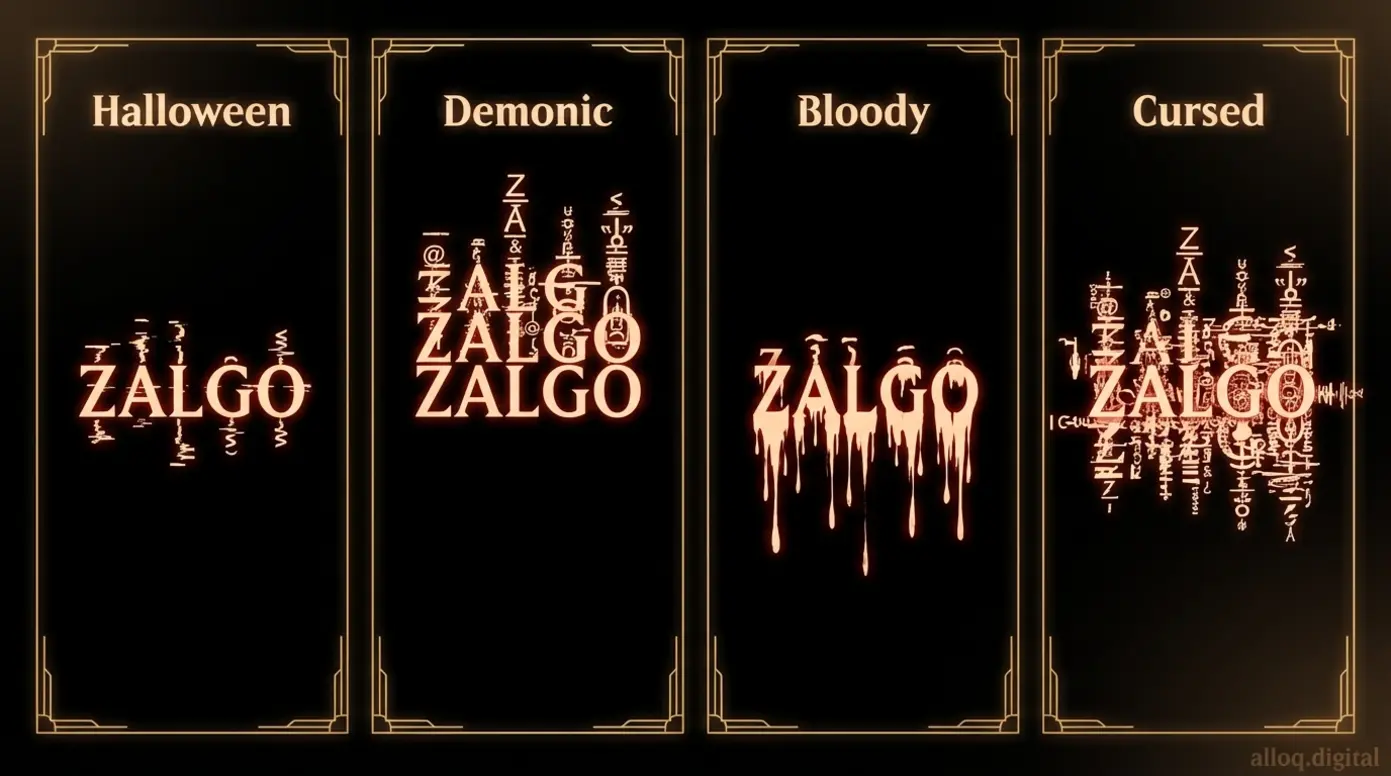 Each Zalgo style serves a different purpose — from readable Halloween themes to deliberately unreadable cursed effects.
A bloody text generator produces effects that mimic dripping, shattered, or decayed letterforms. These styles rely on heavy use of lower combining marks, creating the visual impression of text melting downward. Demonic styles tend to stack upper marks aggressively, giving letters a towering, chaotic silhouette.
Halloween style text typically uses moderate distortion on all three axes. The result looks corrupted but remains partially readable. This balance works well for seasonal social media posts, game usernames, or themed server channels. Cursed flair, by contrast, pushes every slider to maximum. The output becomes deliberately unreadable, which is the point for meme content and shock-value posts.
Platform Compatibility Guide: Discord, Roblox & Socials
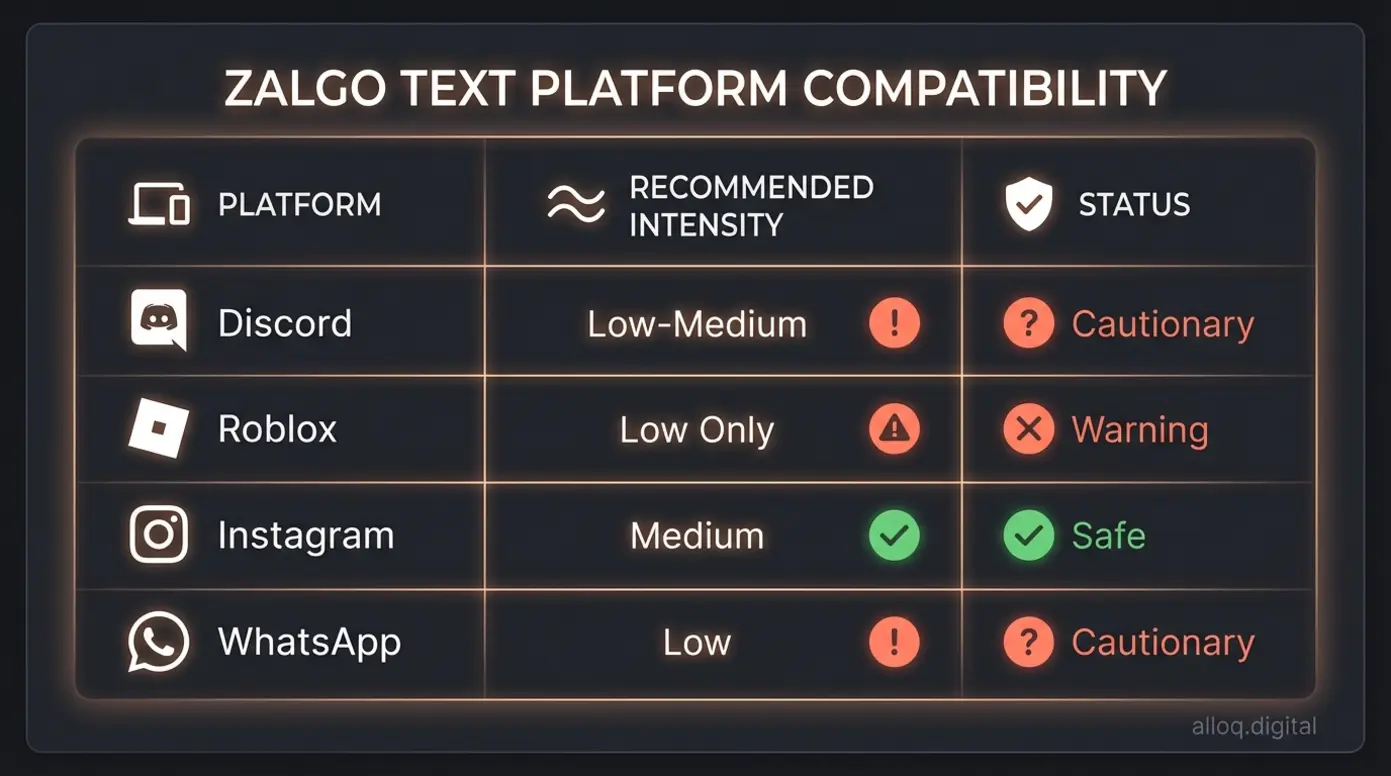 Not every platform handles Zalgo text equally — this chart shows recommended intensity levels to avoid filters and crashes.
A zalgo text generator for Discord needs to respect a hard technical boundary. Discord enforces a strict 2,000-character limit for standard messages. Each combining mark in your Zalgo text counts as a separate character. A single heavily distorted word can consume dozens of those characters invisibly. This means a sentence that looks short on screen may actually exceed the limit and fail to send.
Roblox presents a different challenge. Its chat filter actively scans for unusual character patterns and may censor or block messages containing high-intensity Zalgo. A zalgo text generator for Roblox should default to low-intensity settings, especially for bios and display names where filtering is strictest.
Mobile devices add a third layer of concern. Older phones and tablets may struggle to render hundreds of stacked combining marks, causing visible lag or app crashes. Keeping distortion moderate solves most rendering issues across platforms.
Is Zalgo Text Safe for Discord and Roblox?
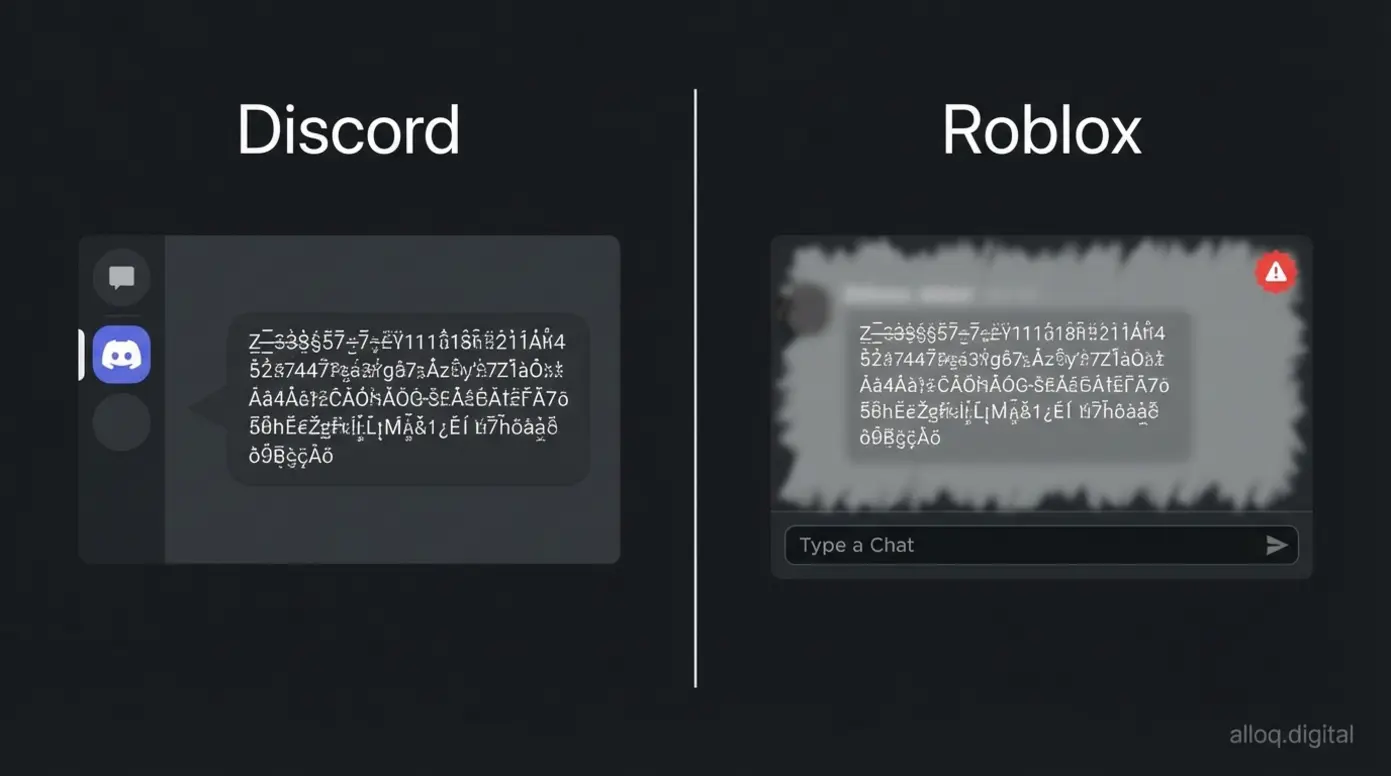 Discord counts every combining mark against its 2,000-character limit while Roblox filters may censor heavy Zalgo outright.
Zalgo text is generally safe for visual use on both platforms, but intensity matters. On Discord, according to Discord’s official documentation, the 2,000-character message limit applies to all characters, including invisible combining marks. A single word at maximum distortion can use 50 or more characters. Sending a full sentence at high intensity may silently fail.
On Roblox, the risk shifts from character limits to content filtering. The platform’s automated moderation flags unusual Unicode patterns. Using the “Low” intensity setting for Roblox bios can help avoid triggering these filters. According to analysis of spam flag risks, platforms increasingly associate dense combining characters with spam behavior.
As the chart below illustrates, compatibility varies significantly across platforms.
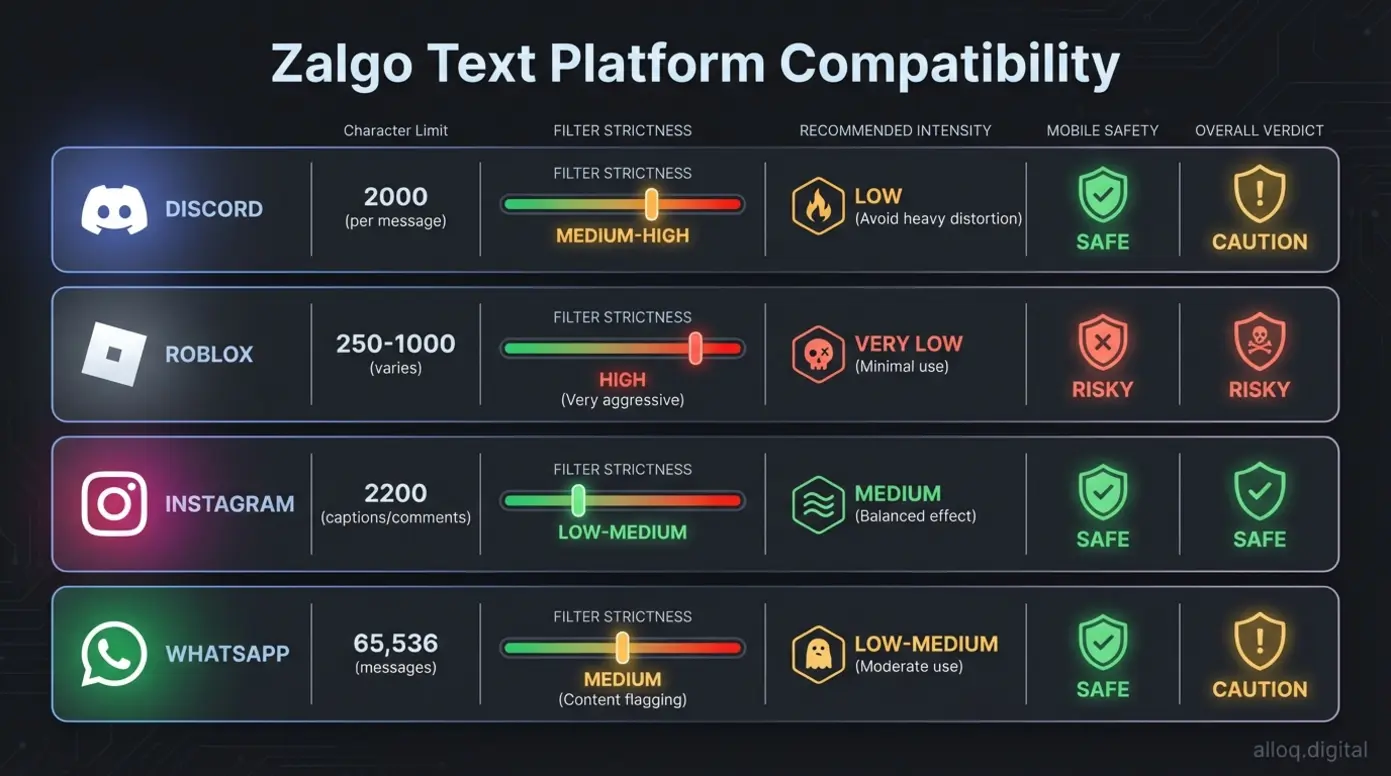 Platform compatibility at a glance — character limits, filter strictness, and mobile safety ratings for the four most popular Zalgo text destinations.
Platform rules are strict, but mobile device limitations are even stricter.
Fixing Layout Breaks on Mobile Devices
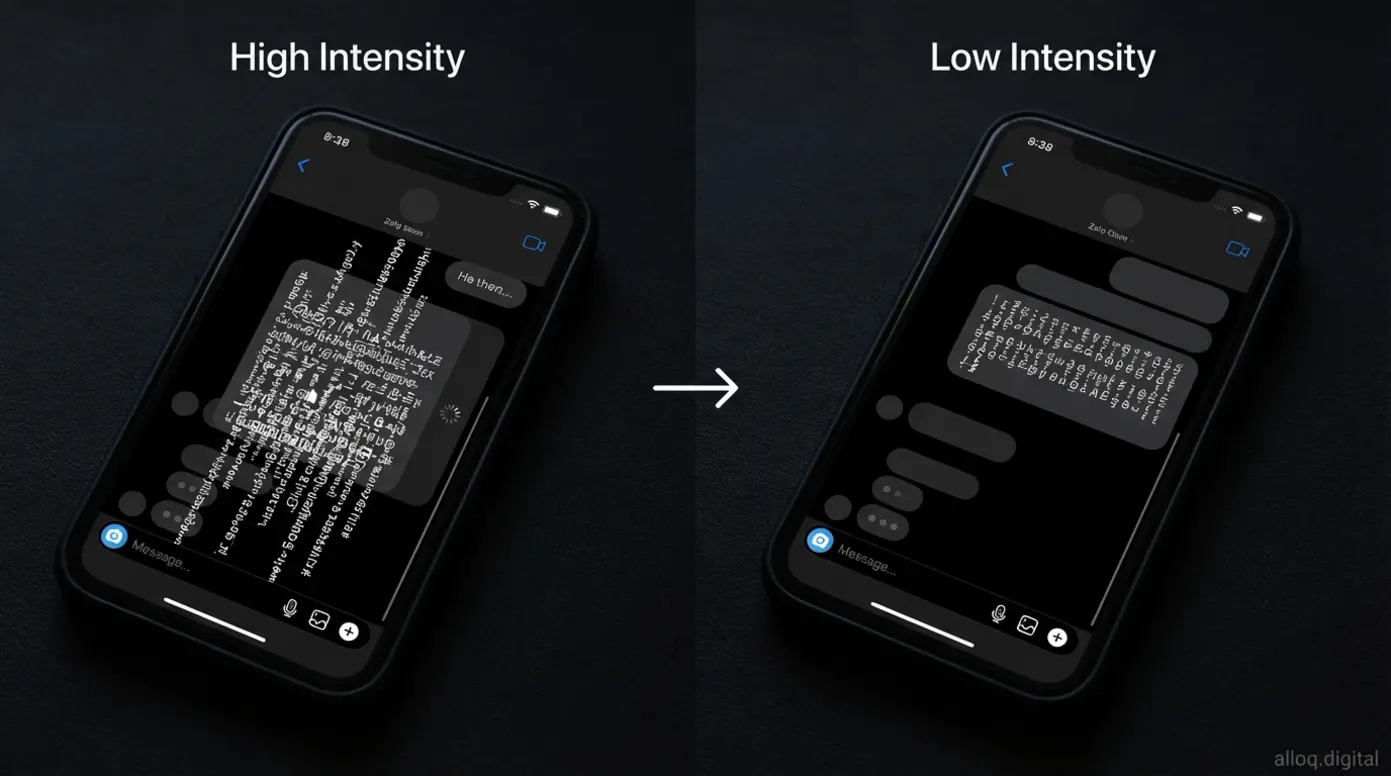 Reducing distortion intensity before copying fixes most mobile rendering issues — always test on your own device first.
A glitch text generator for Roblox mobile can produce output that renders cleanly on desktop but breaks entirely on a phone screen. The issue is rendering overhead. Each combining mark requires the device to calculate a separate position relative to the base character. Stack enough marks and the rendering engine slows down or fails.
Technical issues regarding text rendering often surface on older Android devices and budget tablets. The fix is straightforward. Reduce distortion intensity before copying text intended for mobile viewing. Test your output on your own phone before sharing it publicly. For broader guidance on fixing mobile display issues, responsive design principles apply to text rendering as well.
How It Works: The Science of Unicode & Combining Characters
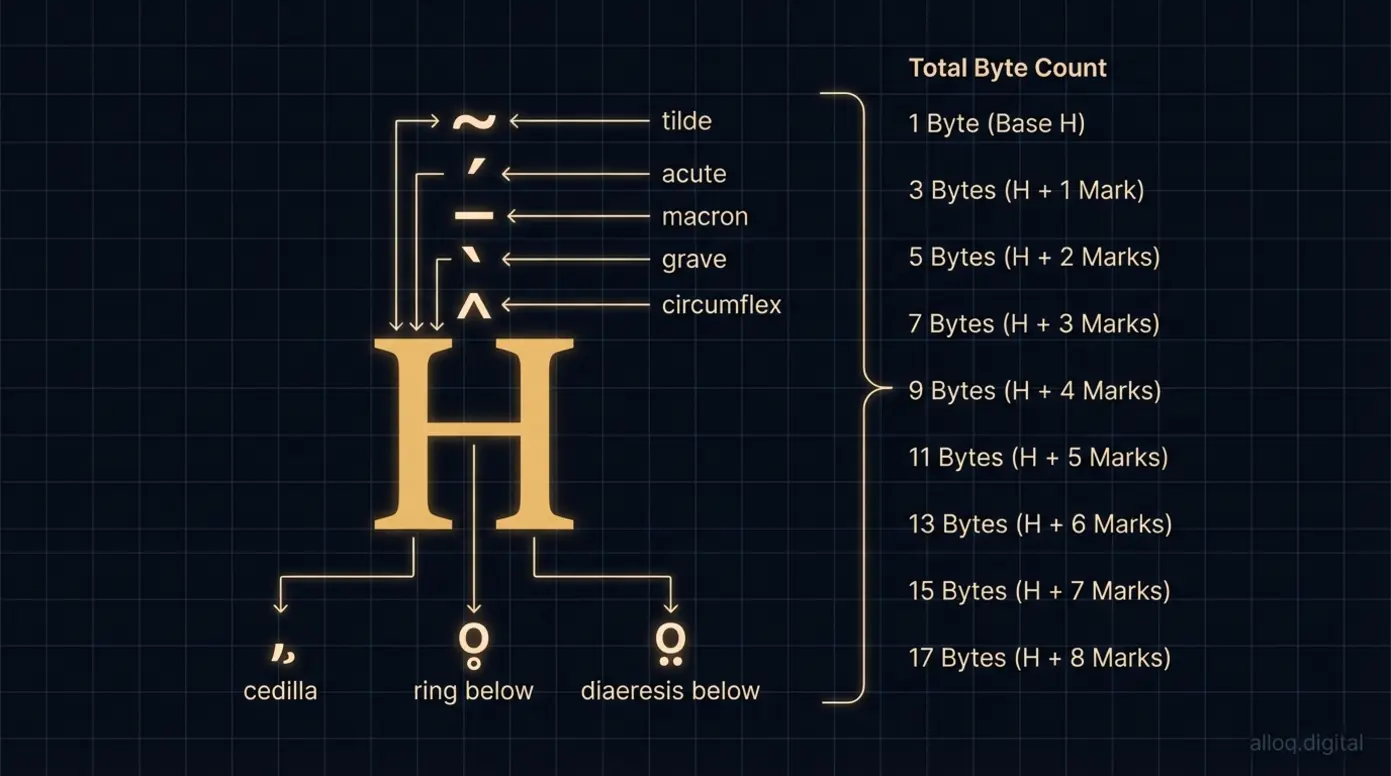 Each combining mark is a separate Unicode code point — stack enough of them and a single letter consumes dozens of characters.
The zalgo text font effect is not a font at all. It is standard Unicode text with combining diacritical marks stacked on top of base characters. According to the Unicode Consortium’s documentation, combining marks in the U+0300–U+036F block are designed to be positioned relative to a preceding base character. The specification places no hard limit on how many marks you can stack per character.
This infinite vertical stacking capability is the technical foundation of the glitch effect. A single letter “a” can carry dozens of marks above and below it, each one rendered by the device. The text is not broken or corrupted in a technical sense. It is valid Unicode being used at an extreme scale.
The risk emerges with visual spoofing. As noted in a Unicode security considerations report, combining characters can be used to disguise the true content of a string. This has implications for phishing and content moderation systems. A zalgo text remover can strip these marks to reveal the original base text underneath.
The Mechanics of Unicode Stacking
When you use zalgo text copy paste, the clipboard captures every combining mark along with the base characters. Each mark occupies its own code point in the Unicode standard. Visually, they overlap. Technically, they are distinct characters with distinct byte values.
Imagine the letter “H.” A single acute accent above it uses one combining mark (U+0301). The Zalgo effect adds 10, 20, or 50 marks — tildes, cedillas, horns, and more — all positioned above or below that same “H.” The device tries to render every one. For related reference on Unicode and special character codes, the same combining mark system powers many standard text features.
While technically fascinating, this stacking can cause real-world issues.
Why Glitch Text Can Crash Apps (The ‘Byte-Size’ Issue)
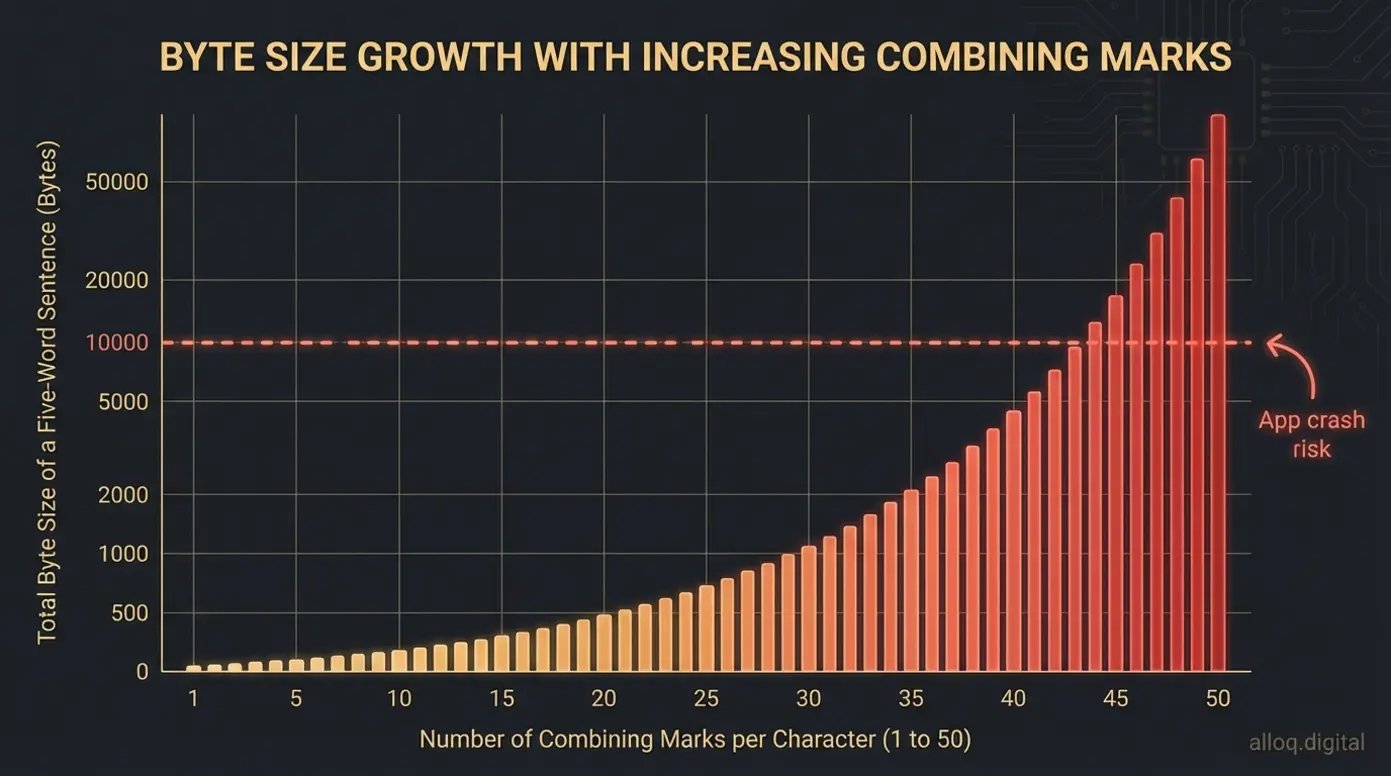 A five-word sentence at maximum distortion can consume thousands of bytes — enough to crash older messaging apps.
A zalgo text generator app that applies maximum distortion can produce strings that are hundreds or thousands of bytes long despite appearing as a single short word. Older messaging apps, browsers, and rendering engines may not handle this gracefully. The result ranges from visual glitches to complete app crashes.
Buffer overflow risks exist in poorly optimized apps that allocate fixed memory for text display. When a Zalgo string exceeds that allocation, the app may freeze or close. Modern browsers handle this more reliably, but the performance cost remains. Heavy Zalgo text can cause scroll lag, delayed input response, and increased battery drain on mobile devices.
The technical claims in this guide are grounded in Unicode specification documents and platform documentation. According to Simon, Founder and Full-Stack Developer, “The byte-size issue is the most commonly overlooked risk. Users generate text that looks like five words but consumes the character budget of a full paragraph.” This level of detail helps you make informed decisions about distortion intensity rather than discovering limits through trial and error.
Safety Precautions & Common Pitfalls
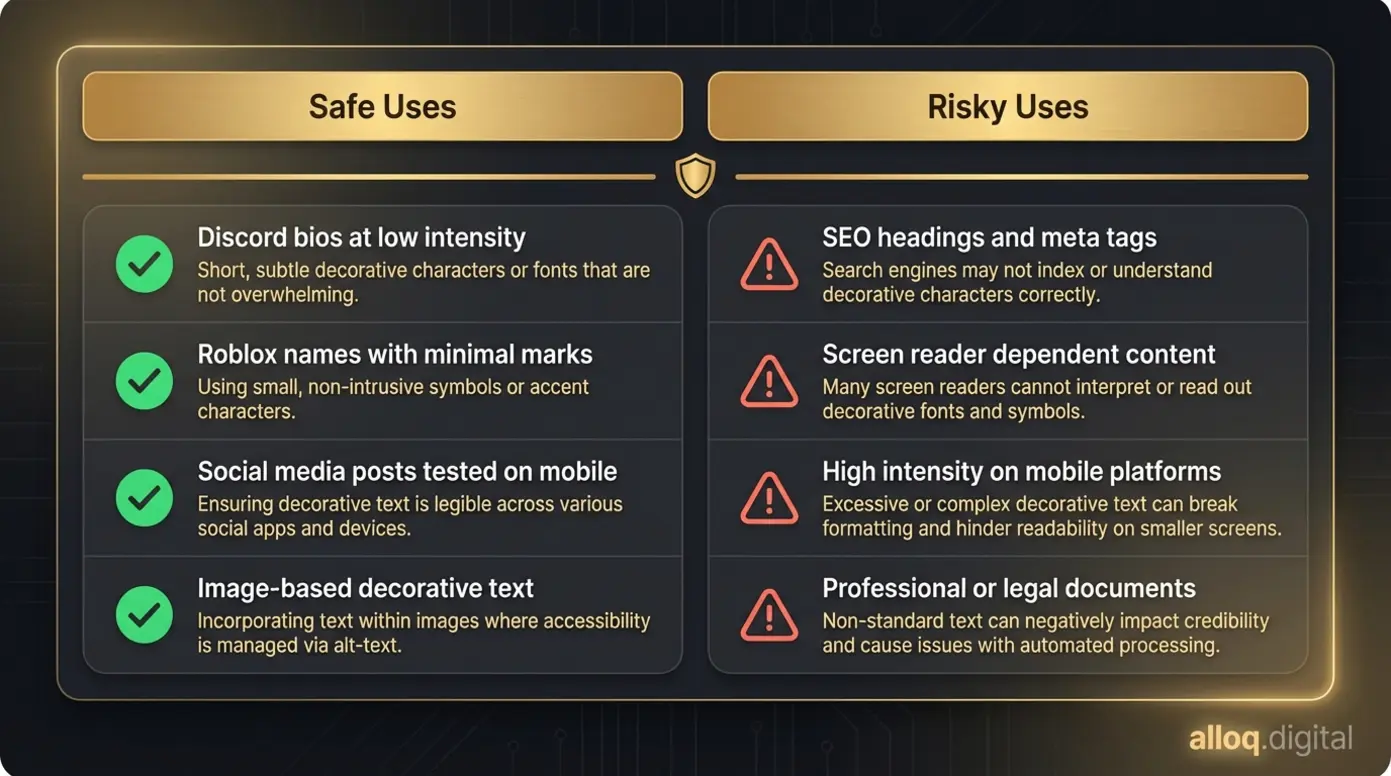 Know where Zalgo text works and where it creates problems — this checklist covers the most common scenarios.
Avoiding Spam Filters and SEO Penalties
Zalgo text on a website can trigger search engine penalties. Search engine crawlers interpret the combining characters as content, but the visual output appears broken or unreadable. This mismatch may cause a page to be flagged as low-quality or spammy. For content creators, using Zalgo in headings, meta descriptions, or body copy is a direct risk to indexing.
According to analysis of accessibility impact, screen readers attempt to announce every combining mark individually. For visually impaired users, a single Zalgo word becomes a long, incomprehensible string of diacritical mark names. This makes Zalgo text an accessibility barrier.
If your content targets a broad audience or must meet accessibility compliance standards, consult a web accessibility specialist before using Zalgo effects. For SEO-focused pages, keep Zalgo text limited to decorative images with proper alt text rather than live text in the DOM. Alternatively, use CSS-based glitch effects that achieve a similar visual result without altering the underlying text content.
When to Use Standard Fonts Instead
There are clear situations where standard fonts are the better choice. Professional communications, legal documents, and any context requiring screen reader compatibility should avoid Zalgo entirely. Educational content and e-commerce product descriptions also suffer when readability drops.
If your audience includes users on older devices, budget phones, or assistive technology, standard fonts deliver your message without technical risk. If you need a “glitchy” aesthetic for branding, a graphic designer can build custom assets that look corrupted without using combining characters. This approach gives you visual chaos with zero platform risk.
Frequently Asked Questions
Is Zalgo text safe?
Zalgo text is safe for casual visual use on most modern platforms. It does not contain malware or executable code. However, heavy distortion can cause lag or crashes on older messaging apps and browsers. Spam filters on platforms like Discord and Instagram may flag dense combining characters. Use low-to-medium intensity settings for the most reliable results, and test on your target device before sharing widely.
Does Zalgo text affect SEO?
Excessive Zalgo text can harm your search engine rankings. Search engines may struggle to index content with dense combining characters correctly. Google can flag pages as spam or low-quality if the visible text appears broken or unreadable. Keep Zalgo effects out of headings, meta tags, and body copy on pages you want indexed. Use image-based or CSS-based glitch effects instead.
What are the limitations of Zalgo text?
Compatibility is the primary limitation of any zalgo text generator. Heavily distorted text may not display correctly across all devices and operating systems. Social media platforms like Instagram or Discord can block messages that exceed character height limits. Mobile devices with limited processing power may experience rendering lag. Screen readers cannot interpret the stacked marks, creating accessibility barriers for visually impaired users.
What is the glitchy text called?
The glitchy, corrupted text style is most commonly called Zalgo text. It is also referred to as glitch text, cursed text, or demonic text. The effect is created using combining diacritical marks from the Unicode standard. These marks stack above and below base characters to produce the distorted, corrupted appearance. The name comes from a 2004 internet meme about a chaos entity called Zalgo.
Why is Zalgo text used?
Zalgo text is primarily used for aesthetic and entertainment purposes. Gamers, meme creators, and social media users apply the corrupted style to bios, usernames, and posts to create a sense of digital chaos or horror. It mimics a “hacked” or demonic appearance popular in creepypasta communities and Halloween-themed content. Some users also employ it for attention-grabbing Discord server names and Roblox display names.
Your Next Step with Zalgo Text
A zalgo text generator gives you creative control over corrupted, glitchy aesthetics. The core takeaways are straightforward. First, distortion intensity directly affects platform compatibility. Low settings work across Discord, Roblox, and mobile devices. High settings risk filter blocks and rendering failures. Second, the effect relies on valid Unicode combining characters, not broken code. Third, safety presets and byte-size awareness separate functional generators from tools that produce unusable output.
The cultural roots of Zalgo text in creepypasta and meme culture give the style meaning beyond visual noise. When you understand what the effect does at the Unicode level, you can use it deliberately rather than randomly.
Start with a low-intensity setting for your next Discord bio or Roblox username. Test it on mobile before sharing. Then increase the chaos from there.
