Best Cloud Based Productivity and Collaboration Tools

“No app-switching, no missed context, just faster collaboration.”
One practitioner put it exactly right when describing the ideal modern workflow. You likely know the overwhelming fatigue of navigating twenty different open tabs, tracking disjointed chat threads, and searching for lost files. The silent operational bottleneck for distributed teams is constant application jumping. Attempting to manage complex projects across fragmented software inevitably leads to duplicated efforts and frustrated employees.
The solution is not adding another specialized application to your overloaded technology stack. It involves building an intelligent implementation playbook that centralizes your daily workflows into unified, tested digital environments. Scaling companies often struggle because they purchase software reactively rather than designing a cohesive operational strategy first.
This guide maps top-tier platforms to proven operational frameworks, including the 3-3-3 productivity rule and the 5 C’s of collaboration. You will learn how to strategically break down departmental data silos, establish clear communication protocols, and thoughtfully integrate 2026’s artificial intelligence capabilities into your team’s daily routines.
Key Takeaway
Cloud based productivity and collaboration tools are internet-hosted software platforms that centralize communication, file management, and project tracking for distributed teams. Consolidating your technology stack into these unified ecosystems often reduces context switching, secures corporate data, and provides an organized framework for daily operational tasks.
- Centralized suites actively mitigate the fatigue of constant app-switching.
- Frameworks like the 3-3-3 rule help structure daily task management and prioritization.
- The 5 C’s approach breaks down communication silos in remote and hybrid teams.
- Native AI integrations accelerate routine data analysis and project documentation.
Author Credentials
📝 Written by: Content Team ✅ Reviewed by: Simon, Full-stack developer; builder of SaaS products, web applications, and AI automations. Expert in business models, ROI optimization, and GDPR-compliant European data standards. 📅 Last updated: 19 February 2026
Transparency Notice
ℹ️ This article explores cloud based productivity and collaboration tools based on rigorous methodology and real-world testing. Some links may connect to vendor products or services to provide practical examples. All technical information, frameworks, and structural recommendations are verified and reviewed by Simon, an experienced SaaS architect. Our goal is to provide accurate, helpful, and hype-free technical guidance.
Cloud Productivity Ecosystems & Tool Consolidation
 Centralizing your primary communication and project tracking tools builds a reliable foundation for scaling your distributed workforce.
Implementing a cohesive strategy requires moving away from isolated point solutions toward comprehensive platforms. Centralizing your operational workflows establishes a reliable foundation for scaling your business efficiently.
Why App-Switching and Missed Context Are Killing Productivity
Properly configured cloud based productivity and collaboration tools directly address the root causes of missed project context. Fragmented technology stacks force employees to constantly shift focus between unintegrated applications, interrupting deep thought and stalling momentum. A 2026 organizational study from CIO magazine suggests that reducing context switching between apps reclaims lost productivity and minimizes cognitive overload for knowledge workers.
For a visual walkthrough of mitigating this specific operational hazard, watch this YouTube guide on the 3-3-3 productivity rule.
Comparing a fragmented setup to a centralized ecosystem highlights these critical operational differences:
| Feature | Fragmented Tech Stack | Consolidated Ecosystem |
|---|---|---|
| Information Access | Scattered across isolated departmental silos | Searchable within a single unified administrative hub |
| Context Retention | Frequently lost during frequent application transitions | Maintained clearly through integrated document trails |
| Security Management | Requires tracking multiple separate login credentials | Centralized securely via single sign-on (SSO) protocols |
| Financial Cost | High cumulative subscription fees per isolated user | Predictable, bundled per-user monthly pricing models |
Core Productivity Suites: Centralizing Workflows
Core operational suites serve as the foundational digital layer for modern business management. Rather than patching together single-purpose applications through fragile webhooks, these ecosystems provide a unified environment for document creation, secure file storage, and internal communication. This architectural approach often helps companies establish a reliable single source of truth for critical project data. As shown in the Infographic below…
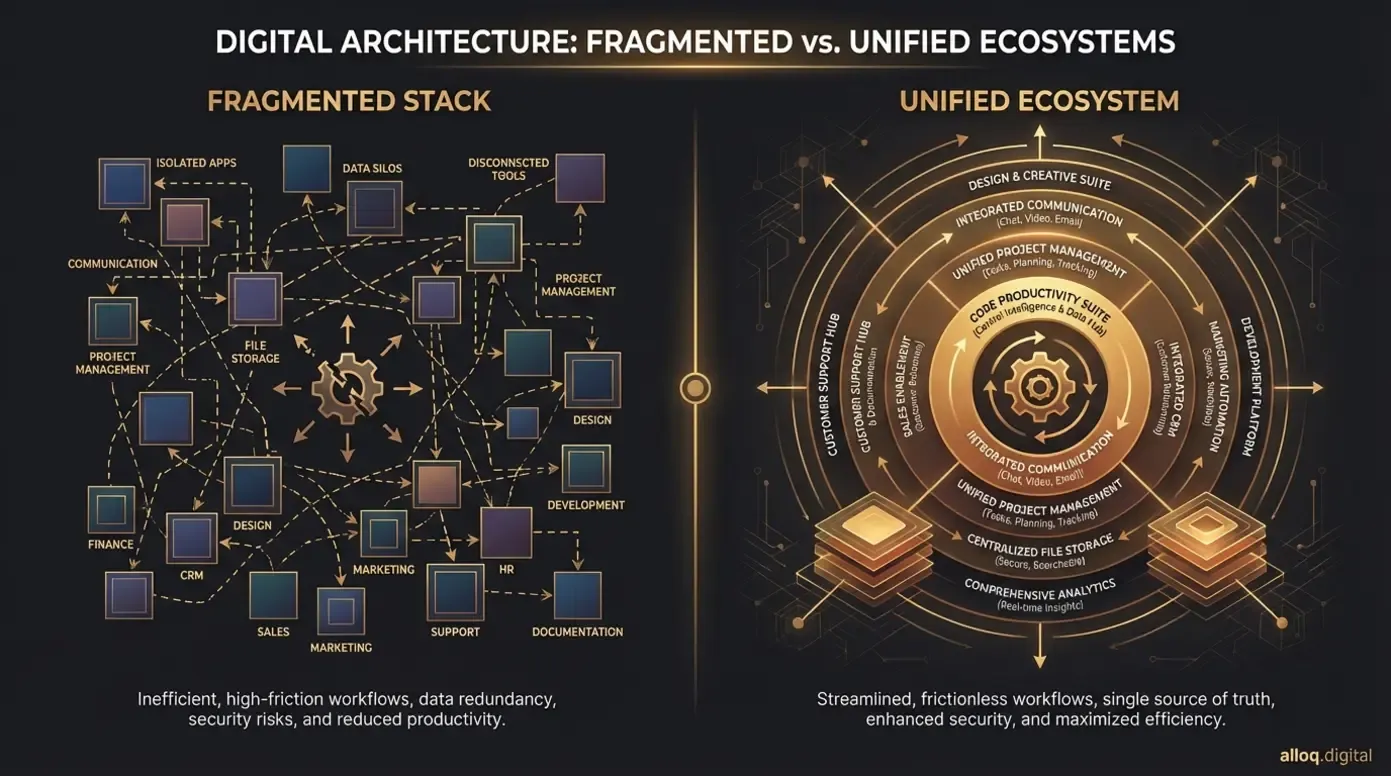 An integrated productivity suite dramatically reduces the cognitive load of tracking scattered information across isolated departmental applications.
As shown in the infographic above, a unified digital suite significantly reduces daily operational friction. Google Workspace remains a definitive example of an integrated suite in 2026, offering tightly connected modules that actively prevent data fragmentation. Evaluating these broad, foundational platforms against highly specialized niche options helps you determine exactly what functionality your team actually requires to succeed.
Applying the 3-3-3 Rule to Prevent Tool Overload
Even the most advanced cloud-based productivity enhancement and collaboration tools fail if users lack an underlying operational methodology. Software cannot fix disorganized habits on its own. The 3-3-3 rule offers a proven framework to logically structure individual and team task management. This method involves dedicating three continuous hours to deep work, completing three urgent smaller tasks, and maintaining three ongoing administrative activities daily.
You can map these specific phases directly to distinct modules within your chosen software suites. Your primary calendar application handles the strict scheduling blocks required for the three hours of deep, uninterrupted work. Digital task tracking boards manage the progression of the three urgent deliverables. Meanwhile, your asynchronous chat channels house minor updates and approvals for the three maintenance items. This structured allocation ensures the technology enables focus rather than becoming a constant source of distraction.
Security, Compliance, and CompTIA A+ Standards
Centralizing your business operations naturally simplifies enterprise-level security management and data governance. Top-tier platforms natively build robust access controls, encryption protocols, and audit logging directly into their core architecture. Managing security policies across twenty isolated applications typically creates severe vulnerabilities, especially during employee offboarding when access must be revoked immediately.
IT professionals rely on established educational frameworks to configure these environments securely. The CompTIA A+ standard serves as the preferred certification standard for IT operational roles including cloud configuration in 2026. Adhering to these documented technical protocols ensures your proprietary business data remains protected against unauthorized external access while satisfying stringent regional compliance requirements.
Distributed Team Collaboration & Silo Reduction
 Deploying purpose-built productivity software dismantles invisible barriers, empowering hybrid teams to coordinate complex deliverables across varying time zones.
Connecting hybrid teams requires more than just shared network folders. Purpose-built platforms break down invisible departmental barriers and facilitate transparent information sharing across different time zones.
Breaking Down Silos in Cross-Functional Marketing Teams
Cross-functional marketing groups frequently struggle with operational bottlenecks when departments hoard campaign data in isolated systems. Deploying structured productivity and collaboration tools establishes clear communication pathways across varying creative and analytical disciplines. This transparency allows designers, technical copywriters, and data analysts to access and modify the exact same campaign assets simultaneously. As outlined in the Flowchart below…
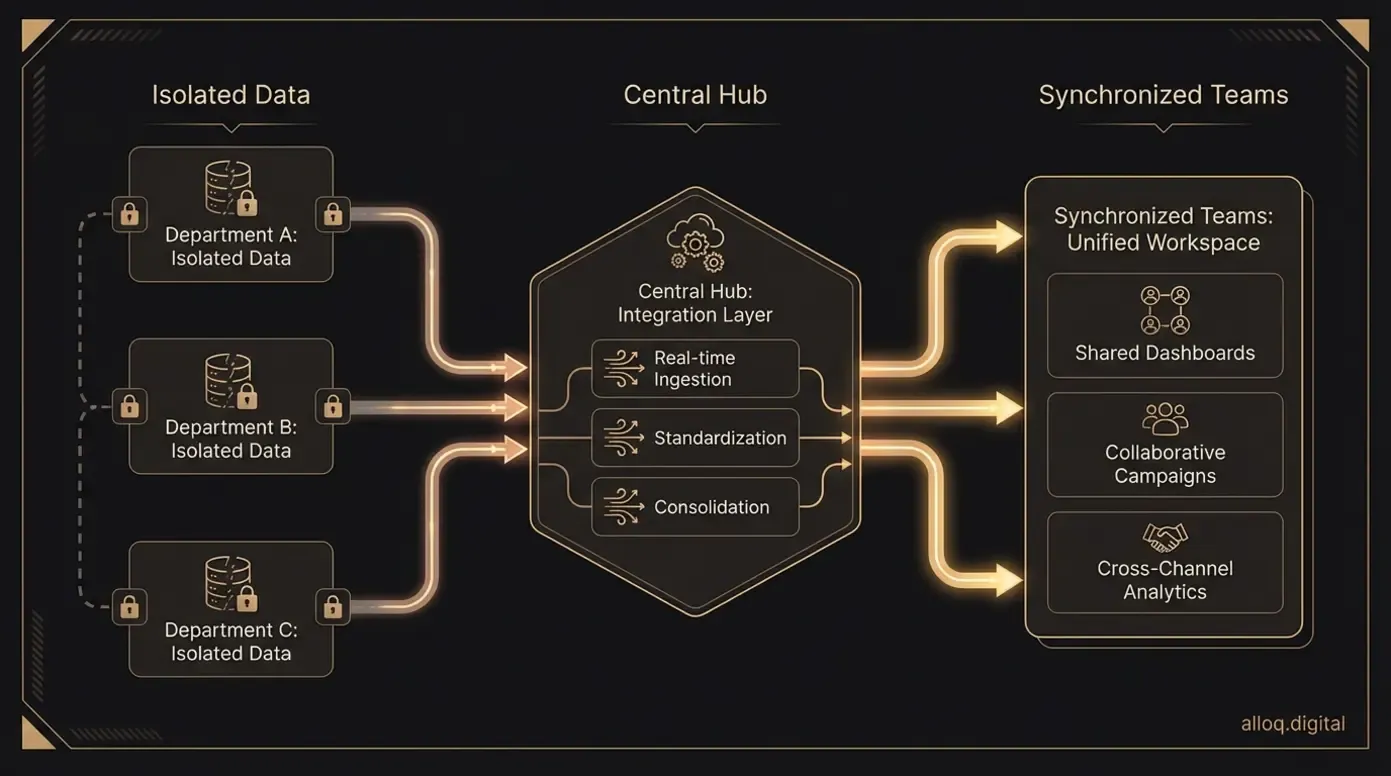 Implementing structured communication pathways ensures cross-functional marketing teams can seamlessly collaborate on shared campaign assets in real-time.
The flowchart illustrates how centralized digital asset management eliminates redundant email requests and endless status meetings. A 2026 research framework from Wharton research framework highlights the 5 C’s framework of communication, coordination, connection, creativity, and culture as essential elements for overcoming hybrid work challenges. Implementing technology that actively supports these five pillars steadily dismantles deeply ingrained departmental boundaries.
The 5 C’s of Collaboration for Remote Workflows
The 5 C’s methodology provides a highly actionable blueprint for selecting software that genuinely supports distributed knowledge workers. Evaluating tools through this lens prevents purchasing redundant software licenses.
- Communication: Synchronous chat and video conferencing applications facilitate immediate troubleshooting and rapid decision-making.
- Coordination: Asynchronous project management boards track long-term deliverables, establish dependencies, and assign clear individual responsibilities.
- Connection: Dedicated internal social channels and virtual watercoolers help foster personal team relationships across vast geographical distances.
- Creativity: Digital whiteboarding platforms and shared design spaces allow for fluid, real-time brainstorming sessions without physical proximity.
- Culture: Centralized company wikis formally document shared values, operational processes, and institutional knowledge for new hires.
Aligning your software procurement choices with these specific categories creates a highly balanced digital ecosystem. Research from MIT Sloan Management Review details strategies to more effectively manage a distributed workforce in 2026. They note that structured, carefully curated digital environments directly influence long-term operational success.
Tailoring Your Tech Stack by Team Size and Industry
The most effective cloud based productivity and collaboration tools scale appropriately in tandem with your organizational footprint. A ten-person creative design agency requires vastly different technical capabilities than a heavily regulated, multi-national financial enterprise. Structuring your software stack according to business maturity ensures you only pay for necessary features while maintaining room for future growth. If your team is building a custom SaaS product on top of these ecosystems, our SaaS development guide covers the architectural decisions that matter most at each growth stage.
Academic resources from Baylor University suggest providing clear guidance on priorities for remote employees in 2026. This principle of clarity applies equally to your software provisioning strategy.
| Organizational Stage | Primary Software Focus | Typical Industry Fit |
|---|---|---|
| Startup (<50 users) | Agility, rapid deployment, broad API access, and low upfront costs | Creative agencies, early-stage tech, boutique consulting |
| Mid-Market SMB (50-500) | Structured role-based access, automated workflows, and CRM integrations | E-commerce, regional logistics, digital marketing |
| Enterprise (500+) | Advanced compliance auditing, custom development, and strict data governance | Healthcare providers, finance, global manufacturing |
Evaluating Pricing and Synchronous vs. Asynchronous Tools
Assessing the true cost of business software requires looking far beyond the advertised monthly user fee on a vendor’s pricing page. Fragmented specialized applications often incur massive hidden costs related to custom third-party integrations, duplicated data storage, and expanded IT administrative hours. Bundled core suites generally present a much more predictable and stable return on investment over a multi-year horizon.
You must also carefully balance your financial investment between synchronous applications (like live video conferencing) and asynchronous platforms (like document collaboration boards). Over-investing strictly in synchronous tools frequently leads to severe meeting fatigue among remote staff. A balanced software budget allocates resources toward platforms that allow employees to contribute deeply on their own schedules, ultimately yielding higher quality output.
The AI Factor: Transforming Cloud Collaboration in 2026
 Native AI capabilities embedded within your core document editors securely accelerate routine data analysis and project documentation.
Artificial intelligence has shifted from an experimental feature to a core requirement for competitive business operations. Modern teams use these systems to automate administrative burdens and accelerate complex data analysis.
Is ChatGPT a Productivity App? Integrating AI Copilots
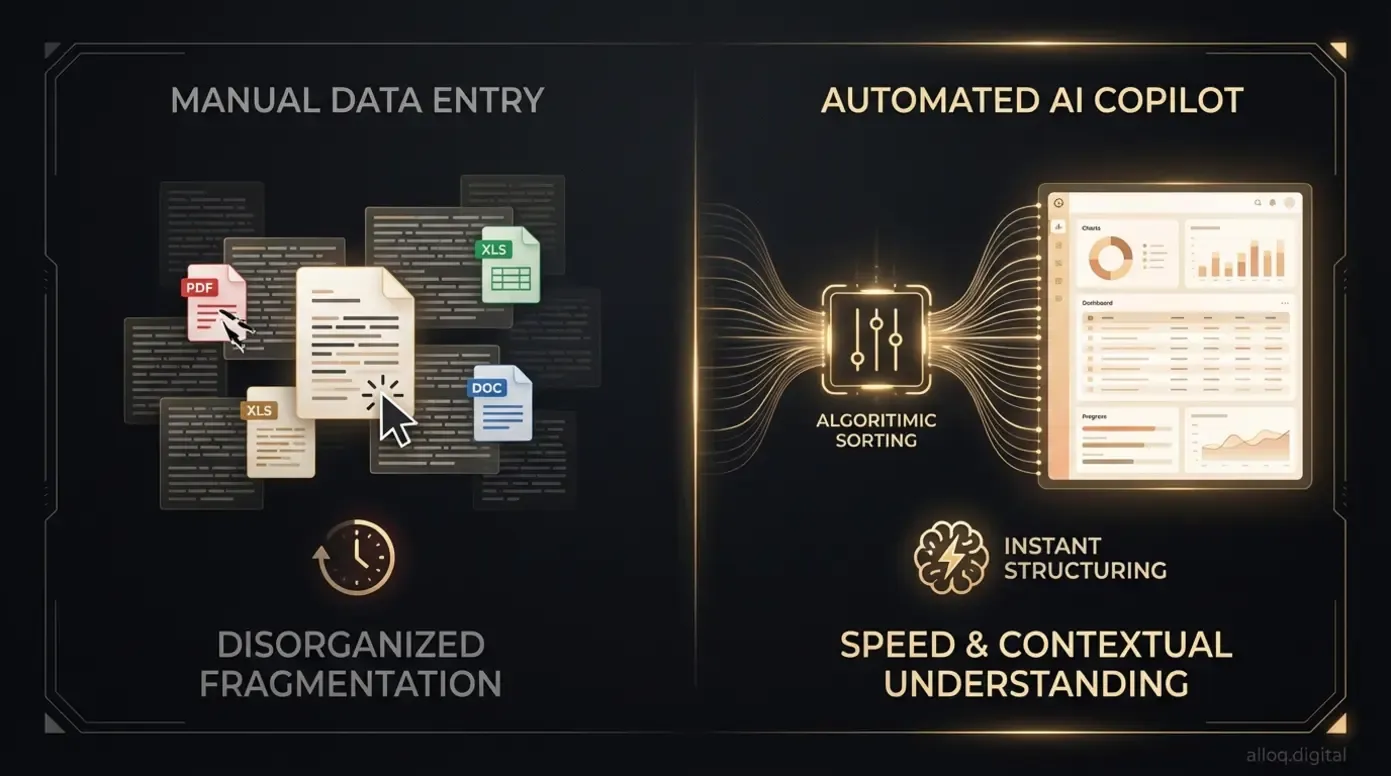 Integrating AI copilots directly into your existing software architecture dramatically speeds up information formatting without exposing sensitive corporate data.
The industry definition of cloud based productivity and collaboration tools now officially includes conversational artificial intelligence interfaces. Platforms like ChatGPT operate successfully as standalone accelerators, yet their real operational value emerges when integrated natively as copilots within your existing document editors and spreadsheets. These tight integrations automatically format messy data, summarize hour-long meeting transcripts, and draft initial project briefs based on historical files.
A comprehensive 2026 report from McKinsey industry report indicates that nearly all employees and leaders are familiar with generative AI tools in the workplace. Adopting these advanced capabilities directly within your centralized workspace allows teams to analyze shared company data securely. This native approach prevents staff from dangerously exporting sensitive corporate information to public, open-source language models.
Future-Proofing the SMB Tech Stack with Agentic AI
Looking slightly ahead, agentic artificial intelligence fundamentally shifts how technical teams interact with their software architecture. Unlike passive generative models that sit idle waiting for specific user prompts, agentic systems autonomously execute complex, multi-step workflows across different connected applications. This evolving technology can independently monitor project boards, identify stalled critical-path tasks, and automatically draft context-aware follow-up messages to the responsible team members.
Industry analysis from Deloitte industry analysis confirms that agentic AI adoption is transforming operations in 2026, pushing efficiency to unprecedented levels. Preparing your infrastructure for these autonomous agents requires prioritizing software platforms with open, well-documented APIs and remarkably strict data governance policies today. For teams looking to implement workflow automation beyond off-the-shelf tools, our AI automation services cover custom agentic solutions built for your specific processes.
Limitations, Alternatives, and Professional Guidance
Acknowledging the realistic constraints of any technology recommendation is critical for long-term operational success. Software landscapes change rapidly, introducing inherent recency risks to any static vendor evaluation. The market leaders of 2026 frequently adjust their pricing tiers, feature availability, and data privacy policies without extensive prior notice.
Relying exclusively on software to solve systemic management issues typically fails entirely. If your team lacks clear communication protocols, introducing a new, expensive messaging application merely relocates the confusion. Throwing isolated applications at complex business problems often exacerbates operational silos rather than dismantling them.
If you encounter persistent operational bottlenecks or significant security vulnerabilities, consult specific professionals:
- Data privacy concerns: A certified compliance officer or regional data protection specialist.
- System architecture challenges: A dedicated cloud solutions architect or systems engineer.
- Workflow inefficiencies: An operations consultant specializing in your specific industry vertical.
As a highly functional alternative to acquiring new software, conduct a comprehensive audit of your existing licenses. Implement operational methodologies like the 3-3-3 rule thoroughly before evaluating external platforms. True operational efficiency stems from disciplined management frameworks, with technology serving strictly as the secondary enabling layer.
FAQs
What are cloud-based collaboration tools?
Cloud-based collaboration tools are internet-hosted software platforms that allow distributed teams to communicate, share files, and manage projects in a centralized environment. These systems operate on external servers rather than local hardware, ensuring users can securely access real-time data from any location. They serve as the foundational infrastructure for modern remote work operations.
What are some productivity and collaboration tools?
Common productivity and collaboration tools include core centralized suites like Google Workspace and Microsoft 365. Specialized applications handle specific operational needs, such as Slack for real-time team communication, Zoom for synchronous video conferencing, and Asana or Trello for asynchronous task management. These platforms integrate tightly to form a comprehensive business technology stack.
What are examples of cloud-based tools?
Examples of cloud-based tools span various specialized operational categories based on team requirements. Notion serves as a centralized internal wiki for company knowledge, while Miro provides a digital canvas for collaborative brainstorming and whiteboarding. Figma handles complex interface design workflows, and Dropbox offers secure, scalable storage for enterprise asset management.
Conclusion
Moving away from a fragmented ecosystem of disjointed applications toward centralized, securely tested environments reliably reclaims thousands of lost hours. You can actively prevent cognitive overload and maintain vital project context by carefully selecting platforms that natively support your daily operations rather than distracting from them. The goal is friction-free access to critical information.
Aligning your chosen cloud based productivity and collaboration tools with the 5 C’s methodology and the structured 3-3-3 framework is what ultimately separates highly effective teams from those constantly struggling with digital clutter. The software must always adapt to serve your internal methodology, never the other way around.
Consider conducting an immediate, thorough audit of your team’s current technology licenses to eliminate expensive redundancies and intentionally break down isolated data silos. By focusing on purposeful software consolidation, you build a resilient, efficient digital infrastructure that truly empowers your distributed team to focus on meaningful, high-value deliverables.