
Your support inbox is growing faster than your team. Tickets pile up overnight. Customers wait hours for answers to questions your FAQ already covers. Meanwhile, your best agents spend half their day on repetitive copy-paste responses instead of solving the problems that actually need a human brain.
The cost of this inefficiency compounds quickly. Every unanswered ticket erodes trust. Every delayed response pushes a customer closer to a competitor. And every skilled agent buried in busywork represents wasted salary spend that could drive retention and revenue instead.
The fix is not another static chatbot that frustrates more than it helps. The real shift in 2026 is toward automated customer service powered by cognitive AI agents — systems that learn, adapt, and resolve issues end-to-end. This guide maps out the specific frameworks, technologies, and strategies you need to build a support operation that scales without sacrificing quality.
Key Takeaway
Automated customer service in 2026 moves beyond rigid scripts to cognitive AI that learns and adapts in real time. Here is what you need to know:
- The distinction between “automatic” (rule-based) and “automated” (AI-driven) service defines your competitive edge
- The 4 Cs framework — Consistency, Choice, Convenience, Communication — provides a measurable evaluation model
- Multimodal AI agents can now process voice, video, and text simultaneously
- A hybrid model pairing AI efficiency with human empathy delivers stronger outcomes than either approach alone
Author Credentials
📝 Written by: Content Team ✅ Reviewed by: Simon, SaaS & Automation Expert 📅 Last updated: 15 February 2026
Transparency
ℹ️ Transparency Notice
This article explores Automated Customer Service based on scientific research and professional analysis. Some links in this article may connect to our products or services. All information presented has been verified and reviewed by Simon. Our goal is to provide accurate, helpful information to our readers.
Essentials of Automated Customer Service
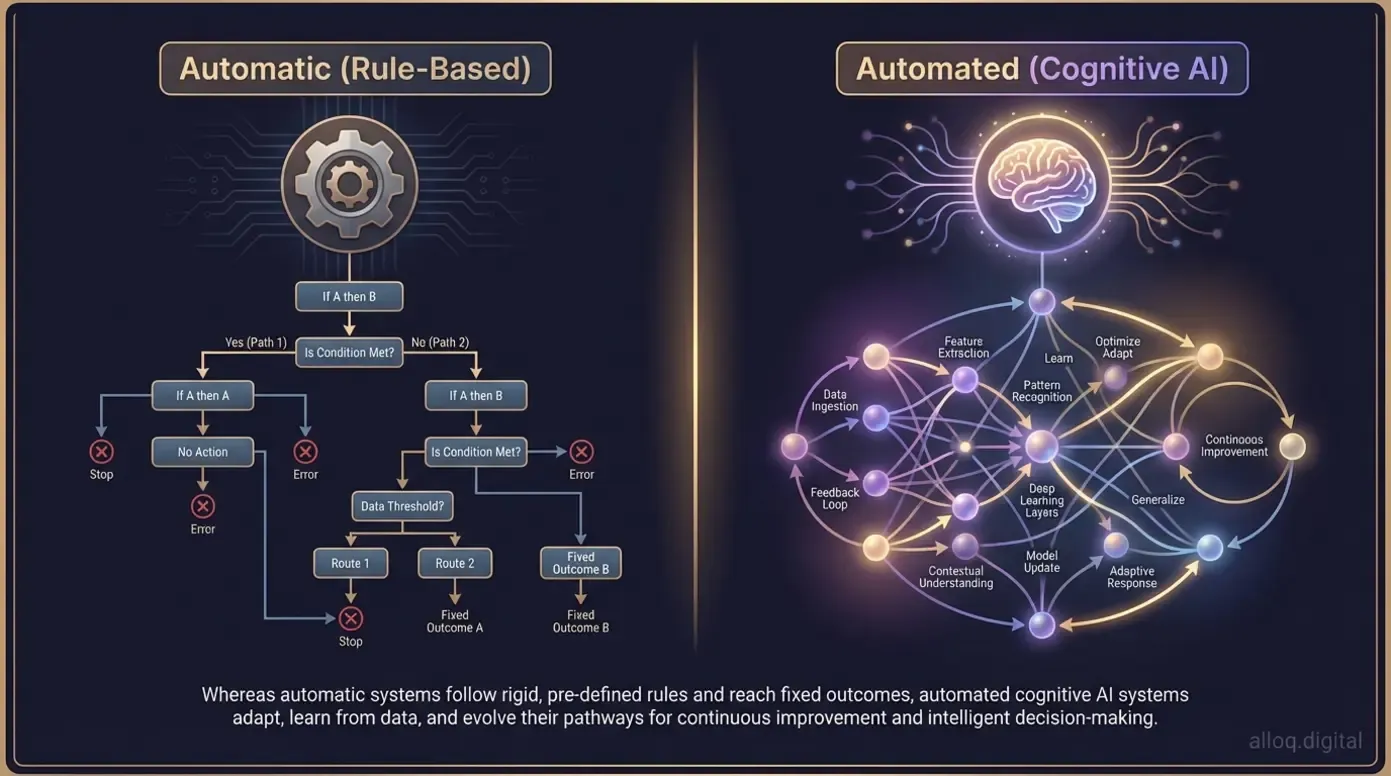 The critical distinction: automatic systems follow fixed rules while automated AI agents learn and adapt from every customer interaction.
Automated customer service is the use of AI and software to handle support tasks — from answering questions to routing tickets — without requiring a human agent for every interaction. According to Salesforce’s definition guide, this includes AI-powered chatbots, self-service portals, and intelligent workflows that operate around the clock.
But most businesses confuse two fundamentally different approaches. Understanding the gap between them determines whether your investment pays off or creates new frustrations. The sections below break down the core distinction, introduce a practical evaluation framework, and show how self-service portals reduce ticket volume.
Automatic vs. Automated: The Core Distinction
Many support teams operate “automatic” systems and believe they have “automated” service. The difference matters. Automatic systems follow static, pre-written rules. Automated systems use AI to learn, adapt, and improve over time. As Zendesk’s analysis of ticketing evolution shows, this shift is reshaping how modern support teams operate.
Consider this comparison:
| Feature | Automatic (Rule-Based) | Automated (Cognitive AI) |
|---|---|---|
| Response logic | Fixed decision trees | Context-aware, adaptive |
| Learning ability | None — requires manual updates | Improves from every interaction |
| Handling complexity | Fails on unexpected inputs | Manages nuance and ambiguity |
| Customer experience | Rigid, often frustrating | Fluid, conversational |
| Scalability | Linear (more rules = more effort) | Exponential (learns at scale) |
A rigid chatbot script that loops a customer through three menus before admitting it cannot help — that is automatic. An AI agent that reads the customer’s message, understands the intent, checks the order history, and processes a refund in under 60 seconds — that is automated. The gap between these two experiences defines customer loyalty in 2026.
For teams evaluating their current setup, our AI automation services page outlines how to assess readiness for this shift.
The 4 Cs of Customer Service Framework
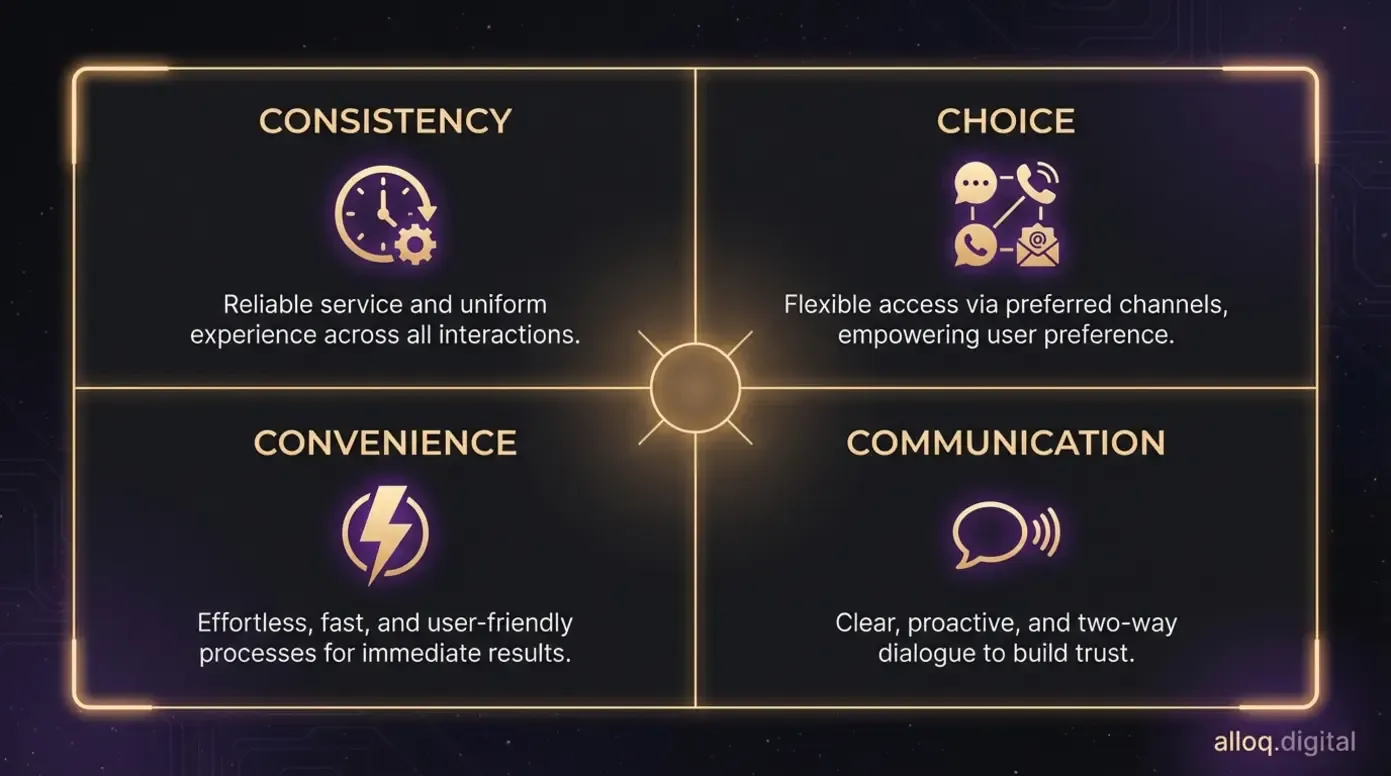 The 4 Cs framework — Consistency, Choice, Convenience, Communication — provides a measurable audit checklist for evaluating automated service quality.
To evaluate whether your automated service actually delivers, apply the 4 Cs framework:
- Consistency: Every customer gets the same quality of response, whether it is 2 AM on a Sunday or 10 AM on a Monday. AI removes the variability of human mood and workload
- Choice: Customers pick their preferred channel — chat, email, phone, or Self-Service portal — and receive the same resolution quality across all of them
- Convenience: Resolution happens in the customer’s workflow. No switching tabs, no repeating information, no waiting in queues
- Communication: The system speaks clearly, confirms actions taken, and follows up proactively rather than leaving customers guessing
These four pillars provide a measurable audit checklist. Score your current support operation against each one. The gaps reveal exactly where automation delivers the highest return.
Self-Service portals deserve special attention here. When designed well, they address all 4 Cs simultaneously. Customers get consistent answers on their own schedule, in the format they prefer, without waiting. Research suggests that well-built knowledge bases can deflect up to 30–40% of incoming tickets, freeing agents for the complex work that requires human judgment.
The foundation is clear. Now, the question is: what does the next generation of AI agents actually look like?
Advanced AI Agents & Multimodal Technology
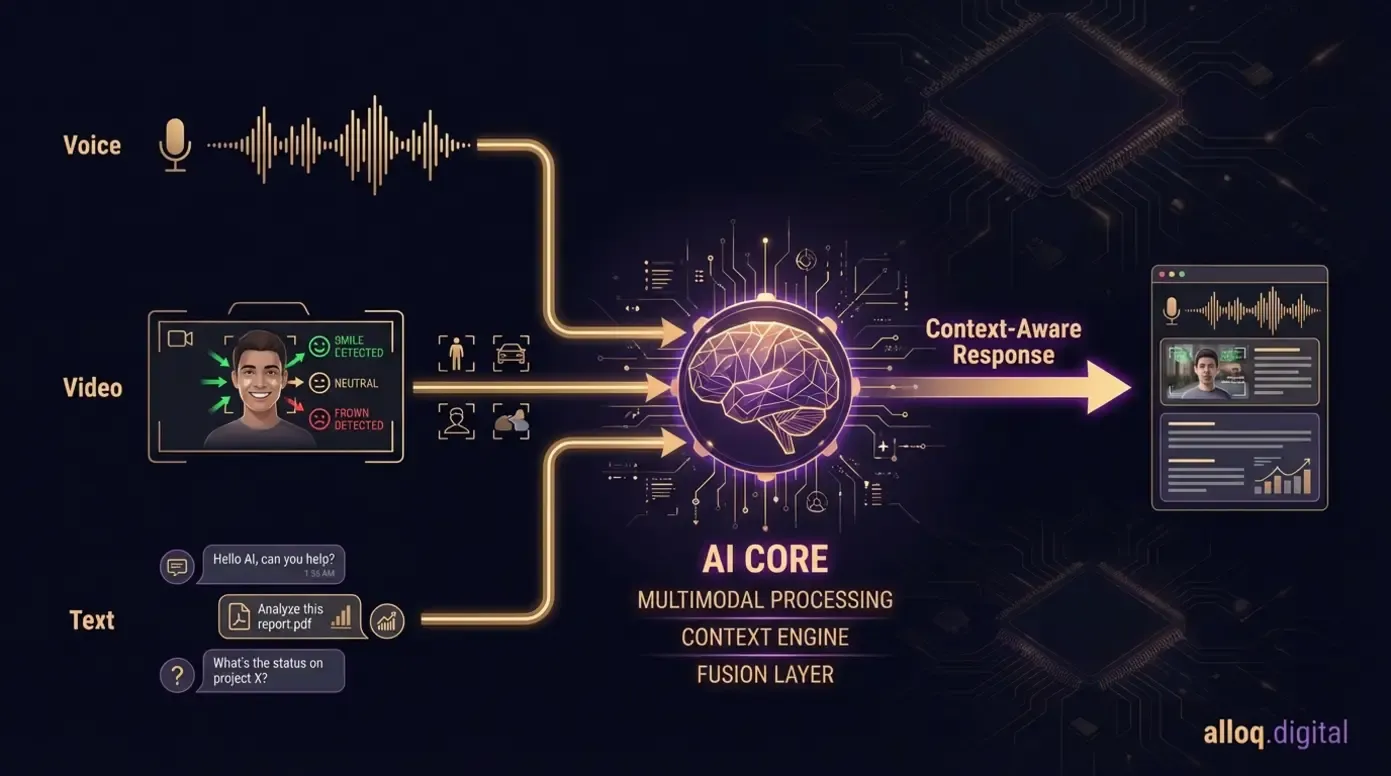 Multimodal AI agents in 2026 synthesize voice tone, facial expressions, and text content simultaneously for truly context-aware customer support.
The next frontier of automated customer service goes far beyond text-based chatbots. In 2026, AI agents are becoming multimodal — capable of processing voice, video, and text simultaneously while interpreting the emotional context behind each interaction. According to Deloitte’s enterprise AI research, organizations deploying these capabilities report measurably faster resolution times and higher satisfaction scores.
This section covers the three capabilities that separate 2026 KI-Agenten from their predecessors: multimodal input processing, real-time sentiment analysis, and end-to-end autonomous resolution.
Beyond Chatbots: The Shift to Multimodal AI
Text-only bots were the standard for a decade. They read typed messages, matched keywords, and returned pre-written answers. Multimodale KI agents in 2026 operate differently. They process a customer’s spoken tone, facial expression on a video call, and written message simultaneously — then synthesize all three inputs into a single, context-aware response.
Here is a practical scenario. A customer calls about a billing error. Their voice is tense. A traditional bot would parse the words and offer a generic FAQ link. A multimodal agent detects the frustration in the vocal tone, cross-references the account for recent charges, identifies the duplicate payment, and initiates a refund — all while adjusting its own communication style to be calmer and more reassuring.
As the infographic below illustrates, this evolution follows a clear trajectory from scripted responses to fully contextual AI.
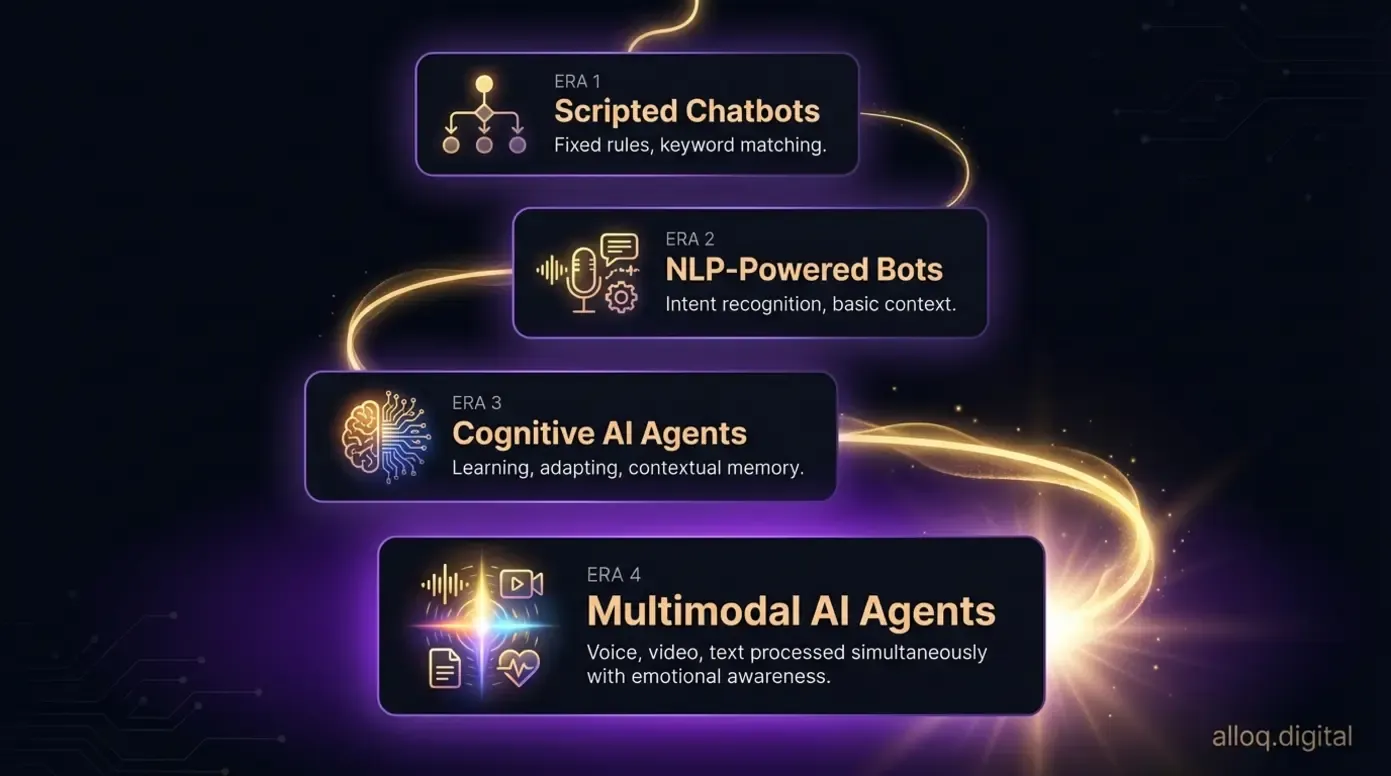 The evolution from scripted chatbots to multimodal AI agents — each generation adds deeper context awareness, learning capability, and multi-channel processing.
Verint’s 2026 analysis of AI transformation highlights that companies adopting multimodal capabilities report stronger customer retention compared to those relying on single-channel bots. For a deeper look at how these capabilities translate into measurable business outcomes, see our guide to building scalable SaaS products.
Implementing “Super-Agents” for Contextual Support
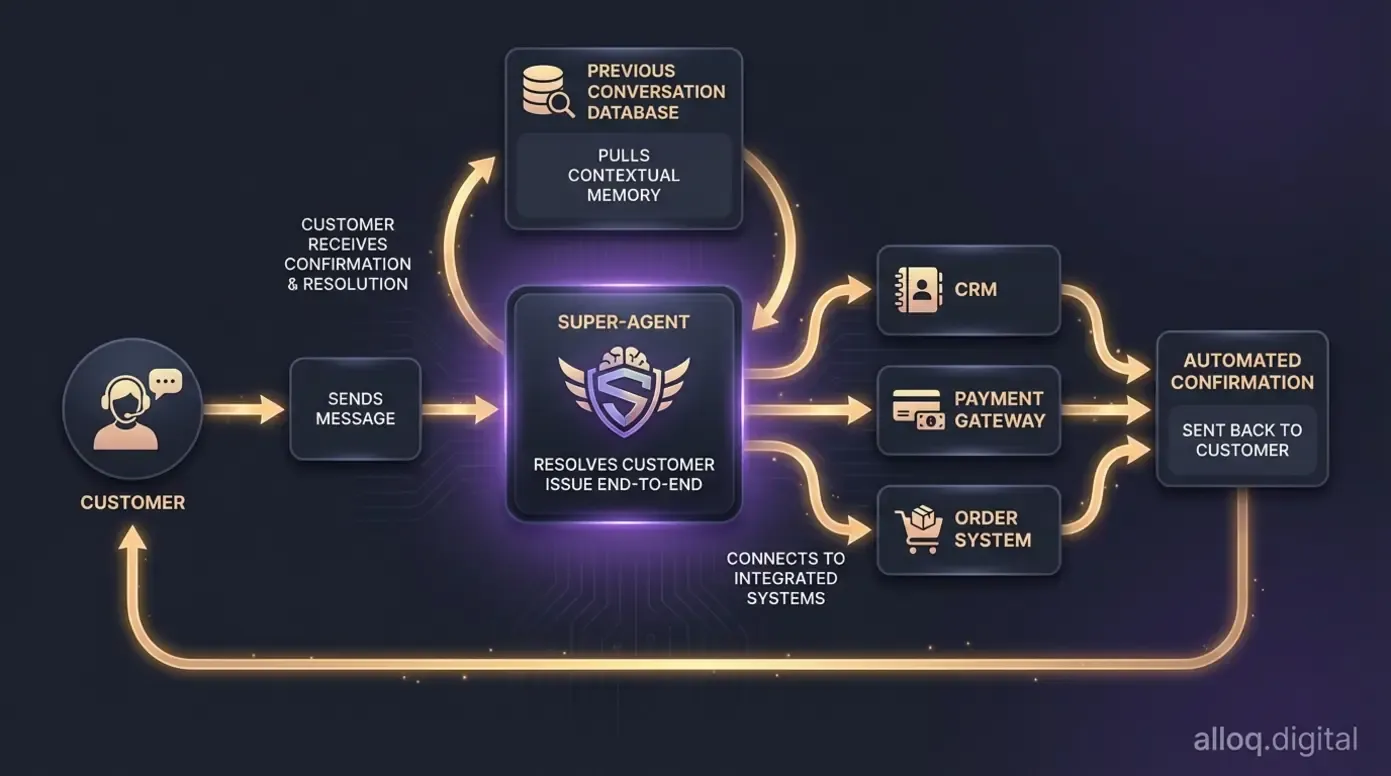 Super-Agents go beyond triage — they resolve issues directly by integrating with your CRM, payment gateway, and order management systems.
The concept of Super-Agenten represents the most significant operational shift in customer support this decade. Traditional bots triage — they identify a problem and hand it off. Super-Agents resolve. They perform actions directly: processing refunds, updating shipping addresses, applying discount codes, and modifying subscriptions without human intervention.
What makes this possible is contextual memory. A Super-Agent remembers that this customer contacted support two days ago about the same order. It pulls up the previous conversation, understands the unresolved issue, and picks up where the last interaction ended.
The practical implications are significant:
- Refund processing happens in the chat window, not through a separate escalation form
- Order modifications complete in real time, with confirmation sent automatically
- Account changes execute with proper verification built into the conversation flow
User consensus across professional communities indicates that Super-Agents reduce average handle time by eliminating the back-and-forth between triage bots and human agents. The key is integration with your existing CRM, payment gateway, and order management system. Without those connections, even advanced AI remains limited to answering questions rather than solving problems.
The technology is clear. But how do these agents fit into your daily workflow?
Workflow Optimization & Process Integration
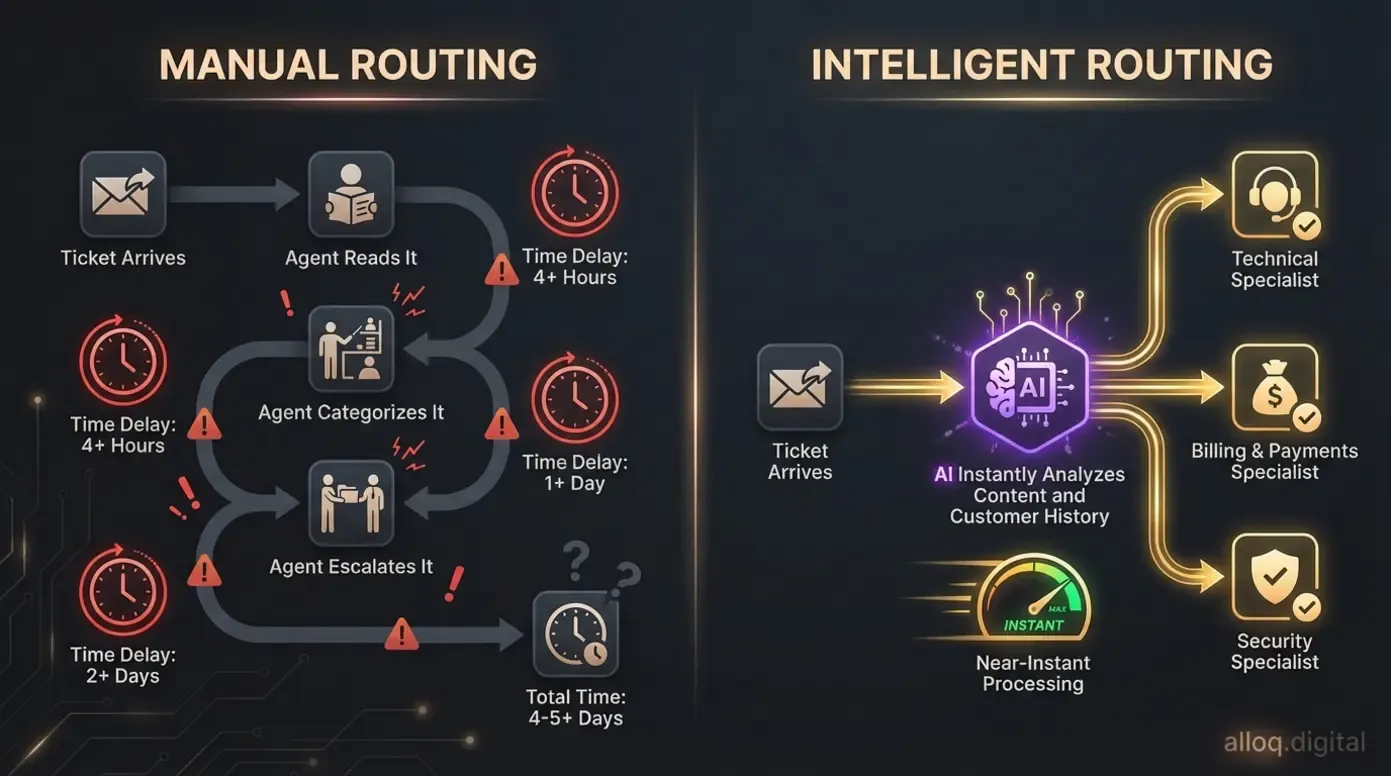 Intelligent routing eliminates manual ticket sorting — AI analyzes content and customer history in milliseconds to reach the right specialist instantly.
Automated customer service delivers its strongest ROI when it eliminates the repetitive manual work — Fleißarbeit — that drains your team’s capacity. Intelligent ticket assignment and End-to-End-Prozesse integration free agents to focus on high-value interactions: complex troubleshooting, relationship building, and revenue-generating conversations. According to PwC’s AI efficiency benchmarks, organizations that automate Ticketzuweisung and resolution workflows can see significant efficiency gains within the first year.
Eliminating “Fleißarbeit” with Intelligent Routing
Fleißarbeit — the busy work of manually reading, categorizing, and assigning tickets — consumes hours of agent time every day. Intelligent routing replaces this process with AI that analyzes ticket content, customer history, and agent expertise in milliseconds.
As the flowchart below illustrates, the process works in three stages:
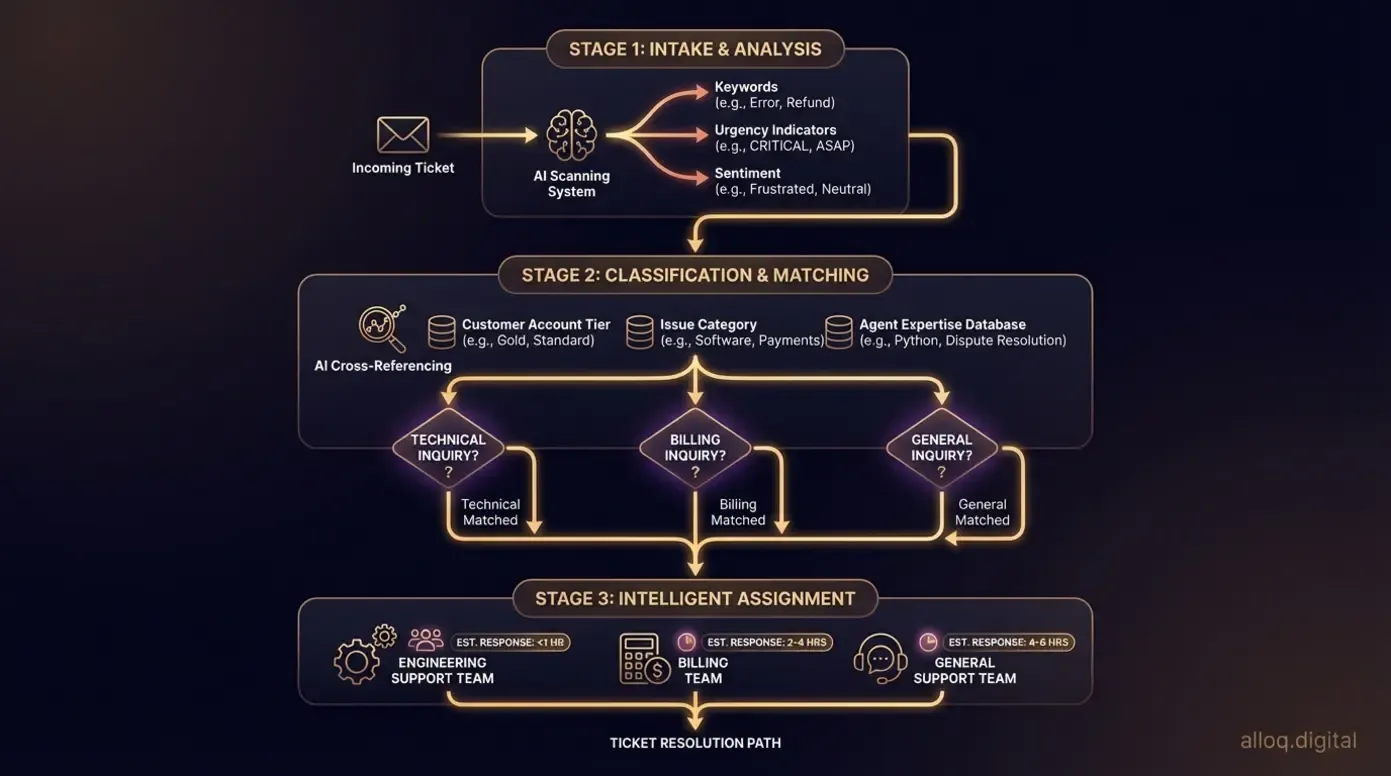 Intelligent routing in three stages: AI analyzes ticket content, classifies by issue type and customer tier, then assigns directly to the best-matched specialist team.
Consider this example: a customer submits a technical query about API integration errors. In a manual system, a Tier 1 agent reads the ticket, realizes it is beyond their scope, and escalates — adding 20–30 minutes of delay. With intelligent routing, the AI identifies the technical keywords and account tier, then sends the ticket directly to the engineering support team. The customer gets a qualified response faster. The Tier 1 agent never handles a ticket they cannot resolve.
According to IBM’s analysis of contact center automation, AI-powered routing can reduce misrouted tickets significantly, which directly impacts first-contact resolution rates. For teams evaluating which platform to build these workflows on, our guide to automated customer workflows breaks down the key trade-offs.
End-to-End Automation Strategies
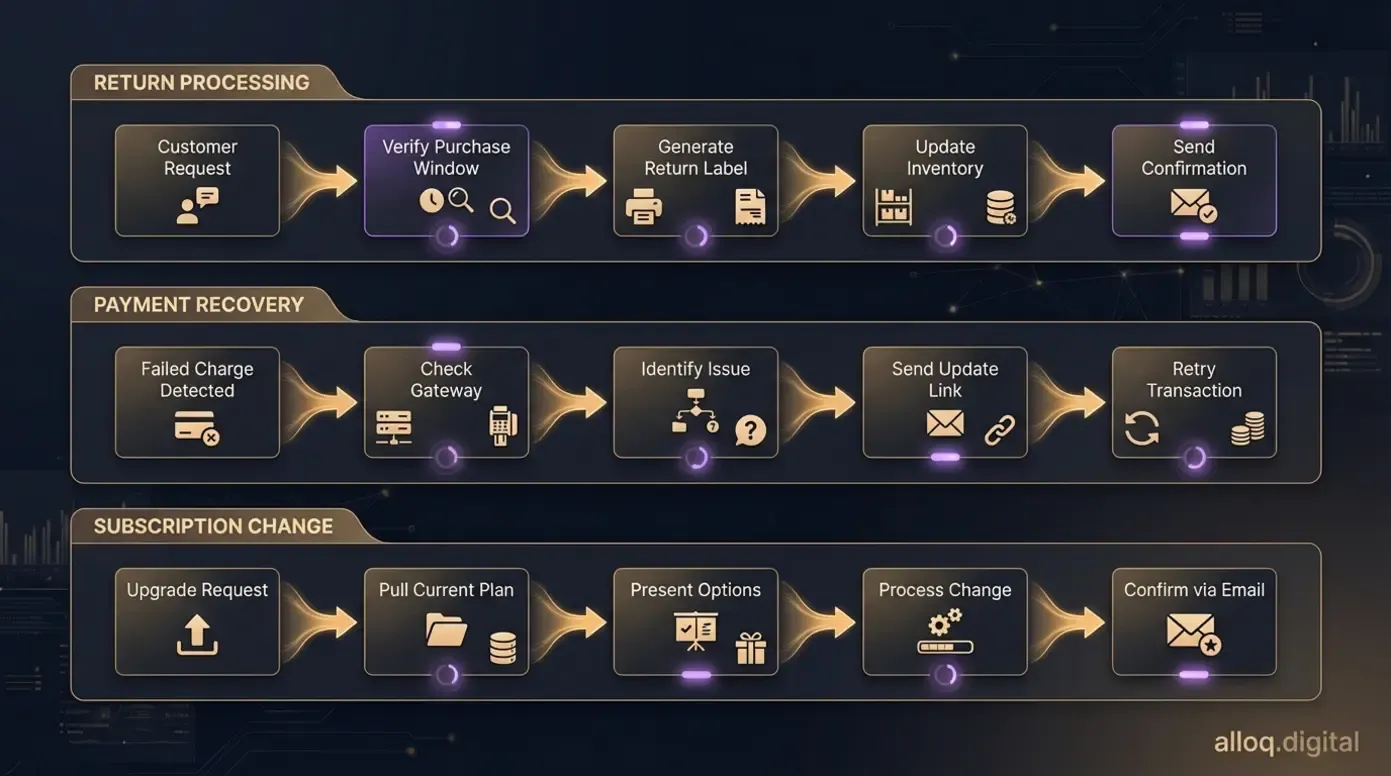 End-to-end automation means AI resolves the full workflow — from customer request through system updates to confirmation — without human intervention.
Routing is only half the equation. True End-to-End-Prozesse automation means the AI does not just assign the ticket — it resolves the issue within the same workflow.
Here is what this looks like in practice:
- Return processing: Customer requests a return → AI verifies purchase window → initiates return label → updates inventory system → sends confirmation email. No human involvement required
- Payment issues: Customer reports failed charge → AI checks payment gateway → identifies expired card → sends secure update link → retries transaction automatically
- Subscription changes: Customer wants to upgrade → AI pulls current plan details → presents options with pricing → processes the change → updates billing → confirms via email
The critical integration points are your CRM, payment gateway, and order management system. Without direct API connections to these tools, automation stops at the conversation layer. With them, a single customer message can trigger a complete resolution chain.
According to Simon, SaaS & Automation Expert: “The teams seeing the strongest returns are those that map their top 10 ticket types and automate the full resolution path — not just the initial response. That is where the real capacity gains come from.”
This specific, workflow-level data helps you prioritize which processes to automate first, rather than relying on generic advice to “implement AI.” Start with your highest-volume, lowest-complexity ticket types. That is where automation pays off fastest.
Risks & Limitations: The Hybrid Model Strategy
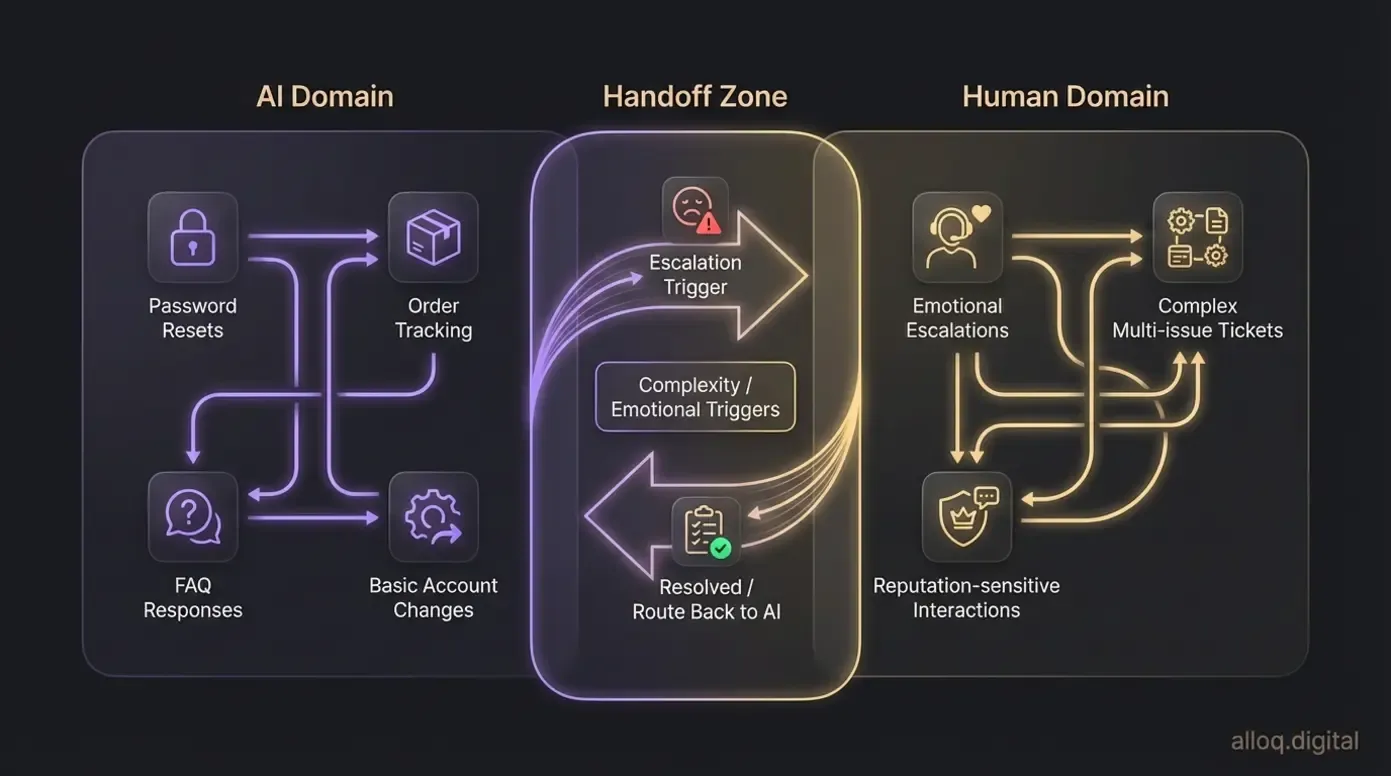 The hybrid model assigns routine volume to AI and reserves human agents for emotional, complex, and reputation-sensitive interactions — with clear handoff triggers.
No automation strategy works without acknowledging where it falls short. A balanced approach builds more trust — with both customers and your own team — than promising AI can handle everything.
The Hybrid Model: Balancing AI and Human Touch
The primary risk of over-automating is depersonalization. According to Customer Experience Dive’s 2026 trend analysis, consumers increasingly expect efficient AI interactions but still demand human access for high-stakes situations. The hybrid model addresses this directly.
A hybrid approach means AI handles the predictable, high-volume work — password resets, order tracking, FAQ responses — while human agents own the interactions that require empathy, judgment, or creative problem-solving. The key is designing clear handoff triggers so customers never feel trapped in an AI loop.
Specific limitations to plan for:
- Emotional complexity: AI can detect frustration but cannot genuinely empathize. Angry customers often escalate further when they realize they are speaking to a bot
- Edge cases: Unusual requests or scenarios outside training data leave AI agents unable to respond helpfully
- Integration gaps: If your systems are not connected, AI may give accurate but incomplete answers based on partial data
If your organization handles sensitive areas such as healthcare data, financial disputes, or legal complaints, consult a compliance specialist before automating those workflows. The liability implications require expert guidance beyond standard implementation.
Alternative approaches for teams not ready for full AI deployment include rule-based triage with human resolution, or a phased rollout starting with internal-facing automation before customer-facing deployment.
When to Consider Human Escalation
Automation works well for structured, repeatable tasks. It struggles with situations that require nuance. Build your escalation triggers around these scenarios:
- High-emotion interactions: A customer dealing with a lost shipment containing a time-sensitive gift needs a human who can make judgment calls — expedited reshipping, courtesy credits — that fall outside standard policy
- Complex multi-issue tickets: When a single customer has overlapping billing, technical, and account issues, an AI agent typically addresses them sequentially rather than holistically. A human agent can prioritize and resolve them as a package
- Reputation-sensitive situations: Public complaints on social media or interactions with high-value accounts warrant human attention for tone management and relationship preservation
Framing escalation as a feature — not a failure — empowers your team. The goal is not to eliminate human agents. It is to ensure they spend their time where they create the most value.
Frequently Asked Questions
Was ist ein automatisierter Kundenservice?
Automated customer service uses AI and software to handle routine support tasks — such as answering FAQs, routing tickets, and processing simple requests — without direct human intervention. These systems operate 24/7 and learn from each interaction to improve accuracy over time. For example, an AI agent can verify a customer’s identity, pull up their order, and initiate a refund in a single conversation. Results depend on the quality of implementation and system integration.
Was verstehen Sie unter Serviceautomatisierung?
Service automation refers to using digital tools and software to execute recurring tasks and workflows automatically, reducing manual effort and error rates. This encompasses everything from automated ticket assignment to self-service knowledge bases. A practical example is an onboarding workflow that sends welcome emails, provisions accounts, and schedules check-ins without manual steps. The scope varies depending on your tech stack and process complexity.
Was ist automatisierte E-Mail?
Automated email uses software to send pre-written messages to specific recipients based on triggers, schedules, or user behavior. Common triggers include a new customer signup, an abandoned cart, or a support ticket update. For instance, a post-purchase sequence can automatically send a confirmation, shipping update, and feedback request over five days. Effectiveness depends on segmentation quality and message relevance.
Welche Beispiele gibt es für Automatisierung?
Common automation examples include AI chatbots handling initial support inquiries, robotic process automation (RPA) extracting data from documents, and automated welcome emails for new customers. Other applications include intelligent ticket routing, self-service password resets, and proactive outreach based on usage patterns. A practical starting point is automating your top three highest-volume ticket types. The specific approach depends on your industry and existing tools.
Was sind die Nachteile der Automatisierung?
The main disadvantages of automation include the potential loss of human empathy in complex interactions, upfront implementation costs, and the risk of frustrating customers with poorly designed systems. AI may struggle with edge cases, emotional nuance, and situations requiring creative problem-solving. A hybrid model that pairs AI efficiency with human judgment for escalations can mitigate most of these risks. Consider professional guidance if automation touches compliance-sensitive workflows.
Your Next Step: From Blueprint to Execution
Automated customer service in 2026 is not about replacing your team. It is about redirecting their energy. The cognitive AI agents, multimodal capabilities, and end-to-end workflows covered in this guide represent a fundamental shift from reactive ticket processing to proactive, intelligent support.
Three priorities should guide your implementation. First, audit your current setup against the 4 Cs framework to identify the highest-impact gaps. Second, map your top 10 ticket types and design end-to-end resolution paths for the five simplest. Third, build your hybrid model with clear escalation triggers so AI and human agents complement each other rather than compete.
The organizations gaining a measurable edge right now are not waiting for the technology to mature further. They are building their automated customer service infrastructure today and iterating as capabilities expand. Start with one workflow. Measure the results. Scale what works.